Back to column formats
Column formattingSharePoint Online

Gantt Chart

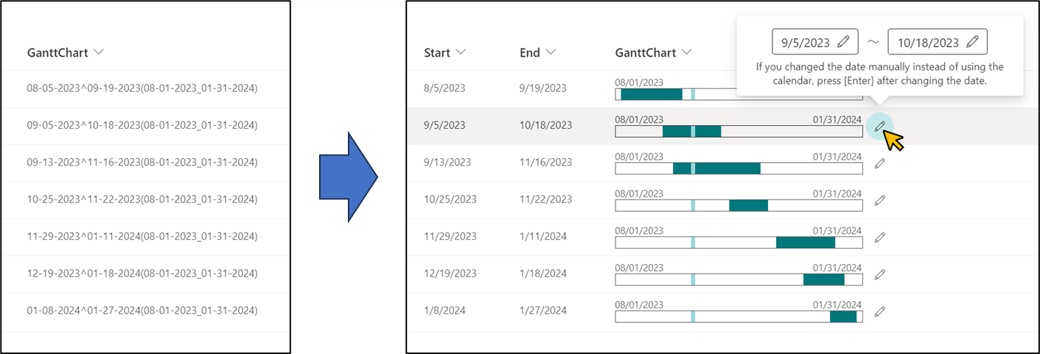
This sample demonstrates the use of the Calculated column to generate a string for displaying a Gantt chart, and then parses the string to display the Gantt chart.

Gantt Chart formatting preview
Sample preview · View original image

Copy. Apply. Make it yours.

Get this format

2 definitions

Review the requirements below, then paste this JSON into the matching formatting panel. Show me where.

Use your list's internal column names and replace any tenant-specific URLs or flow IDs. Formatting is presentation, not a way to secure data.

Column formatting
Download JSON
{
  "$schema": "https://developer.microsoft.com/json-schemas/sp/v2/column-formatting.schema.json",
  "elmType": "div",
  "children": [
    {
      "elmType": "div",
      "style": {
        "display": "flex",
        "flex-direction": "row",
        "width": "100%",
        "align-items": "center"
      },
      "children": [
        {
          "elmType": "div",
          "style": {
            "display": "flex",
            "flex-direction": "column",
            "width": "100%",
            "margin-bottom": "3px"
          },
          "children": [
            {
              "elmType": "div",
              "style": {
                "display": "flex",
                "justify-content": "space-between",
                "width": "100%",
                "white-space": "nowrap"
              },
              "attributes": {
                "class": "ms-fontSize-xs"
              },
              "children": [
                {
                  "elmType": "div",
                  "style": {
                    "display": "flex",
                    "flex-direction": "row-reverse"
                  },
                  "children": [
                    {
                      "elmType": "div",
                      "txtContent": "=if(loopIndex('_startdate')>1,'','/')+[$_startdate]",
                      "forEach": "_startdate in split(substring(@currentField,indexOf(@currentField,'(')+1,indexOf(@currentField,'_')),'-')"
                    }
                  ]
                },
                {
                  "elmType": "div",
                  "style": {
                    "display": "flex",
                    "flex-direction": "row-reverse"
                  },
                  "children": [
                    {
                      "elmType": "div",
                      "txtContent": "=if(loopIndex('_enddate')>1,'','/')+[$_enddate]",
                      "forEach": "_enddate in split(substring(@currentField,indexOf(@currentField,'_')+1,indexOf(@currentField,')')),'-')"
                    }
                  ]
                }
              ]
            },
            {
              "elmType": "div",
              "style": {
                "width": "100%",
                "border": "1px solid",
                "height": "13px",
                "position": "relative",
                "overflow": "hidden"
              },
              "children": [
                {
                  "elmType": "div",
                  "style": {
                    "position": "absolute",
                    "height": "100%",
                    "width": "=((Number(Date(substring(@currentField,indexOf(@currentField,'^')+1,indexOf(@currentField,'('))))-Number(Date(substring(@currentField,0,indexOf(@currentField,'^'))))+86400000)/(Number(Date(substring(@currentField,indexOf(@currentField,'_')+1,indexOf(@currentField,')'))))-Number(Date(substring(@currentField,indexOf(@currentField,'(')+1,indexOf(@currentField,'_'))))+86400000))*100+'%'",
                    "left": "=((Number(Date(substring(@currentField,0,indexOf(@currentField,'^'))))-Number(Date(substring(@currentField,indexOf(@currentField,'(')+1,indexOf(@currentField,'_')))))/(Number(Date(substring(@currentField,indexOf(@currentField,'_')+1,indexOf(@currentField,')'))))-Number(Date(substring(@currentField,indexOf(@currentField,'(')+1,indexOf(@currentField,'_'))))+86400000))*100+'%'"
                  },
                  "attributes": {
                    "class": "ms-bgColor-themePrimary",
                    "title": "=[$Start.displayValue]+' ~ '+[$End.displayValue]"
                  }
                },
                {
                  "elmType": "div",
                  "style": {
                    "position": "absolute",
                    "height": "100%",
                    "width": "=(86400000/(Number(Date(substring(@currentField,indexOf(@currentField,'_')+1,indexOf(@currentField,')'))))-Number(Date(substring(@currentField,indexOf(@currentField,'(')+1,indexOf(@currentField,'_'))))+86400000))*100+'%'",
                    "left": "=((Number(@now)-(60*60*1000*12)-Number(Date(substring(@currentField,indexOf(@currentField,'(')+1,indexOf(@currentField,'_')))))/(Number(Date(substring(@currentField,indexOf(@currentField,'_')+1,indexOf(@currentField,')'))))-Number(Date(substring(@currentField,indexOf(@currentField,'(')+1,indexOf(@currentField,'_'))))+86400000))*100+'%'",
                    "display": "flex",
                    "justify-content": "center",
                    "align-items": "center"
                  },
                  "children": [
                    {
                      "elmType": "div",
                      "style": {
                        "width": "100%",
                        "min-width": "5px",
                        "height": "100%"
                      },
                      "attributes": {
                        "class": "ms-bgColor-themeLight",
                        "title": "Now"
                      }
                    }
                  ]
                }
              ]
            }
          ]
        },
        {
          "elmType": "div",
          "style": {
            "padding": "10px",
            "margin-left": "5px",
            "cursor": "pointer",
            "border-radius": "50%"
          },
          "attributes": {
            "iconName": "Edit",
            "class": "ms-bgColor-themeLighter--hover"
          },
          "customCardProps": {
            "openOnEvent": "click",
            "directionalHint": "topCenter",
            "isBeakVisible": true,
            "formatter": {
              "elmType": "div",
              "style": {
                "display": "flex",
                "flex-direction": "column",
                "padding": "10px 15px"
              },
              "children": [
                {
                  "elmType": "div",
                  "style": {
                    "display": "flex",
                    "flex-direction": "row",
                    "align-items": "center"
                  },
                  "children": [
                    {
                      "elmType": "div",
                      "inlineEditField": "[$Start]",
                      "style": {
                        "border": "1px solid",
                        "padding": "5px 10px",
                        "border-radius": "3px",
                        "display": "flex",
                        "align-items": "center",
                        "margin": "5px"
                      },
                      "children": [
                        {
                          "elmType": "span",
                          "txtContent": "[$Start.displayValue]"
                        },
                        {
                          "elmType": "span",
                          "style": {
                            "margin-left": "8px"
                          },
                          "attributes": {
                            "iconName": "Edit"
                          }
                        }
                      ]
                    },
                    {
                      "elmType": "div",
                      "txtContent": "~",
                      "style": {
                        "margin": "5px"
                      }
                    },
                    {
                      "elmType": "div",
                      "inlineEditField": "[$End]",
                      "style": {
                        "border": "1px solid",
                        "padding": "5px 10px",
                        "border-radius": "3px",
                        "display": "flex",
                        "align-items": "center",
                        "margin": "5px"
                      },
                      "children": [
                        {
                          "elmType": "span",
                          "txtContent": "[$End.displayValue]"
                        },
                        {
                          "elmType": "span",
                          "style": {
                            "margin-left": "8px"
                          },
                          "attributes": {
                            "iconName": "Edit"
                          }
                        }
                      ]
                    }
                  ]
                },
                {
                  "elmType": "div",
                  "txtContent": "If you changed the date manually instead of using the calendar, press [Enter] after changing the date.",
                  "style": {
                    "max-width": "300px",
                    "text-align": "center"
                  },
                  "attributes": {
                    "class": "ms-fontSize-s"
                  }
                }
              ]
            }
          }
        }
      ]
    }
  ]
}
Schema compatibility review notes

This historical definition differs from the pinned Microsoft schema. This may indicate an unsupported pattern or a schema limitation. Check the original requirements and test in your tenant before use.

  • /children/0/children/0/children/0/children/0/children/0/forEach must match pattern "^[^\]\$@\. ]+ in (\@currentField|\[\$.+\])$"

From the contributor

How to use this sample

Summary

This sample demonstrates the use of the Calculated column to generate a string for displaying a Gantt chart, and then parses the string to display the Gantt chart. The start and end dates for the entire Gantt chart can be changed to any value by changing the formula in the Calculated Value column.
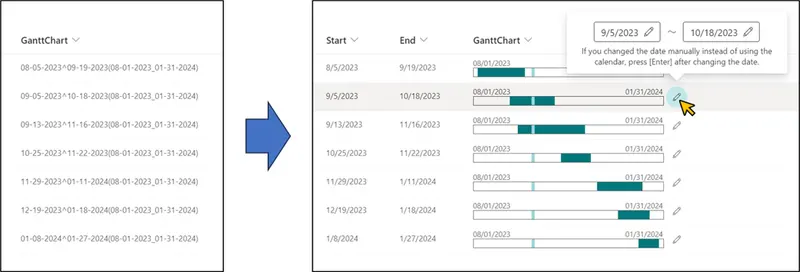
screenshot of the sample

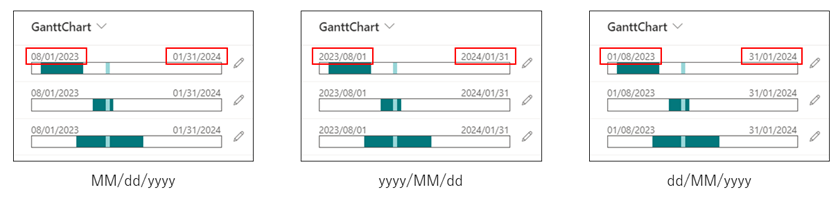
Additionally, you can adjust the date format displayed on the Gantt chart by combining JSON and the corresponding formulas. Refer to the table below for date format options and the associated JSON and formulas:

Date Format JSON File Formula for GanttChart Column
MM/dd/yyyy generic-gantt-chart.json Formula1 or Formula3
yyyy/MM/dd generic-gantt-chart.json Formula2 or Formula4
dd/MM/yyyy generic-gantt-chart-ddMMyyyy.json Formula2 or Formula4

screenshot of the date format sample

View requirements

Type Internal Name Required
Date and time Start Yes
Date and time End Yes
Calculated (Single line of text) GanttChart Yes

Set one of the following formulas for the GanttChart column.

[Formula1]
=TEXT([Start],"MM-dd-yyyy")&"^"&TEXT([End],"MM-dd-yyyy")&"(【Overall start date of the Gantt chart (in MM-dd-yyyy format)】_【Overall end date of the Gantt chart (in MM-dd-yyyy format)】)"

[Formula1 Sample]
=TEXT([Start],"MM-dd-yyyy")&"^"&TEXT([End],"MM-dd-yyyy")&"(08-01-2023_01-31-2024)"
[Formula2]
=TEXT([Start],"yyyy-MM-dd")&"^"&TEXT([End],"yyyy-MM-dd")&"(【Overall start date of the Gantt chart (in yyyy-MM-dd format)】_【Overall end date of the Gantt chart (in yyyy-MM-dd format)】)"

[Formula2 Sample]
=TEXT([Start],"yyyy-MM-dd")&"^"&TEXT([End],"yyyy-MM-dd")&"(2023-08-01_2024-01-31)"
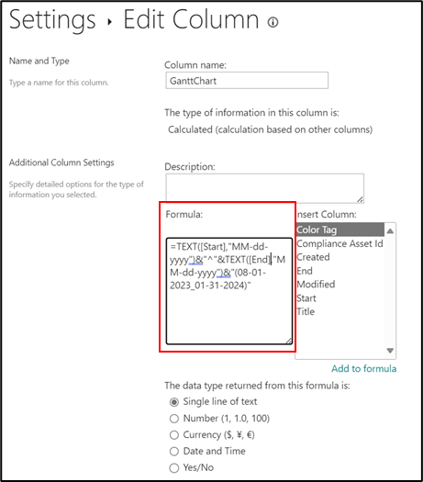
screenshot of the calculated column setting screen

Note
Depending on the site settings, the parameter delimiter in the Calculated column may be a ; (semi-colon) instead of a , (comma). If the parameter delimiter is incorrect, an error screen will appear after creating or editing the Calculated column. If the site uses ; (semi-colon) as the parameter delimiter, please use the following formula.

[Formula3]
=TEXT([Start];"MM-dd-yyyy")&"^"&TEXT([End];"MM-dd-yyyy")&"(【Overall start date of the Gantt chart (in MM-dd-yyyy format)】_【Overall end date of the Gantt chart (in MM-dd-yyyy format)】)"

[Formula3 Sample]
=TEXT([Start];"MM-dd-yyyy")&"^"&TEXT([End];"MM-dd-yyyy")&"(08-01-2023_01-31-2024)"
[Formula4]
=TEXT([Start];"yyyy-MM-dd")&"^"&TEXT([End];"yyyy-MM-dd")&"(【Overall start date of the Gantt chart (in yyyy-MM-dd format)】_【Overall end date of the Gantt chart (in yyyy-MM-dd format)】)"

[Formula4 Sample]
=TEXT([Start];"yyyy-MM-dd")&"^"&TEXT([End];"yyyy-MM-dd")&"(2023-08-01_2024-01-31)"

Sample

Solution Author(s)
generic-gantt-chart.json Tetsuya Kawahara
generic-gantt-chart-ddMMyyyy.json Tetsuya Kawahara

Version history

Version Date Comments
1.0 September 27, 2023 Initial release
1.1 October 12, 2023 Added note on delimiter character in Calculated column
1.2 October 13, 2023 Added more options for date format displayed on Gantt chart

Disclaimer

THIS CODE IS PROVIDED AS IS WITHOUT WARRANTY OF ANY KIND, EITHER EXPRESS OR IMPLIED, INCLUDING ANY IMPLIED WARRANTIES OF FITNESS FOR A PARTICULAR PURPOSE, MERCHANTABILITY, OR NON-INFRINGEMENT.


Additional notes

  • Calculated columns can be added from [See all column types] on the Create Column screen.
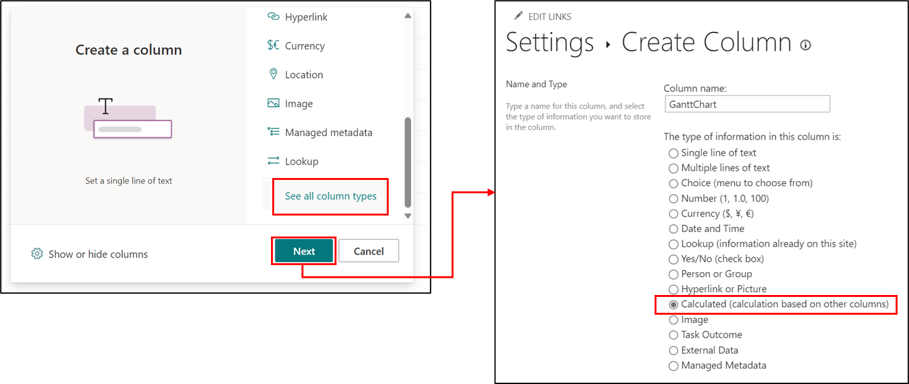
    screenshot of the create column screen