
Back to column formats
Column formattingSharePoint Online

Identicon Column Formatting

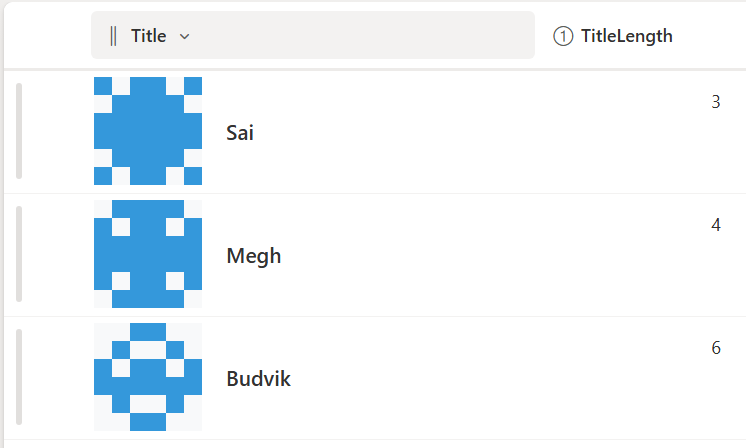
This sample demonstrates how to use SharePoint Column Formatting to generate Identicons for list items.

Identicon Column Formatting formatting preview
Sample preview · View original image

Copy. Apply. Make it yours.

Get this format

1 definition

Review the requirements below, then paste this JSON into the matching formatting panel. Show me where.

Use your list's internal column names and replace any tenant-specific URLs or flow IDs. Formatting is presentation, not a way to secure data.

Column formatting
Download JSON
{
  "$schema": "https://developer.microsoft.com/json-schemas/sp/v2/column-formatting.schema.json",
  "elmType": "div",
  "style": {
    "display": "flex",
    "align-items": "center",
    "gap": "8px",
    "padding": "4px"
  },
  "children": [
    {
      "elmType": "div",
      "style": {
        "display": "flex",
        "flex-direction": "column"
      },
      "children": [
        {
          "elmType": "div",
          "style": { "display": "flex" },
          "children": [
            { "elmType": "div", "style": { "width": "12px", "height": "12px", "background-color": "=if(Number([$TitleLength])%2>0,'#3498db','#f8f9fa')" } },
            { "elmType": "div", "style": { "width": "12px", "height": "12px", "background-color": "=if(Number([$TitleLength])%3>0,'#3498db','#f8f9fa')" } },
            { "elmType": "div", "style": { "width": "12px", "height": "12px", "background-color": "=if(Number([$TitleLength])%5>0,'#3498db','#f8f9fa')" } },
            { "elmType": "div", "style": { "width": "12px", "height": "12px", "background-color": "=if(Number([$TitleLength])%5>0,'#3498db','#f8f9fa')" } },
            { "elmType": "div", "style": { "width": "12px", "height": "12px", "background-color": "=if(Number([$TitleLength])%3>0,'#3498db','#f8f9fa')" } },
            { "elmType": "div", "style": { "width": "12px", "height": "12px", "background-color": "=if(Number([$TitleLength])%2>0,'#3498db','#f8f9fa')" } }
          ]
        },
        {
          "elmType": "div",
          "style": { "display": "flex" },
          "children": [
            { "elmType": "div", "style": { "width": "12px", "height": "12px", "background-color": "=if(Number([$TitleLength])%3>0,'#3498db','#f8f9fa')" } },
            { "elmType": "div", "style": { "width": "12px", "height": "12px", "background-color": "=if(Number([$TitleLength])%4>0,'#3498db','#f8f9fa')" } },
            { "elmType": "div", "style": { "width": "12px", "height": "12px", "background-color": "=if(Number([$TitleLength])%6>0,'#3498db','#f8f9fa')" } },
            { "elmType": "div", "style": { "width": "12px", "height": "12px", "background-color": "=if(Number([$TitleLength])%6>0,'#3498db','#f8f9fa')" } },
            { "elmType": "div", "style": { "width": "12px", "height": "12px", "background-color": "=if(Number([$TitleLength])%4>0,'#3498db','#f8f9fa')" } },
            { "elmType": "div", "style": { "width": "12px", "height": "12px", "background-color": "=if(Number([$TitleLength])%3>0,'#3498db','#f8f9fa')" } }
          ]
        },
        {
          "elmType": "div",
          "style": { "display": "flex" },
          "children": [
            { "elmType": "div", "style": { "width": "12px", "height": "12px", "background-color": "=if(Number([$TitleLength])%5>0,'#3498db','#f8f9fa')" } },
            { "elmType": "div", "style": { "width": "12px", "height": "12px", "background-color": "=if(Number([$TitleLength])%6>0,'#3498db','#f8f9fa')" } },
            { "elmType": "div", "style": { "width": "12px", "height": "12px", "background-color": "=if(Number([$TitleLength])%7>0,'#3498db','#f8f9fa')" } },
            { "elmType": "div", "style": { "width": "12px", "height": "12px", "background-color": "=if(Number([$TitleLength])%7>0,'#3498db','#f8f9fa')" } },
            { "elmType": "div", "style": { "width": "12px", "height": "12px", "background-color": "=if(Number([$TitleLength])%6>0,'#3498db','#f8f9fa')" } },
            { "elmType": "div", "style": { "width": "12px", "height": "12px", "background-color": "=if(Number([$TitleLength])%5>0,'#3498db','#f8f9fa')" } }
          ]
        },
        {
          "elmType": "div",
          "style": { "display": "flex" },
          "children": [
            { "elmType": "div", "style": { "width": "12px", "height": "12px", "background-color": "=if(Number([$TitleLength])%5>0,'#3498db','#f8f9fa')" } },
            { "elmType": "div", "style": { "width": "12px", "height": "12px", "background-color": "=if(Number([$TitleLength])%7>0,'#3498db','#f8f9fa')" } },
            { "elmType": "div", "style": { "width": "12px", "height": "12px", "background-color": "=if(Number([$TitleLength])%8>0,'#3498db','#f8f9fa')" } },
            { "elmType": "div", "style": { "width": "12px", "height": "12px", "background-color": "=if(Number([$TitleLength])%8>0,'#3498db','#f8f9fa')" } },
            { "elmType": "div", "style": { "width": "12px", "height": "12px", "background-color": "=if(Number([$TitleLength])%7>0,'#3498db','#f8f9fa')" } },
            { "elmType": "div", "style": { "width": "12px", "height": "12px", "background-color": "=if(Number([$TitleLength])%5>0,'#3498db','#f8f9fa')" } }
          ]
        },
        {
          "elmType": "div",
          "style": { "display": "flex" },
          "children": [
            { "elmType": "div", "style": { "width": "12px", "height": "12px", "background-color": "=if(Number([$TitleLength])%3>0,'#3498db','#f8f9fa')" } },
            { "elmType": "div", "style": { "width": "12px", "height": "12px", "background-color": "=if(Number([$TitleLength])%4>0,'#3498db','#f8f9fa')" } },
            { "elmType": "div", "style": { "width": "12px", "height": "12px", "background-color": "=if(Number([$TitleLength])%6>0,'#3498db','#f8f9fa')" } },
            { "elmType": "div", "style": { "width": "12px", "height": "12px", "background-color": "=if(Number([$TitleLength])%6>0,'#3498db','#f8f9fa')" } },
            { "elmType": "div", "style": { "width": "12px", "height": "12px", "background-color": "=if(Number([$TitleLength])%4>0,'#3498db','#f8f9fa')" } },
            { "elmType": "div", "style": { "width": "12px", "height": "12px", "background-color": "=if(Number([$TitleLength])%3>0,'#3498db','#f8f9fa')" } }
          ]
        },
        {
          "elmType": "div",
          "style": { "display": "flex" },
          "children": [
            { "elmType": "div", "style": { "width": "12px", "height": "12px", "background-color": "=if(Number([$TitleLength])%2>0,'#3498db','#f8f9fa')" } },
            { "elmType": "div", "style": { "width": "12px", "height": "12px", "background-color": "=if(Number([$TitleLength])%3>0,'#3498db','#f8f9fa')" } },
            { "elmType": "div", "style": { "width": "12px", "height": "12px", "background-color": "=if(Number([$TitleLength])%5>0,'#3498db','#f8f9fa')" } },
            { "elmType": "div", "style": { "width": "12px", "height": "12px", "background-color": "=if(Number([$TitleLength])%5>0,'#3498db','#f8f9fa')" } },
            { "elmType": "div", "style": { "width": "12px", "height": "12px", "background-color": "=if(Number([$TitleLength])%3>0,'#3498db','#f8f9fa')" } },
            { "elmType": "div", "style": { "width": "12px", "height": "12px", "background-color": "=if(Number([$TitleLength])%2>0,'#3498db','#f8f9fa')" } }
          ]
        }
      ]
    },
    {
      "elmType": "div",
      "txtContent": "=[$Title]",
      "style": {
        "font-family": "Segoe UI, system-ui, sans-serif",
        "font-size": "14px",
        "font-weight": "500",
        "color": "#333",
        "margin-left": "8px"
      }
    }
  ]
}

From the contributor

How to use this sample

Summary

This sample demonstrates how to use SharePoint Column Formatting to generate Identicons for list items.
Each identicon is a small visual grid that represents the Title of the item, making it easier to identify items at a glance.
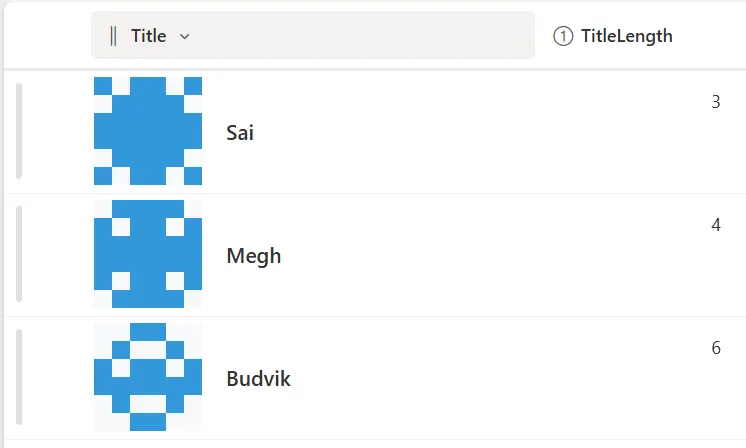
screenshot of the sample

Sample Overview

  • Identicons are 6x7 grids of colored squares.
  • Colors are generated based on a calculated TitleLength column.
  • Works in modern SharePoint list views.
  • Displayed alongside the Title column for quick identification.

View Requirements

Create a SharePoint list with the following columns:

Internal Name Type
Title Single line of text
TitleLength Calculated (Number)

TitleLength formula:

=LEN([Title])

This calculates the number of characters in the Title and is used to generate the identicon pattern.

Sample Data

Title TitleLength
Sai 3
Megh 2
Budvik 5

The identicon pattern automatically updates based on TitleLength.

How It Works

  • Each square in the identicon grid is colored using a formula based on TitleLength.
  • Squares change between two colors to produce a unique visual pattern.
  • Supports light and dark SharePoint themes.
  • Ideal for list views where quick visual identification is needed.

Sample

Solution Author(s)
generic-identicon.json Sai Bandaru

Version History

Version Date Comments
1.0 August 25, 2025 Initial release

Disclaimer

THIS CODE IS PROVIDED AS IS WITHOUT WARRANTY OF ANY KIND, EITHER EXPRESS OR IMPLIED, INCLUDING ANY IMPLIED WARRANTIES OF FITNESS FOR A PARTICULAR PURPOSE, MERCHANTABILITY, OR NON-INFRINGEMENT.


Additional Notes

  • Adjust colors or square size by editing the generic-identicon.json.
  • Works best in modern SharePoint lists sorted by Title or other relevant columns.