
From the contributor
How to use this sample
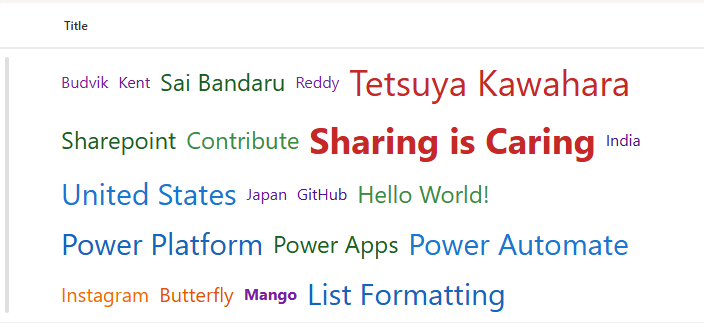
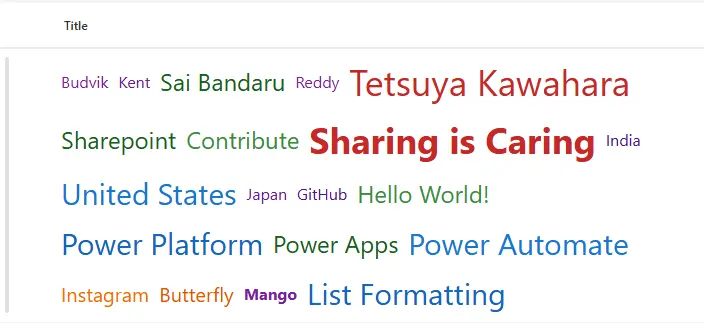
This project demonstrates how to create a dynamic and visually appealing word cloud within a SharePoint list using column formatting JSON. The word cloud visualizes data from multiple label columns, applying dynamic font sizes, colors, and bold styling based on word characteristics.
Summary
- Flexible Word Cloud Layout: Uses
flexandflex-wrapto automatically arrange words in multiple rows. - Dynamic Font Sizes: Word size is calculated based on character length:
- Words with >15 characters →
36px - Words with >12 characters →
30px - Words with >9 characters →
24px - Words with >7 characters →
20px - Words with ≤7 characters →
16px
- Words with >15 characters →
- Color Variation: Each word is assigned a color based on thresholds to emphasize word importance and create a visually diverse cloud.
- Bold Highlighting: Specific words, like
"Sharing is Caring"and"Mango", are automatically displayed in bold for emphasis. - Responsive Design: Layout adapts to different screen sizes and wraps words automatically.
- Multi-column Support: Displays words from 20 label columns per item, making it ideal for survey data, tags, or keyword visualization.
View requirements
This word cloud supports the following columns in your SharePoint list:
| Column Name | Description |
|---|---|
| Title | Title |
| LABEL1 | Single Line of Text |
| LABEL2 | Single Line of Text |
| LABEL3 | Single Line of Text |
| LABEL4 | Single Line of Text |
| LABEL5 | Single Line of Text |
| LABEL6 | Single Line of Text |
| LABEL7 | Single Line of Text |
| LABEL8 | Single Line of Text |
| LABEL9 | Single Line of Text |
| LABEL10 | Single Line of Text |
| LABEL11 | Single Line of Text |
| LABEL12 | Single Line of Text |
| LABEL13 | Single Line of Text |
| LABEL14 | Single Line of Text |
| LABEL15 | Single Line of Text |
| LABEL16 | Single Line of Text |
| LABEL17 | Single Line of Text |
| LABEL18 | Single Line of Text |
| LABEL19 | Single Line of Text |
| LABEL20 | Single Line of Text |
Each column represents a single word or short phrase that will appear in the word cloud. You can extend beyond 20 labels by adding more
spanelements in the JSON formatting code.
You can extend beyond 20 labels by adding additional
spanelements in the JSON.
JSON Column Formatting
The JSON formatting applies styles using conditional expressions:
- Font Size dynamically changes according to word length.
- Color changes to provide visual differentiation between words.
- Bold Text applied for highlighted words.
- Layout uses
display: flexwithflex-wrap: wrapandgapto arrange words cleanly.
Note: SharePoint JSON formatting does not support rotation or random positioning, so words are displayed in a flexible grid rather than a fully freeform cloud.
How to Apply
- Open your SharePoint list.
- Click the column header you want to format → Column settings → Format this column.
- Switch to Advanced mode.
- Paste the JSON provided in this project into the formatting editor.
- Click Save. The column will render as a word cloud automatically.
Example Visualization
Suppose your list has the following label columns:
| LABEL1 | LABEL2 | LABEL3 | LABEL4 |
|---|---|---|---|
| Sharing is Caring | Mango | Banana | Apple |
The resulting word cloud will:
- Display
"Sharing is Caring"and"Mango"in bold. - Assign larger font size to longer words like
"Sharing is Caring". - Wrap all words neatly across multiple rows.
- Apply varying colors to each word for better visual effect.
- Layout automatically wraps and adapts to screen size.
Customization Tips
- Adding More Words: Extend the JSON by copying existing
<span>blocks and updating the column references (LABEL21, LABEL22, etc.). - Changing Thresholds: Adjust the character limits and font sizes in the JSON expressions to fit your dataset.
- Color Palette: Replace the hex codes with your preferred colors to match branding or theme.
- Bold Words: Add or remove words in the conditional font-weight expressions to highlight other important words.
Limitations
- No Freeform Rotation: SharePoint JSON formatting cannot rotate or arbitrarily position words. The layout is grid-based using flex wrap.
- Maximum Columns: JSON supports multiple columns, but extremely large numbers of labels may impact performance.
- Text Only: This solution works for text/label columns. Rich text or HTML may require preprocessing to extract plain words.
Sample
| Solution | Author(s) |
|---|---|
| generic-word-cloud.json | Sai Bandaru |
Version history
| Version | Date | Comments |
|---|---|---|
| 1.0 | September 2, 2025 | Initial release |
Disclaimer
THIS CODE IS PROVIDED AS IS WITHOUT WARRANTY OF ANY KIND, EITHER EXPRESS OR IMPLIED, INCLUDING ANY IMPLIED WARRANTIES OF FITNESS FOR A PARTICULAR PURPOSE, MERCHANTABILITY, OR NON-INFRINGEMENT.