
From the contributor
How to use this sample
Summary
Lookup columns that support multiple values can be formatted using the advanced forEach property.
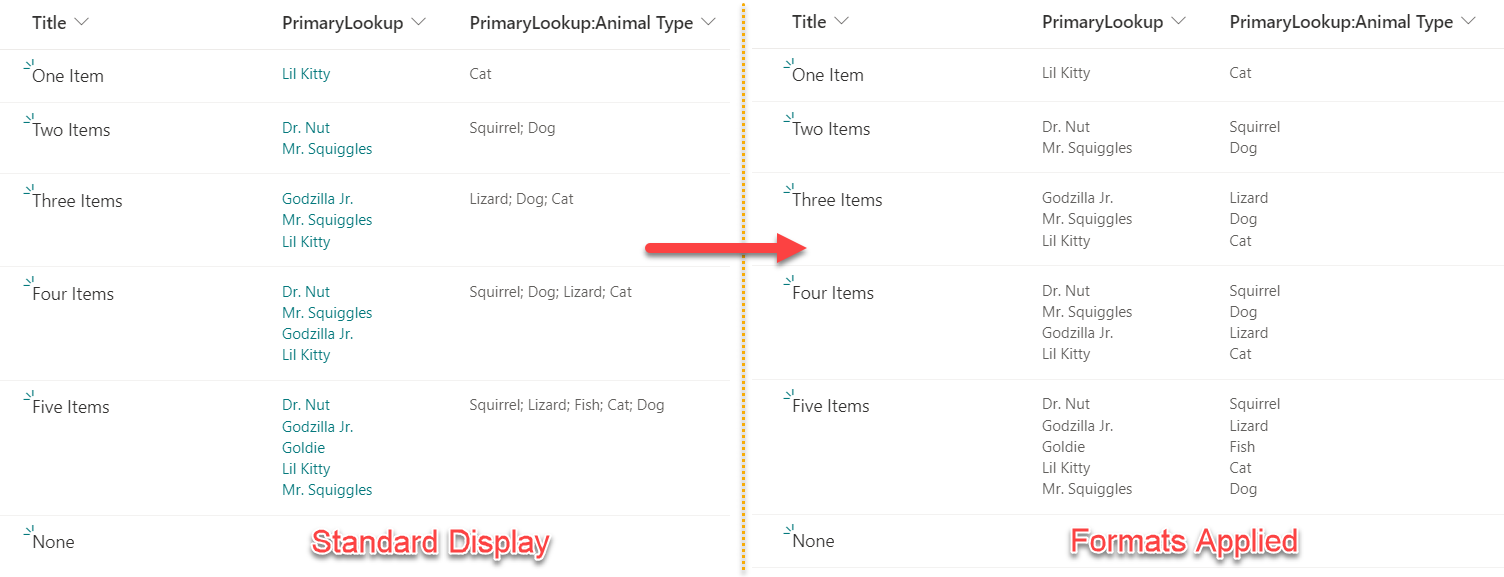
Since the inclusion of the split operation, projected fields (additional columns associated to your lookup column) can now also be formatted using the same method. This sample provides two formats illustrating the difference in how these columns are formatted.
Multi-Lookup Columns vs Projected Fields
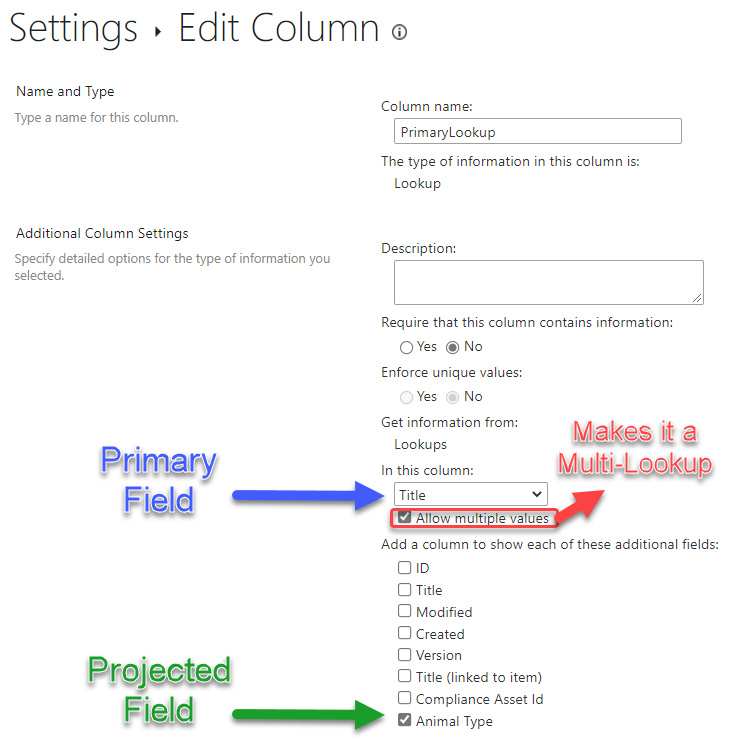
A lookup column becomes a multi-lookup column when you check the Allow multiple values box under the primary column selection in the classic Column Settings screen for the Lookup column. If you check the box for any additional columns, these values become projected fields.
Formatting Multi-Lookup Columns
The multi-lookup.json format should be applied to your primary lookup column. This format uses the forEach property to act as a template elment for each selected lookup value for an item. This format puts each value in its own box.
We are accessing the value portion of the lookup item by using the lookupValue syntax (alternatively, we could access the lookup list's item id for the item with lookupId).
Formatting Multi-Lookup Projected Fields
Unfortunately, multi-lookup projected fields don't come back as nice. Instead of being an array of objects, the values are all joined into a single line of text with multiple values separated by a space and a semi-colon (as seen in the Standard Display above).
We can now use the split operation to separate the string into an array which can then be used with the forEach property, with the $itemIterator value for the txtContent.
It's ideal to match the formatting properties of the projected fields with the primary lookup column to ensure the values line up correctly.
View requirements
- The
multi-lookup.jsonformat can be applied to any multi-value lookup column - The
multi-lookup-projected-field.jsonformat can be applied to any projected field
Sample
| Solution | Author(s) |
|---|---|
| multi-lookup-projected-field.json | Chris Kent, Tim Hunt |
| multi-lookup.json | Chris Kent |
Version history
| Version | Date | Comments |
|---|---|---|
| 1.0 | April 22, 2021 | Initial release |
| 1.1 | August 14, 2023 | Updated projected field to use split and forEach |
Disclaimer
THIS CODE IS PROVIDED AS IS WITHOUT WARRANTY OF ANY KIND, EITHER EXPRESS OR IMPLIED, INCLUDING ANY IMPLIED WARRANTIES OF FITNESS FOR A PARTICULAR PURPOSE, MERCHANTABILITY, OR NON-INFRINGEMENT.