
From the contributor
How to use this sample
Summary
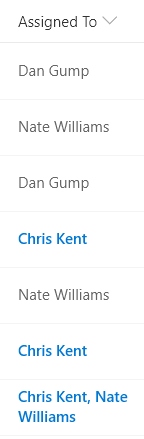
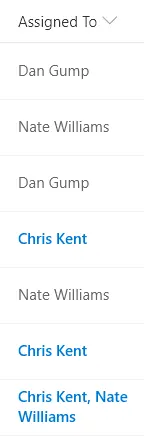
This sample uses the @me keyword to check if the person field contains the current user and shows that entry using a different color and weight. This is a dynamic check that will always highlight the user using the list (not the creater of the format). This template could easily be extended to apply different/additional styles or icons as desired by simply copying the same expression logic for other fields.
Note - The entry set of users will be formatted (not just the current user's name)
The Office UI Fabric theme color classes and a font weight class are used to ensure the format looks good across themes (including custom themes).
View requirements
- This format can be applied to a Person column
- This format uses operators only available in SharePoint Online and cannot be used in SharePoint 2019
Sample
| Solution | Author(s) |
|---|---|
| multi-person-currentuser.json | Chris Kent |
Version history
| Version | Date | Comments |
|---|---|---|
| 1.0 | February 5, 2019 | Initial release |
Disclaimer
THIS CODE IS PROVIDED AS IS WITHOUT WARRANTY OF ANY KIND, EITHER EXPRESS OR IMPLIED, INCLUDING ANY IMPLIED WARRANTIES OF FITNESS FOR A PARTICULAR PURPOSE, MERCHANTABILITY, OR NON-INFRINGEMENT.
Additional notes
This sample works for both single and multi-select person fields.However, an additional sample is available intended for use with single-select person fields: person-currentuser-rowclass. It is a simpler sample intended to show how to use the @me operator.