
From the contributor
How to use this sample
Summary
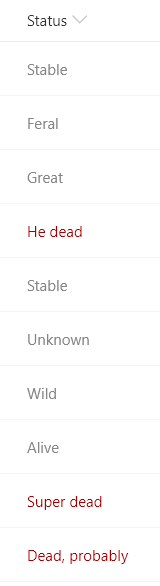
This sample demonstrates using the indexOf function (O365 only) to test if text contains a given value. The sample also uses the toLowerCase function to ensure the contains condition is case-insensitive. In this sample, if the text of the current field contains the word "dead" a class is applied to turn the text red.
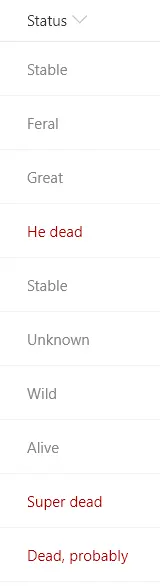
The indexOf function returns the index where a given value is found within a string (indexes start at 0). If the value is not found in the text, the result is -1.
To evaluate if text contains a given value, we want to know if the index of the value within the string is anything but -1. So we can use the function like this:
"=if(indexOf(@currentField,'dog') != -1, 'Yes', 'No')"
Some example values and the result using the function above:
@currentField |
result |
|---|---|
| A dog | Yes |
| a Dog | No |
| dog's are nice | Yes |
| bark dog bark | Yes |
Notice that the indexOf function is case-sensitive. You can do a case-insensitive check by adding the toLowerCase function like this:
"=if(indexOf(toLowerCase(@currentField),'dog') != -1, 'Yes', 'No')"
View requirements
- This format can be applied to a Text or Choice column
- This format uses operators only available in SharePoint Online and cannot be used in SharePoint 2019
Sample
| Solution | Author(s) |
|---|---|
| text-contains.json | Chris Kent |
Version history
| Version | Date | Comments |
|---|---|---|
| 1.0 | February 5, 2019 | Initial release |
Disclaimer
THIS CODE IS PROVIDED AS IS WITHOUT WARRANTY OF ANY KIND, EITHER EXPRESS OR IMPLIED, INCLUDING ANY IMPLIED WARRANTIES OF FITNESS FOR A PARTICULAR PURPOSE, MERCHANTABILITY, OR NON-INFRINGEMENT.
Additional notes
The indexOf and toLowerCase functions are not available in SharePoint 2019