
Back to form formats
Form formattingSharePoint Online

Countdown Timer Header

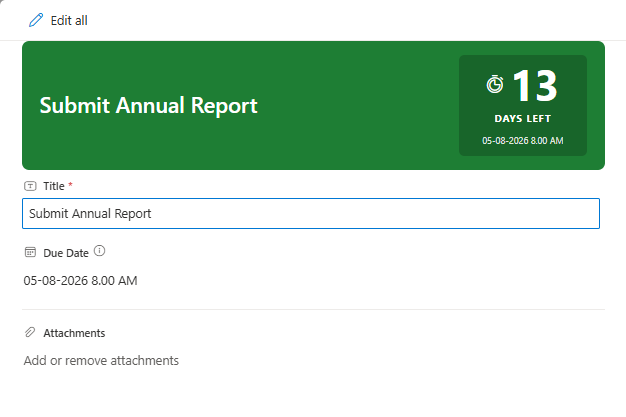
A form header formatter that displays days remaining until a due date with color-coded urgency: green (calm, >7 days), amber (warning, 4-7 days), red (urgent, 1-3 days), and crimson (overdue).

Countdown Timer Header formatting preview
Sample preview · View original image

Copy. Apply. Make it yours.

Get this format

1 definition

Review the requirements below, then paste this JSON into the matching formatting panel. Show me where.

Use your list's internal column names and replace any tenant-specific URLs or flow IDs. Formatting is presentation, not a way to secure data.

Form header
Download JSON
{
  "elmType": "div",
  "style": {
    "display": "flex",
    "justify-content": "space-between",
    "align-items": "center",
    "border-radius": "8px",
    "padding": "16px 20px",
    "background-color": "=if(floor(([$DueDate] - @now) / 86400000) > 7, '#1e7e34', if(floor(([$DueDate] - @now) / 86400000) > 3, '#b8860b', if(floor(([$DueDate] - @now) / 86400000) > 0, '#c0392b', '#6d0000')))",
    "color": "#ffffff",
    "min-height": "80px"
  },
  "children": [
    {
      "elmType": "div",
      "txtContent": "[$Title]",
      "style": {
        "flex": "1",
        "font-size": "24px",
        "font-weight": "600",
        "margin-right": "16px",
        "line-height": "1.2",
        "color": "#ffffff"
      }
    },
    {
      "elmType": "div",
      "style": {
        "display": "flex",
        "flex-direction": "column",
        "align-items": "center",
        "background-color": "rgba(0,0,0,0.2)",
        "border-radius": "6px",
        "padding": "8px 16px",
        "min-width": "110px",
        "text-align": "center"
      },
      "children": [
        {
          "elmType": "div",
          "style": {
            "display": "flex",
            "align-items": "center",
            "justify-content": "center"
          },
          "children": [
            {
              "elmType": "div",
              "attributes": {
                "iconName": "=if(floor(([$DueDate] - @now) / 86400000) > 7, 'Timer', if(floor(([$DueDate] - @now) / 86400000) > 3, 'Clock', if(floor(([$DueDate] - @now) / 86400000) > 0, 'Warning', 'ErrorBadge')))"
              },
              "style": {
                "font-size": "20px",
                "margin-right": "6px",
                "color": "#ffffff"
              }
            },
            {
              "elmType": "div",
              "txtContent": "=if(floor(([$DueDate] - @now) / 86400000) >= 0, toString(floor(([$DueDate] - @now) / 86400000)), toString(floor(([$DueDate] - @now) / 86400000) * -1))",
              "style": {
                "font-size": "48px",
                "font-weight": "700",
                "line-height": "1",
                "color": "#ffffff"
              }
            }
          ]
        },
        {
          "elmType": "div",
          "txtContent": "=if(floor(([$DueDate] - @now) / 86400000) > 0, 'DAYS LEFT', if(floor(([$DueDate] - @now) / 86400000) == 0, 'DUE TODAY', 'OVERDUE'))",
          "style": {
            "font-size": "11px",
            "font-weight": "700",
            "letter-spacing": "1px",
            "color": "#ffffff",
            "margin-top": "4px"
          }
        },
        {
          "elmType": "div",
          "txtContent": "[$DueDate.displayValue]",
          "style": {
            "font-size": "10px",
            "color": "rgba(255,255,255,0.85)",
            "margin-top": "4px"
          }
        }
      ]
    }
  ]
}

From the contributor

How to use this sample

Summary

This SharePoint JSON form header formatter transforms the form header into a color-coded urgency banner. It shows the item title on the left and a countdown badge on the right — displaying days remaining until a due date, a status label (DAYS LEFT / DUE TODAY / OVERDUE), and the formatted due date.

The banner background shifts through four urgency tiers based on days remaining:

  • Green (#1e7e34) — more than 7 days remaining
  • Amber (#b8860b) — 4 to 7 days remaining
  • Red (#c0392b) — 1 to 3 days remaining
  • Crimson (#6d0000) — overdue (0 or fewer days)

It's designed for task lists, project trackers, action item registers, or any list where due-date urgency should be immediately visible when opening a form.
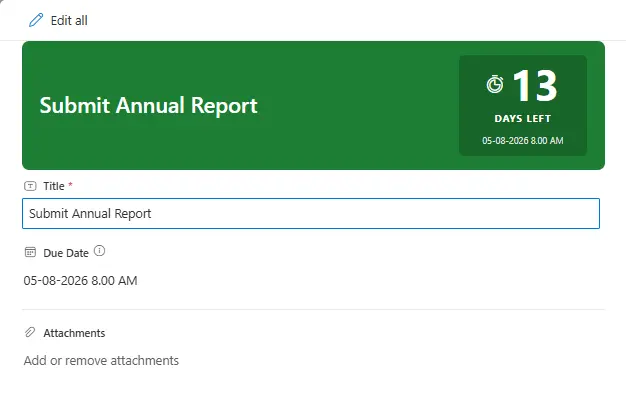
screenshot of the sample

Form requirements

This formatter is applied to the Header Format slot in SharePoint's Configure Layout panel.

Required SharePoint List Columns

Type Internal Name Required Description
Single line of text Title Yes Item name — displayed on the left of the header
Date and Time DueDate Yes Target deadline — drives all countdown logic

Expression used

Days remaining is computed as:

=floor(([$DueDate] - @now) / 86400000)

This yields a positive integer (days left), 0 (due today), or a negative integer (overdue). All conditional styling, icon selection, and label text branch from this single expression.

Provisioning script

A PowerShell script is provided in the assets folder. It creates the list with the required columns and seeds one item per urgency tier so you can see all four color states immediately.

Note: The script uses PnP PowerShell. Make sure PnP PowerShell is installed and you can connect to your tenant before running it.

Sample

Solution Author
countdown-timer-header.json Sudeep Ghatak (LinkedIn)

Version history

Version Date Comments
1.0 July 23, 2026 Initial release

Disclaimer

THIS CODE IS PROVIDED AS IS WITHOUT WARRANTY OF ANY KIND, EITHER EXPRESS OR IMPLIED, INCLUDING ANY IMPLIED WARRANTIES OF FITNESS FOR A PARTICULAR PURPOSE, MERCHANTABILITY, OR NON-INFRINGEMENT.


Additional notes

  • Background color is inline hex — not Fluent CSS class names. Class-based conditionals in background-color style values are unreliable across SharePoint Online tenants.
  • Overdue day count shows the absolute number of days past due (e.g., 3 not -3), paired with the "OVERDUE" label so the meaning is unambiguous.
  • [$DueDate.displayValue] is used (not [$DueDate]) to render the locale-formatted date string in the badge subtitle.
  • No gradients are used — gradient background values silently fail to render in SharePoint form formatters.
  • The formatter has no footer counterpart — it is a header-only sample.