
Back to view formats
View formattingSharePoint Online

Certificate Card

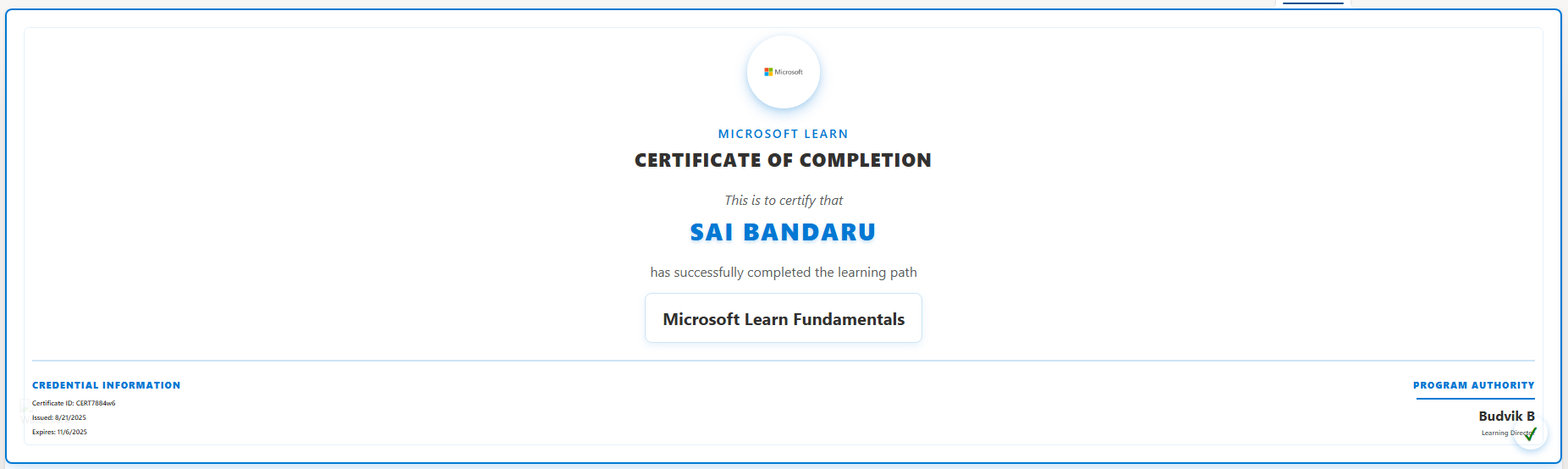
This sample uses SharePoint List Formatting to display certificate data as a card list view.

Certificate Card formatting preview
Sample preview · View original image

Copy. Apply. Make it yours.

Get this format

1 definition

Review the requirements below, then paste this JSON into the matching formatting panel. Show me where.

Use your list's internal column names and replace any tenant-specific URLs or flow IDs. Formatting is presentation, not a way to secure data.

View formatting
Download JSON
{
  "$schema": "https://developer.microsoft.com/json-schemas/sp/v2/view-formatting.schema.json",
  "hideSelection": true,
  "hideColumnHeader": true,
  "rowFormatter": {
    "elmType": "div",
    "style": {
      "display": "flex",
      "flex-direction": "column",
      "align-items": "center",
      "border": "2px solid #0078d4",
      "padding": "30px",
      "border-radius": "8px",
      "text-align": "center",
      "font-family": "Segoe UI, -apple-system, BlinkMacSystemFont, sans-serif",
      "margin-bottom": "15px",
      "position": "relative",
      "min-height": "400px",
      "overflow": "hidden"
    },
    "children": [
      {
        "elmType": "div",
        "style": {
          "position": "absolute",
          "top": "0",
          "left": "0",
          "right": "0",
          "height": "8px",
          "background": "#0078d4",
          "border-radius": "10px 10px 0 0"
        }
      },
      {
        "elmType": "div",
        "style": {
          "position": "absolute",
          "top": "20px",
          "left": "20px",
          "right": "20px",
          "bottom": "20px",
          "border": "1px solid #e0f0ff",
          "border-radius": "6px",
          "pointer-events": "none"
        }
      },
      {
        "elmType": "div",
        "style": {
          "width": "80px",
          "height": "80px",
          "border-radius": "50%",
          "background": "#0078d4",
          "display": "flex",
          "align-items": "center",
          "justify-content": "center",
          "margin-bottom": "20px",
          "border": "3px solid #ffffff",
          "z-index": "10",
          "position": "relative"
        },
        "children": [
          {
            "elmType": "img",
            "attributes": {
              "src": "https://tenant.sharepoint.com/:i:/r/sites/saitename/SiteAssets/image.png",
              "alt": "Certificate Logo"
            },
            "style": {
              "width": "50px",
              "height": "50px",
              "object-fit": "contain"
            }
          }
        ]
      },
      {
        "elmType": "div",
        "txtContent": "Microsoft Learn",
        "style": {
          "font-weight": "500",
          "margin-bottom": "6px",
          "font-size": "14px",
          "color": "#0078d4",
          "text-transform": "uppercase",
          "letter-spacing": "2px"
        }
      },
      {
        "elmType": "div",
        "txtContent": "CERTIFICATE OF COMPLETION",
        "style": {
          "font-weight": "800",
          "margin-bottom": "22px",
          "font-size": "22px",
          "color": "#323130",
          "letter-spacing": "1px"
        }
      },
      {
        "elmType": "div",
        "txtContent": "This is to certify that",
        "style": {
          "margin-bottom": "8px",
          "font-size": "16px",
          "color": "#605e5c",
          "font-style": "italic",
          "font-weight": "400"
        }
      },
      {
        "elmType": "div",
        "txtContent": "[$EmployeeName]",
        "style": {
          "font-size": "28px",
          "font-weight": "800",
          "color": "#0078d4",
          "margin-bottom": "18px",
          "text-transform": "uppercase",
          "letter-spacing": "2px",
          "position": "relative"
        }
      },
      {
        "elmType": "div",
        "txtContent": "has successfully completed the learning path",
        "style": {
          "margin-bottom": "15px",
          "font-size": "16px",
          "color": "#605e5c",
          "font-weight": "400"
        }
      },
      {
        "elmType": "div",
        "txtContent": "[$CertificationName]",
        "style": {
          "font-size": "20px",
          "font-weight": "700",
          "color": "#323130",
          "margin-bottom": "20px",
          "padding": "15px 20px",
          "background": "#f0f8ff",
          "border-radius": "8px",
          "border": "1px solid #e0f0ff"
        }
      },
      {
        "elmType": "div",
        "style": {
          "display": "flex",
          "justify-content": "space-between",
          "width": "100%",
          "padding-top": "20px",
          "border-top": "2px solid #e0f0ff"
        },
        "children": [
          {
            "elmType": "div",
            "style": {
              "text-align": "left",
              "flex": "1"
            },
            "children": [
              {
                "elmType": "div",
                "txtContent": "CREDENTIAL INFORMATION",
                "style": {
                  "font-weight": "800",
                  "margin-bottom": "8px",
                  "font-size": "11px",
                  "color": "#0078d4",
                  "letter-spacing": "1px",
                  "text-transform": "uppercase"
                }
              },
              {
                "elmType": "div",
                "txtContent": "='Certificate ID: ' + [$CertificateID]",
                "style": {
                  "margin-bottom": "6px",
                  "font-size": "8px",
                  "color": "#323130",
                  "font-weight": "600"
                }
              },
              {
                "elmType": "div",
                "txtContent": "='Issued: ' + toLocaleDateString([$IssueDate])",
                "style": {
                  "margin-bottom": "6px",
                  "font-size": "8px",
                  "color": "#323130",
                  "font-weight": "600"
                }
              },
              {
                "elmType": "div",
                "txtContent": "='Expires: ' + toLocaleDateString([$ExpiryDate])",
                "style": {
                  "font-size": "8px",
                  "color": "#323130",
                  "font-weight": "600"
                }
              }
            ]
          },
          {
            "elmType": "div",
            "style": {
              "text-align": "right",
              "flex": "1"
            },
            "children": [
              {
                "elmType": "div",
                "txtContent": "PROGRAM AUTHORITY",
                "style": {
                  "font-weight": "800",
                  "margin-bottom": "8px",
                  "font-size": "11px",
                  "color": "#0078d4",
                  "letter-spacing": "1px",
                  "text-transform": "uppercase"
                }
              },
              {
                "elmType": "div",
                "style": {
                  "border-bottom": "2px solid #0078d4",
                  "width": "140px",
                  "margin-left": "auto",
                  "margin-bottom": "8px"
                }
              },
              {
                "elmType": "div",
                "txtContent": "[$HRManager]",
                "style": {
                  "font-size": "16px",
                  "font-weight": "700",
                  "margin-bottom": "4px",
                  "color": "#323130"
                }
              },
              {
                "elmType": "div",
                "txtContent": "Learning Director",
                "style": {
                  "font-size": "8px",
                  "color": "#605e5c",
                  "font-weight": "600"
                }
              }
            ]
          }
        ]
      },
      {
        "elmType": "div",
        "style": {
          "position": "absolute",
          "bottom": "15px",
          "right": "15px",
          "width": "40px",
          "height": "40px",
          "border-radius": "50%",
          "background": "#0078d4",
          "display": "flex",
          "align-items": "center",
          "justify-content": "center",
          "z-index": "10"
        },
        "children": [
          {
            "elmType": "div",
            "txtContent": "✓",
            "style": {
              "font-size": "20px",
              "font-weight": "900",
              "color": "#008000"
            }
          }
        ]
      }
    ]
  }
}

From the contributor

How to use this sample

This sample uses SharePoint List View Formatting to display a certificate-style card for each employee.
Each row in the list is transformed into a visually rich certificate layout, including logos, employee details, certification information, and program authority.
screenshot of the sample

View Requirements

Create a list with the following columns:

Internal Name Type
Title Single line of text
EmployeeName Single line of text
CertificationName Single line of text
CertificateID Single line of text
IssueDate Date and Time
ExpiryDate Date and Time
HRManager Single line of text

Sample Data

| Title | EmployeeName | CertificationName | CertificateID | IssueDate | ExpiryDate | HRManager | |---------|--------------|-----------------------------|---------------|-------------------|-------------------|-------------|-------| | Cert 1 | Sai Bandaru | Microsoft Learn Fundamentals | CERT7884w6 | 2025-08-01T04:00:00Z | 2026-08-01T04:00:00Z | Budvik B |

Summary

  • Each row is displayed as a certificate card with a logo, employee name, certification name, and details.
  • Employee Name is highlighted with gradient text and uppercase letters.
  • Credential Information (Certificate ID, Issue Date, Expiry Date) is shown on the bottom left.
  • Program Authority (HR Manager) is shown on the bottom right with a signature line.
  • Optional watermark image appears at the bottom-left of the certificate.
  • A checkmark badge indicates successful completion.

Sample

Solution Author(s)
certificate-card.json Sai Bandaru

Version history

Version Date Comments
1.0 August 26, 2025 Initial release

Disclaimer

THIS CODE IS PROVIDED AS IS WITHOUT WARRANTY OF ANY KIND, EITHER EXPRESS OR IMPLIED, INCLUDING ANY IMPLIED WARRANTIES OF FITNESS FOR A PARTICULAR PURPOSE, MERCHANTABILITY, OR NON-INFRINGEMENT.


Additional Notes

  • Change the Logo in the json code because SharePoint blocks images from other domains if they don’t allow CORS (cross-origin requests). Best fix → store images in SharePoint (same domain) or ensure the external server sets Access-Control-Allow-Origin: *.
  • Works best in List view with EmployeeName sorted ascending.
  • You can adjust logo, colors, and shadows in the JSON to match your corporate branding.
  • Compatible with SharePoint Online Modern Lists.