
Back to view formats
View formattingSharePoint Online

Key Dates Timeline

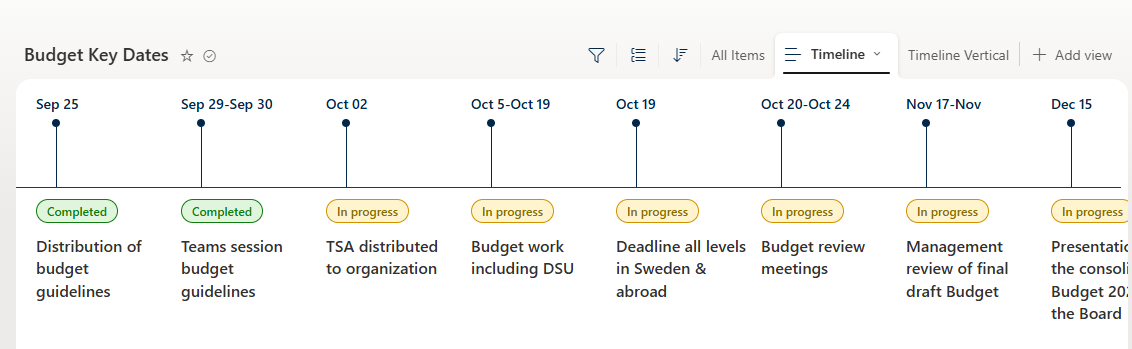
Horizontal timeline view for budget key dates and milestones with hover cards

Key Dates Timeline formatting preview
Sample preview · View original image

Copy. Apply. Make it yours.

Get this format

1 definition

Review the requirements below, then paste this JSON into the matching formatting panel. Show me where.

Use your list's internal column names and replace any tenant-specific URLs or flow IDs. Formatting is presentation, not a way to secure data.

View formatting
Download JSON
{
  "$schema": "https://developer.microsoft.com/json-schemas/sp/v2/row-formatting.schema.json",
  "hideColumnHeader": true,
  "hideSelection": true,
  "rowFormatter": {
    "elmType": "div",
    "style": {
      "position": "absolute",
      "left": "= @rowIndex * 145 + 'px'",
      "width": "160px",
      "height": "360px",
      "font-family": "Segoe UI",
      "top": "5px",
      "display": "block",
      "min-height": "360px",
      "margin-bottom": "50px"
    },
    "children": [
      {
        "elmType": "div",
        "txtContent": "[$Title]",
        "style": {
          "position": "absolute",
          "top": "10px",
          "left": "20px",
          "font-size": "14px",
          "font-weight": "600",
          "color": "#03274a"
        }
      },
      {
        "elmType": "div",
        "style": {
          "position": "absolute",
          "top": "35px",
          "left": "36px",
          "width": "8px",
          "height": "8px",
          "border-radius": "50%",
          "background-color": "#03274a",
          "z-index": "2"
        }
      },
      {
        "elmType": "div",
        "style": {
          "position": "absolute",
          "top": "43px",
          "left": "40px",
          "width": "1px",
          "height": "60px",
          "background-color": "#03274a"
        }
      },
      {
        "elmType": "div",
        "style": {
          "position": "absolute",
          "top": "103px",
          "left": "-90px",
          "width": "180px",
          "height": "1px",
          "background-color": "#333333"
        }
      },
      {
        "elmType": "div",
        "style": {
          "position": "absolute",
          "top": "115px",
          "left": "20px",
          "right": "10px",
          "display": "flex",
          "flex-direction": "column",
          "gap": "12px",
          "align-items": "flex-start"
        },
        "children": [
          {
            "elmType": "div",
            "txtContent": "[$Status]",
            "style": {
              "display": "inline-flex",
              "align-items": "center",
              "justify-content": "center",
              "padding": "3px 10px",
              "border-radius": "999px",
              "font-size": "12px",
              "font-weight": "600",
              "white-space": "nowrap",
              "background-color": "=if([$Status] == 'Completed', '#DFF6DD', if([$Status] == 'In progress', '#FFF4CE', '#EDEBE9'))",
              "color": "=if([$Status] == 'Completed', '#107C10', if([$Status] == 'In progress', '#8A6D00', '#605E5C'))",
              "border": "=if([$Status] == 'Completed', '1px solid #107C10', if([$Status] == 'In progress', '1px solid #D29200', '1px solid #C8C6C4'))"
            }
          },
          {
            "elmType": "div",
            "txtContent": "[$Milestone]",
            "style": {
              "font-size": "16px",
              "font-weight": "500",
              "line-height": "1.4",
              "color": "#323130",
              "cursor": "pointer"
            },
            "customCardProps": {
              "formatter": {
                "elmType": "div",
                "style": {
                  "display": "flex",
                  "flex-direction": "column",
                  "gap": "14px",
                  "align-items": "flex-start",
                  "width": "320px",
                  "padding": "14px 16px",
                  "background-color": "#ffffff",
                  "box-shadow": "0 4px 12px rgba(0,0,0,0.15)",
                  "border-radius": "6px",
                  "border": "1px solid #edebe9"
                },
                "children": [
                  {
                    "elmType": "div",
                    "txtContent": "[$Description]",
                    "style": {
                      "font-size": "13px",
                      "color": "#605e5c",
                      "white-space": "pre-wrap",
                      "line-height": "1.4"
                    }
                  },
                  {
                    "elmType": "div",
                    "style": {
                      "display": "=if([$Link]=='','none', 'flex')",
                      "flex-direction": "row",
                      "gap": "6px",
                      "padding-top": "12px"
                    },
                    "children": [
                      {
                        "elmType": "a",
                        "attributes": {
                          "class": "sp-card-urlContent ms-border-purpleDark ms-bgColor-purpleDark",
                          "href": "[$Link]",
                          "target": "_blank"
                        },
                        "style": {
                          "background-color": "#03274a",
                          "padding": "5px 10px",
                          "border-radius": "5px",
                          "color": "white",
                          "text-decoration": "none"
                        },
                        "txtContent": "Learn more"
                      }
                    ]
                  }
                ]
              },
              "openOnEvent": "click",
              "isBeakVisible": true,
              "directionalHint": "bottomCenter"
            }
          }
        ]
      }
    ]
  }
}

From the contributor

How to use this sample

Summary

Beautiful horizontal timeline view for budget key dates/milestones. Shows status badges, milestone titles with hover cards containing descriptions and "Learn more" links.
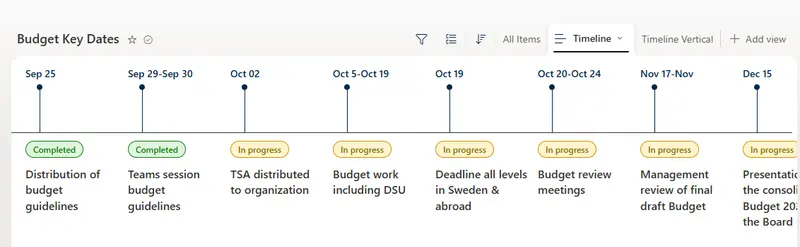
screenshot of the sample

View requirements

This sample works with any list that has the following columns:

Type Internal Name Required Notes
Single line of text Title Yes Date label (e.g. "Sep 25")
Choice Status Yes Values: Completed, In progress
Single line of text / Multiple lines of text Milestone Yes Milestone title
Multiple lines of text Description Yes Details shown in hover card
Hyperlink Link No Optional link for "Learn more"

Sample

Solution Author(s)
key-dates-timeline.json Anand Ragav

Version history

Version Date Comments
1.0 July 20, 2026 Initial release

Disclaimer

THIS CODE IS PROVIDED AS IS WITHOUT WARRANTY OF ANY KIND, EITHER EXPRESS OR IMPLIED, INCLUDING ANY IMPLIED WARRANTIES OF FITNESS FOR A PARTICULAR PURPOSE, MERCHANTABILITY, OR NON-INFRINGEMENT.