
From the contributor
How to use this sample
Summary
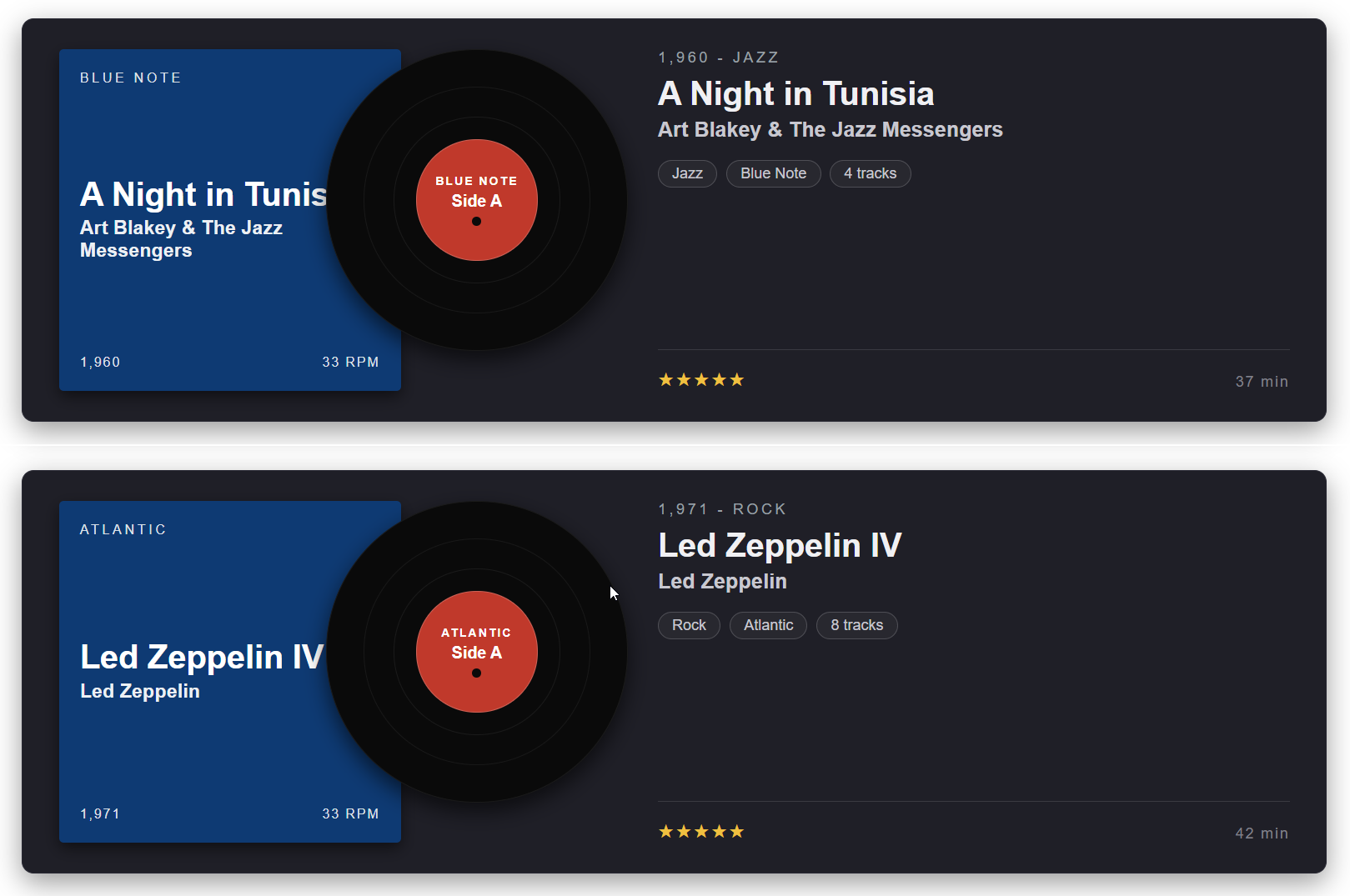
This SharePoint JSON view formatting sample transforms list items into vinyl record album cards. Each item renders as an album sleeve on the left with a vinyl record peeking out to the right, followed by a metadata column with year, genre, label, track count, rating, and duration. It's designed for music libraries, podcast catalogues, or any "collection" style list.
View requirements
Recommended SharePoint List Columns
| Column Name | Internal Name | Type | Description |
|---|---|---|---|
| Title | Title | Single line of text | Album title (e.g. A Night in Tunisia) |
| Artist | Artist | Single line of text | Artist or band name |
| Label | Label | Single line of text | Record label (e.g. Blue Note, Atlantic, Sub Pop) |
| Year | Year | Number | Release year (e.g. 1960) |
| Genre | Genre | Choice | Music genre (Jazz, Rock, Pop, Indie, Folk, Hip-Hop, etc.) |
| Side | Side | Choice | Side label shown on the record (Side A, Side B) |
| Tracks | Tracks | Number | Number of tracks on the album |
| Duration Minutes | DurationMinutes | Number | Total duration in minutes (e.g. 37) |
| Rating | Rating | Single line of text | Star rating as text (e.g. ★★★★★) |
A PowerShell script has been provided in the assets folder to provision the list for you.
Note: This script uses PnP PowerShell and requires an environment ready for PnP PowerShell.
Sample
| Solution | Author |
|---|---|
| vinyl-record.json | Sudeep Ghatak (LinkedIn) |
Version history
| Version | Date | Comments |
|---|---|---|
| 1.0 | May 11, 2026 | Initial release |
Disclaimer
THIS CODE IS PROVIDED AS IS WITHOUT WARRANTY OF ANY KIND, EITHER EXPRESS OR IMPLIED, INCLUDING ANY IMPLIED WARRANTIES OF FITNESS FOR A PARTICULAR PURPOSE, MERCHANTABILITY, OR NON-INFRINGEMENT.
Additional notes
- The vinyl record is rendered entirely with concentric div elements (no images) — outer disc, middle disc, inner disc, and a coloured centre label. The black "spindle hole" in the middle is also a styled div.
- The record overlaps the sleeve by
margin-left: -50pxso it looks like it's sliding out. - The Side column lets you flip between Side A and Side B labelling on the centre disc without touching the formatter.
- Rating is stored as plain text so users can paste ★ / ☆ glyphs directly (e.g.
★★★★☆). - Year and other numeric fields are wrapped in
toString()inside expressions to avoid the SharePoint view formatter's strict number+string concatenation rule.