
Prompt
Create a new record in Power Apps
Generate PowerFx code to create a new record in Power Apps using GitHub Copilot


- Sample type
- Prompt
- Products
- GitHub Copilot
- Created
- Updated
Sample documentation
How to use this sample
Summary
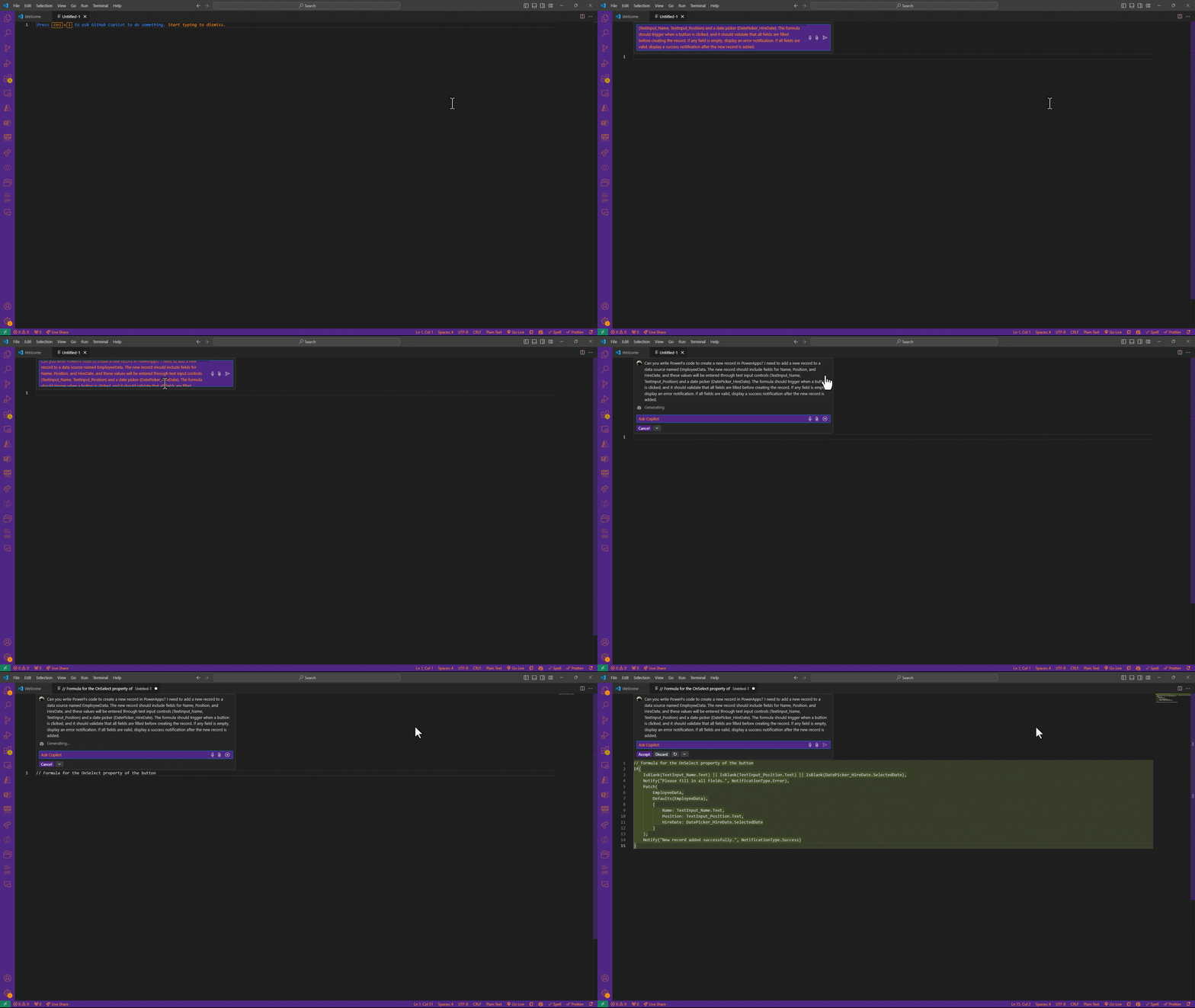
This prompt asks GitHub Copilot to generate PowerFx code that creates a new record in a Power Apps data source. The record will include fields for Name, Position, and HireDate, with values provided by user input through text input controls and a date picker. The formula should be triggered by a button click, with validation to ensure all fields are filled. If validation fails, an error notification will be displayed; otherwise, a success message will confirm the record creation.
Prompt💡
Can you write PowerFx code to create a new record in Power Apps? I need to add a new record to a data source named EmployeeData. The new record should include fields for Name, Position, and HireDate, and these values will be entered through text input controls (TextInput_Name, TextInput_Position) and a date picker (DatePicker_HireDate). The formula should trigger when a button is clicked, and it should validate that all fields are filled before creating the record. If any field is empty, display an error notification. If all fields are valid, display a success notification after the new record is added.
Description ℹ️
The Patch function in Power Fx allows you to add new data to a data source without affecting the rest of the data.
Contributors 👨💻
Version history
| Version | Date | Comments |
|---|---|---|
| 1.0 | January 16, 2025 | Initial release |
Instructions 📝
Install Github Copilot Extension
- Open Visual Studio Code.
- Go to the Extensions panel(you can open it by clicking on the Extensions icon on the left toolbar or pressing Ctrl+Shift+X).
- Search for "Github Copilot" and install the extension.
Sign in to GitHub
- Once the extension is installed, you will need to sign in with your GitHub account.
- After installation, Visual Studio Code will prompt you to authenticate. Follow the steps to sign in.
Create File for Github Copilot Prompt
- Click on File in the top menu and select New File. (Alternatively, you can use the shortcut Ctrl+N(Windows) or Cmd+N(Mac) to create a new file.)
- Name the file whatever you'd like.(Make sure to give the file the appropriate extension for the language e.g., .txt)
- Start writing your prompt by pressing Ctrl+i and entering the desired prompt.
Prerequisites
Help
We do not support samples, but this community is always willing to help, and we want to improve these samples. We use GitHub to track issues, which makes it easy for community members to volunteer their time and help resolve issues.
You can try looking at issues related to this sample to see if anybody else is having the same issues.
If you encounter any issues using this sample, create a new issue.
Finally, if you have an idea for improvement, make a suggestion.
Disclaimer
THIS CODE IS PROVIDED AS IS WITHOUT WARRANTY OF ANY KIND, EITHER EXPRESS OR IMPLIED, INCLUDING ANY IMPLIED WARRANTIES OF FITNESS FOR A PARTICULAR PURPOSE, MERCHANTABILITY, OR NON-INFRINGEMENT.
Learn more
References
Background and supporting resources provided by the contributor.