
Prompt
Convert text to diagram with mermaid.js
This prompt will ask Copilot to convert text to diagram using mermaid.js.

- Sample type
- Prompt
- Products
- Copilot for Microsoft 365
- Created
- Updated
Sample documentation
How to use this sample
Summary 📜
This prompt utilizes Copilot to take plain text input and organize it into a diagram using mermaid.js syntax. It provides a convenient way to visually represent information and improve readability. By leveraging Copilot's capabilities, users can easily generate complex diagrams from simple text descriptions.
Prompt 💡
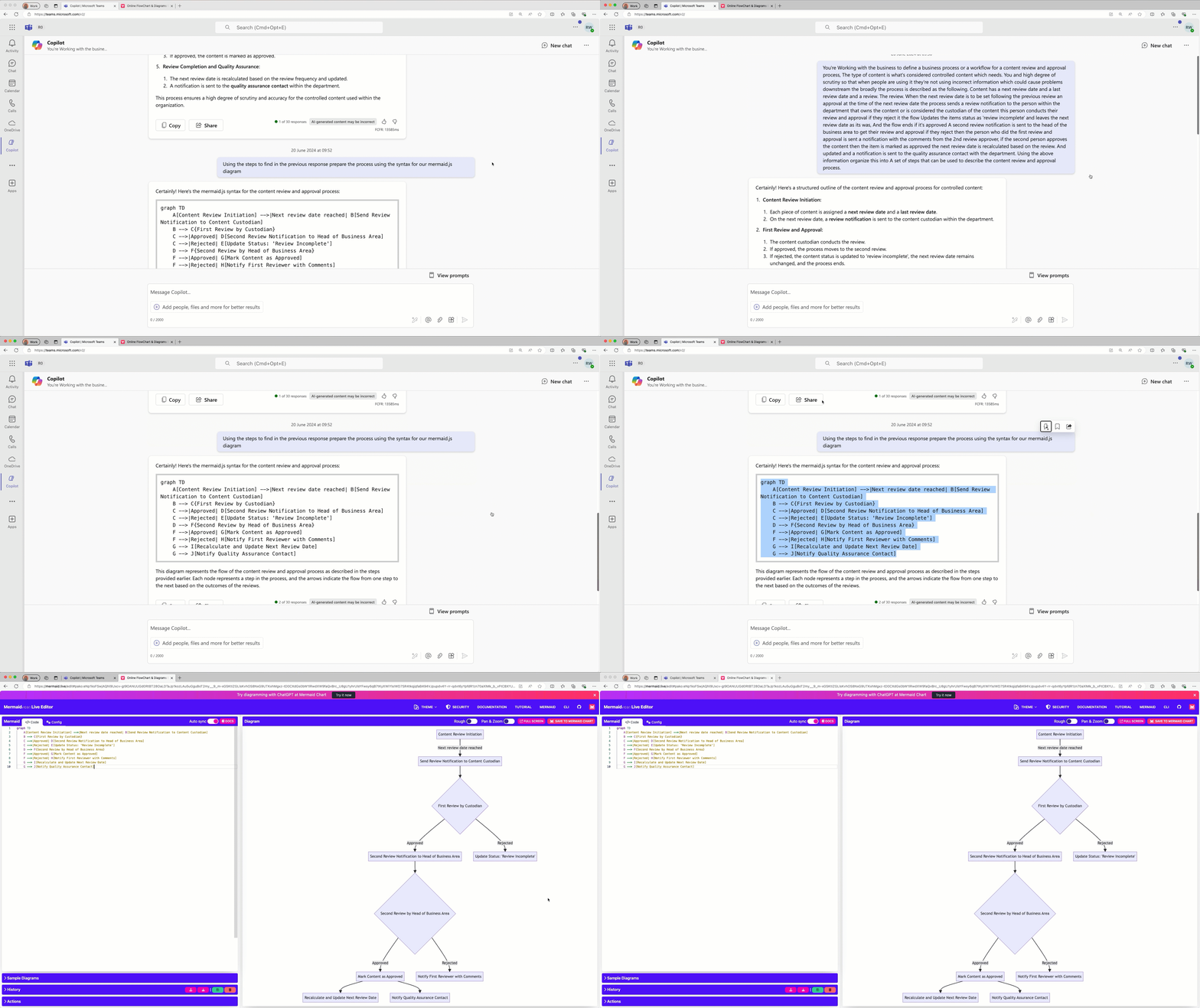
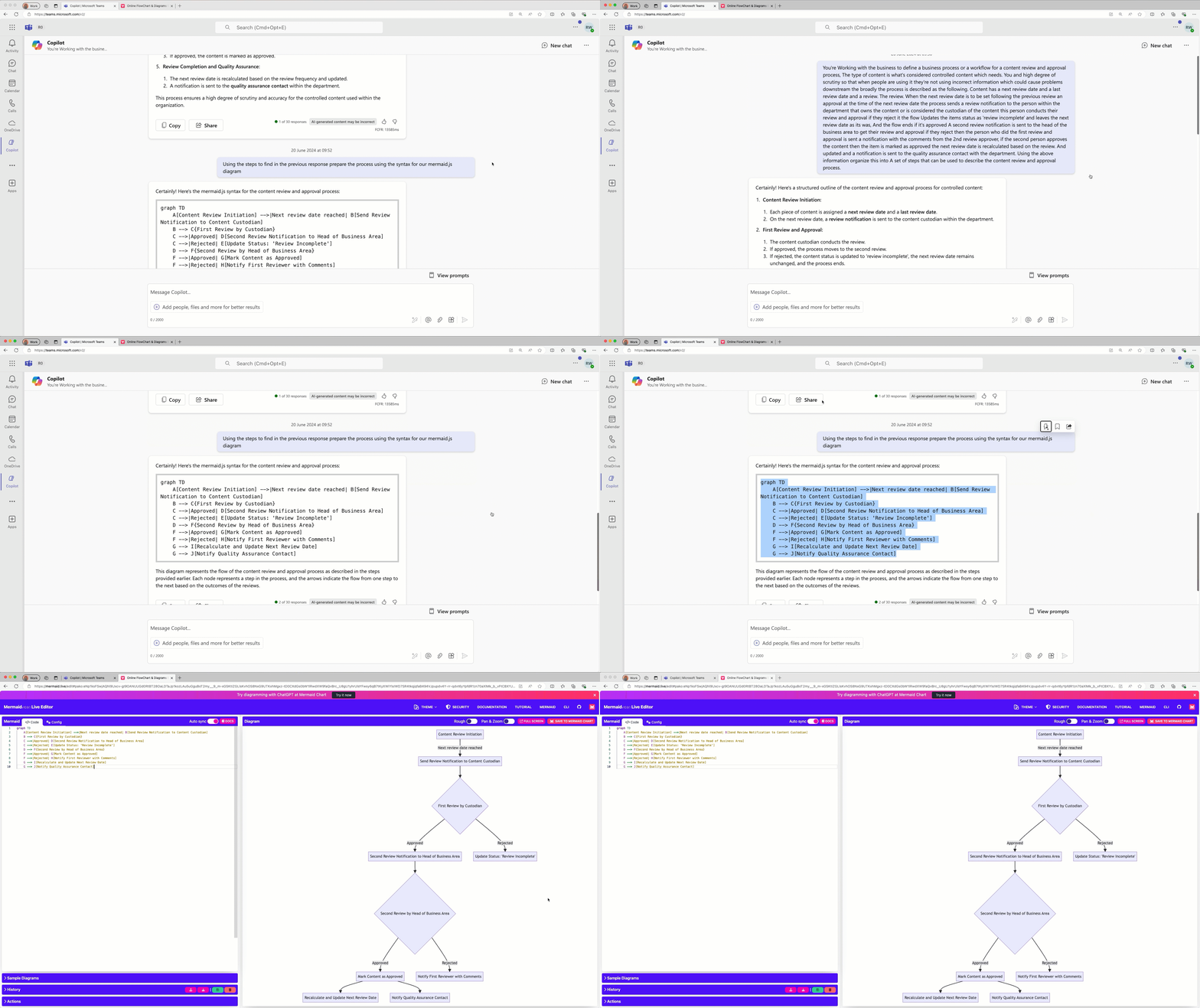
first prompt
You're Working with the business to define a business process or a workflow for a content review and approval process, The type of content is what's considered controlled content which needs. You and high degree of scrutiny so that when people are using it they're not using incorrect information which could cause problems downstream the broadly the process is described as the following. Content has a next review date and a last review date and a review. The review. When the next review date is to be set following the previous review an approval at the time of the next review date the process sends a review notification to the person within the department that owns the content or is considered the custodian of the content this person conducts their review and approval if they reject it the flow Updates the items status as review incomplete and leaves the next review date as its was, And the flow ends if it's approved A second review notification is sent to the head of the business area to get their review and approval if they reject then the person who did the first review and approval is sent a notification with the comments from the 2nd review approver, if the second person approves the content then the item is marked as approved the next review date is recalculated based on the review. And updated and a notification is sent to the quality assurance contact with the department.
Using the above information organize this into A set of steps that can be used to describe the content review and approval process.
second prompt
Using the steps to find in the previous response prepare the process using the syntax for our mermaid.js diagram
Description ℹ️
This prompt utilizes Copilot to take plain text input and organize it into a diagram using mermaid.js syntax. It provides a convenient way to visually represent information and improve readability. By leveraging Copilot's capabilities, users can easily generate complex diagrams from simple text descriptions. This is multi turn so make sure you send the first prompt to Copilot, wait for response and then send the second response
Contributors 👨💻
Version history 📋
| Version | Date | Comments |
|---|---|---|
| 1.0 | June 20, 2024 | Initial release |
Instructions 📝
- Go to Copilot app in Teams/Bing
- Copy paste the first prompt
- Wait for reponse to first prompt
- Copy past the second prompt
- Copy the response in the format needed to create the diagram
- Go to https://mermaid.liveand paste the code to generate diagram
Improvise Usage 🚀
You can add more text to make the process more complex.
Help 💁
We do not support samples, but this community is always willing to help, and we want to improve these samples. We use GitHub to track issues, which makes it easy for community members to volunteer their time and help resolve issues.
You can try looking at issues related to this sample to see if anybody else is having the same issues.
If you encounter any issues using this sample, create a new issue.
Finally, if you have an idea for improvement, make a suggestion.
Disclaimer
THIS CODE IS PROVIDED AS IS WITHOUT WARRANTY OF ANY KIND, EITHER EXPRESS OR IMPLIED, INCLUDING ANY IMPLIED WARRANTIES OF FITNESS FOR A PARTICULAR PURPOSE, MERCHANTABILITY, OR NON-INFRINGEMENT.
Learn more
References
Background and supporting resources provided by the contributor.