
Prompt
Create guidance with best practices and comprehensive examples on prompting Gen AI tools like Microsoft Copilot for your users in Microsoft Word.
Create a baseline guideline for prompting in specific business context that can be easily understood by users from different businesses and departments using comprehensive context and examples.

- Sample type
- Prompt
- Products
- Copilot for Microsoft 365, Copilot for Microsoft Word
- Created
- Updated
Sample documentation
How to use this sample
Summary
Rolling out Microsoft Copilot and other Generative AI tools might be challenging. This prompt helps people in charge of implementations or leading departments adoption to create easily some guidance for a smoother adoption process and roll out of this technolgy. It provides a template prompt that users can customize by replacing variables in brackets with specific tool names, business roles, and department names. This helps tailor the guidance to specific use cases.
Prompt💡
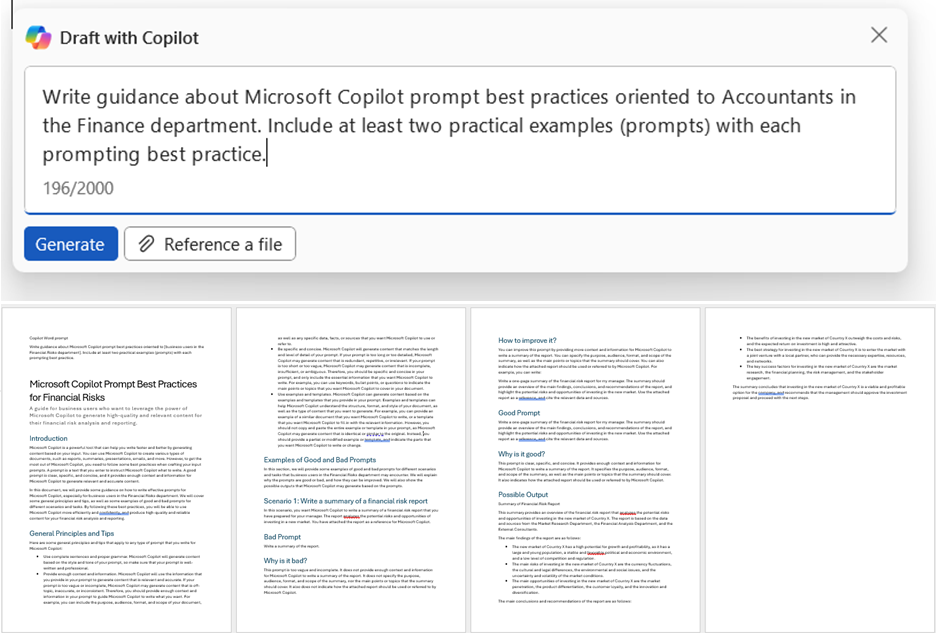
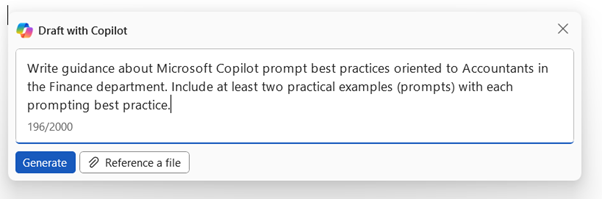
Write guidance about {Gen AI tool of choice} prompt best practices oriented to {business role} in the {XYZ} department. Include at least two practical examples (prompts) with each prompting best practice.
Descriptionℹ️
Create a baseline guideline for prompting in specific business context that can be easily understood by users from different businesses and departments using comprehensive context and examples.
Contributors 👨💻
Version history
| Version | Date | Comments |
|---|---|---|
| 1.0 | September 04, 2024 | Initial release |
Instructions 📝
- Make sure you have copilot for Microsoft 365 in your tenant so you can use Copilot for Word
- Go to Word and Click on draft with Copilot
- Copy paste the prompt above and replace the variables in brackets with the specific Tool name, business role and department name. Feel free to remove department if not relevant or too generic
- (Optional) Add more business context after the prompt to tailor the output towards specific use cases
- (Optional) Prompt again for more practical samples to be included in the guidance
Improvise Usage 🚀
Add more business context after the prompt to tailor the output towards specific use cases Prompt again for more practical samples to be included in the guidance
Prerequisites
Help
We do not support samples, but this community is always willing to help, and we want to improve these samples. We use GitHub to track issues, which makes it easy for community members to volunteer their time and help resolve issues.
You can try looking at issues related to this sample to see if anybody else is having the same issues.
If you encounter any issues using this sample, create a new issue.
Finally, if you have an idea for improvement, make a suggestion.
Disclaimer
THIS CODE IS PROVIDED AS IS WITHOUT WARRANTY OF ANY KIND, EITHER EXPRESS OR IMPLIED, INCLUDING ANY IMPLIED WARRANTIES OF FITNESS FOR A PARTICULAR PURPOSE, MERCHANTABILITY, OR NON-INFRINGEMENT.
Learn more
References
Background and supporting resources provided by the contributor.