
A community-built Power Platform sample
Date Range Picker Component
A reusable canvas component for picking a single date or a date range, with booking rules such as blocked dates, no weekends and a maximum length.
 Power AppsPower Fx
- Last updated
- Oct 27, 2026
- Category
- Canvas apps, Component libraries
- Premium license
- Not required
- Experimental features
- No
From idea to implementation
Make it your own.
Check this sample's prerequisites, permissions, and licensing before importing it. The documentation below comes directly from the sample README.
Summary
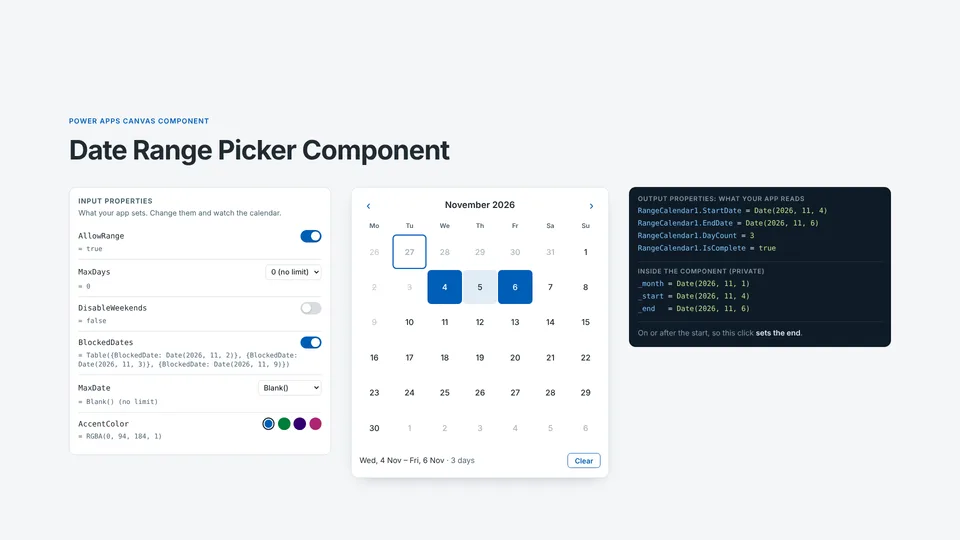
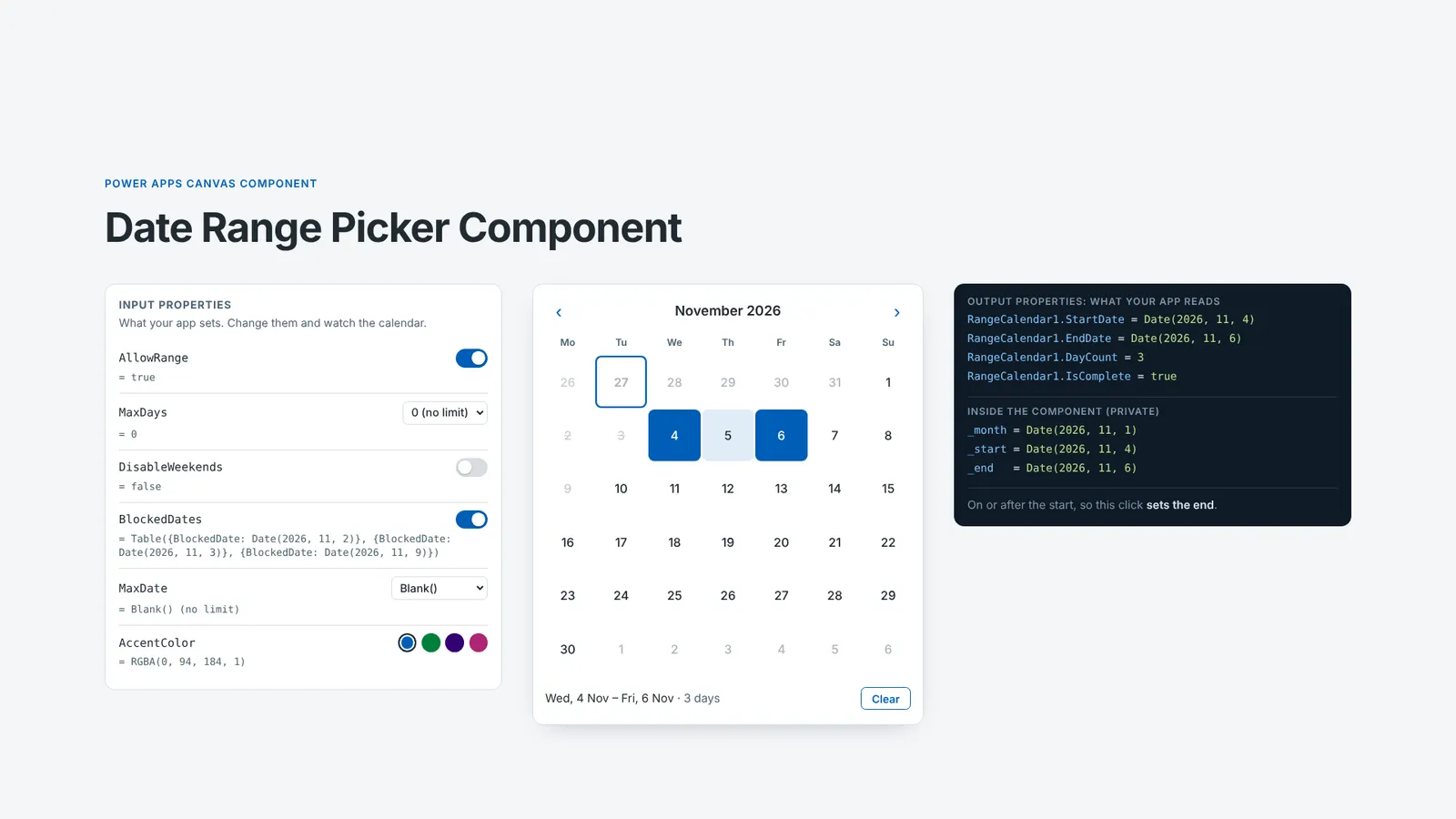
A reusable canvas component for picking a single date or a date range, built for booking apps. It marks today and disables past days. It also applies booking rules set through input properties: earliest and latest dates, blocked dates, no weekends, and a maximum range length. Your app reads the result from output properties (StartDate, EndDate, DayCount, IsComplete).
It's an input control. It complements the existing Calendar Component, which displays events.
Applies to








Compatibility


Contributors
Version history
| Version | Date | Comments |
|---|---|---|
| 1.0 | October 27, 2026 | Initial release |
Prerequisites
None. The component uses no data sources, connectors or premium features. Importing the solution needs an environment with Dataverse and permission to import solutions (Environment Maker role).
Minimal path to awesome
Using the solution zip
- Download the
.zipfrom thesolutionfolder. - In Power Apps, go to Solutions > Import solution and select the
.zipfile. This adds the Range Calendar component library to your environment. - Open your canvas app in Power Apps Studio. Select Insert > Get more components, tick cmpRangeCalendar, then select Import.
- Insert cmpRangeCalendar from Library components. Read the selection from its output properties, e.g.
RangeCalendar1.StartDate.
Using the source code
You can also use the Power Platform CLI to pack the source code:
Clone the repository to a local drive.
Pack the source files back into a solution
.zipfile:pac solution pack --zipfile pathtodestinationfile --folder pathtosourcefolder --processCanvasAppsReplace
pathtosourcefolderwith the path to this sample'ssourcecodefolder, andpathtodestinationfilewith the path for the new.zipfile.Import the
.zipfile using Solutions > Import solution.
Using the component
Input properties
All are optional and have defaults.
| Property | Type | Default | Description |
|---|---|---|---|
MinDate |
Date and time | Today() |
Days before this are disabled. Blank() allows past dates. |
MaxDate |
Date and time | Blank() |
Days after this are disabled. Blank means no limit. |
BlockedDates |
Table | Table({BlockedDate: Date(1900, 1, 1)}) |
Days that can't be picked, in a column called BlockedDate. A range can't cross a blocked day. |
DisableWeekends |
Boolean | false |
Saturdays and Sundays can't be a start or end day. A range can still span a weekend. |
AllowRange |
Boolean | true |
Set to false for single-day picking. |
MaxDays |
Number | 0 |
Longest range allowed, counting both ends. 0 means no limit. |
AccentColor |
Color | RGBA(0, 94, 184, 1) |
Colour of the selection, today marker and buttons. Lighter shades are derived from it. |
Output properties
| Property | Type | Description |
|---|---|---|
StartDate |
Date and time | First selected day, or blank. |
EndDate |
Date and time | Last selected day. Equals StartDate until an end day is picked. |
DayCount |
Number | Number of days selected, counting both ends. 0 when nothing is selected. |
IsComplete |
Boolean | true once an end day has been picked. |
Reset(RangeCalendar1) clears the selection and returns to the current month.
Example: saving a booking
// btnBook.DisplayMode
If(RangeCalendar1.IsComplete, DisplayMode.Edit, DisplayMode.Disabled)

// btnBook.OnSelect
Patch(Bookings, Defaults(Bookings),
    { StartDate: RangeCalendar1.StartDate, EndDate: RangeCalendar1.EndDate });
Reset(RangeCalendar1)
Example: blocking days that are already booked
Bookings are usually stored as start and end dates. Expand them into single days and pass the result to BlockedDates:
Clear(colBlocked);
ForAll(
    Filter(Bookings, AssetID = varAsset.ID, EndDate >= Today()) As b,
    Collect(colBlocked,
        ForAll(Sequence(DateDiff(b.StartDate, b.EndDate, TimeUnit.Days) + 1, 0) As i,
            { BlockedDate: DateAdd(b.StartDate, i.Value, TimeUnit.Days) }))
)
// RangeCalendar1.BlockedDates = colBlocked
Use dates without a time part, e.g. SharePoint Date only columns, Today() or Date(). Otherwise blocked dates won't match.
Features
This sample illustrates the following concepts:
- Building a month grid from
Sequence(42, 0): six weeks, offset withWeekday(first, StartOfWeek.Monday) - 1so every row starts on Monday, and a fixed height for every month - Keeping state inside a component.
Set()variables are scoped to each component instance, so several calendars on one screen keep separate selections and never clash with app variables. - Combining every booking rule into one
IsDisabledflag per cell, and usingDisplayModeso disabled days can't be selected or reached by keyboard - Selection logic in a single
If(): if a click can't finish a valid range, it starts a new one. This covers clicking before the start, going overMaxDays, and crossing a blocked day. - Exposing results through output properties and using the built-in
OnReset, with no reliance on experimental custom event properties - Theming from a single
AccentColorinput, with lighter shades derived usingColorFade()
A live demo and formula walkthrough runs the same logic in the browser, and the project repository has the YAML source and a demo app.
Help
For product and how-to questions, visit the Power Platform Community forums, our primary discussion space. For a reproducible sample bug or repository suggestion, open an issue in the Power Platform samples repository.
Join the community calls, present your sample, and watch recordings and demos on Microsoft Community Learning. Find Power Platform product videos on Microsoft Power Platform.
Disclaimer
THIS CODE IS PROVIDED AS IS WITHOUT WARRANTY OF ANY KIND, EITHER EXPRESS OR IMPLIED, INCLUDING ANY IMPLIED WARRANTIES OF FITNESS FOR A PARTICULAR PURPOSE, MERCHANTABILITY, OR NON-INFRINGEMENT.