
A community-built Power Platform sample
Term Buddy
Term Buddy is your AI-powered terminology assistant. It provides clear term definitions, generates quizzes, and offers real-world term usage examples to enhance learning and comprehension.
 Power Apps
 Power Automate
 Copilot StudioPower Fx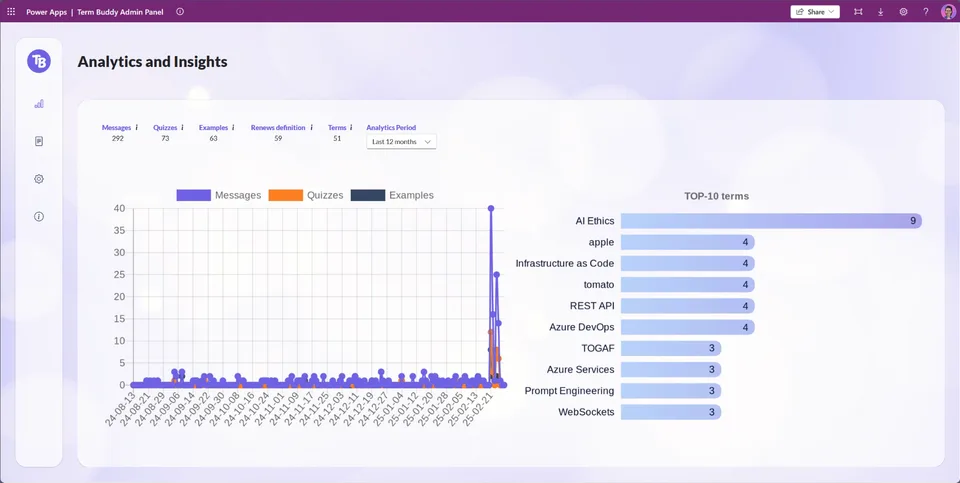
- Last updated
- Feb 28, 2025
- Category
- Canvas apps, Cloud flows, Agents & chatbots
- Premium license
- Required
- Experimental features
- Yes
From idea to implementation
Make it your own.
Check this sample's prerequisites, permissions, and licensing before importing it. The documentation below comes directly from the sample README.
Summary
Term Buddy is your AI-powered terminology assistant. It provides clear term definitions, generates quizzes, and offers real-world term usage examples to enhance learning and comprehension.
Applies to





Compatibility


Contributors
Version history
| Version | Date | Comments |
|---|---|---|
| 1.1 | February 28, 2025 | Updated source code |
| 1.0 | February 26, 2025 | Initial release |
🚀 Features
- 🔍 AI-Powered Definitions – Get concise, AI-generated explanations for complex terms.
- 🎯 Quiz Generation – Automatically generate quizzes to test knowledge.
- 📚 Real-World Usage – Understand terms in context with practical examples.
- 🌎 Multi-Language Support – Translate and explain terms in different languages.
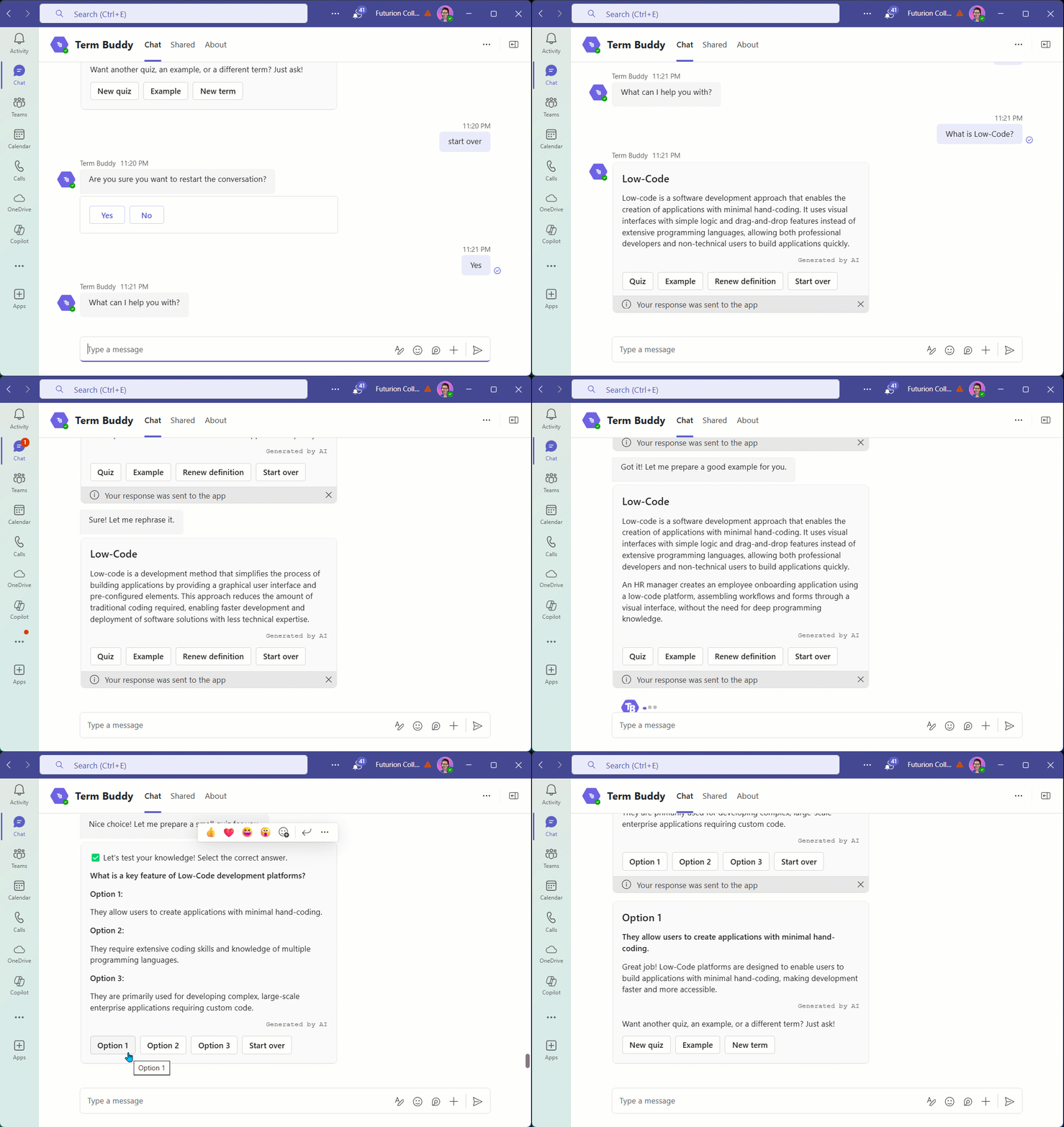
- 💬 Interactive Chatbot – Ask follow-up questions for deeper insights.
📖 How It Works
- Search for a Term – Enter a term, and Term Buddy provides an AI-powered definition.
- Explore Context – See real-world examples and translations.
- Test Your Knowledge – Generate a quiz to reinforce learning.
- Interact with the Agent – Ask follow-up questions for further clarification.
🛠 Tech Stack
1️⃣ Microsoft Teams – User Interface & Chat Entry Point
Serves as the primary communication channel where users interact with the Term Buddy Agent.
Provides a seamless and familiar experience for users, integrating AI-powered assistance directly into their workflow.
2️⃣ Copilot Studio (Topic-based Agent) – User Interaction Orchestrator
Copilot Studio serves as the orchestrator, handling user queries, storing history, triggering the back-end with required parameters, and generating a well-structured adaptive card with the answer. Ensures seamless workflow automation, enhances user experience with dynamic responses, and enables structured, interactive AI-driven conversations while allowing for future scalability and customization.
3️⃣ Azure AI Foundry (Prompt Flow) – AI Processing Orchestrator
AI Foundry’s Prompt Flow handles request preprocessing, query structuring, and interaction with Azure OpenAI.
Ensures efficient prompt engineering, reducing hallucinations and improving response relevance by structuring AI interactions intelligently.
4️⃣ Azure OpenAI (GPT-4o) – AI-powered Term Definition & Explanation
Generates accurate and contextual term explanations, real-world examples, and quizzes based on the user’s query.
Delivers high-quality natural language responses, enhancing learning with AI-driven explanations tailored to the user's needs.
5️⃣ Power Automate – Process Automation & Data Logging
Power Automate automates key workflows by saving logs into Dataverse and retrieving user prompts for processing. Ensures efficient data management, real-time logging, and seamless integration between the chatbot and backend services.
6️⃣ Dataverse – Logging & Data Storage
Stores user prompts, chat logs for auditing and insights, and dynamic data for app theming and endpoint connection, ensuring seamless adaptability and integration. Facilitates in-depth auditing of past interactions, enhances AI response accuracy through data-driven improvements, and enables real-time monitoring of user engagement trends for continuous optimization.
7️⃣ Power Apps Canvas app – Knowledge Management & Analytics
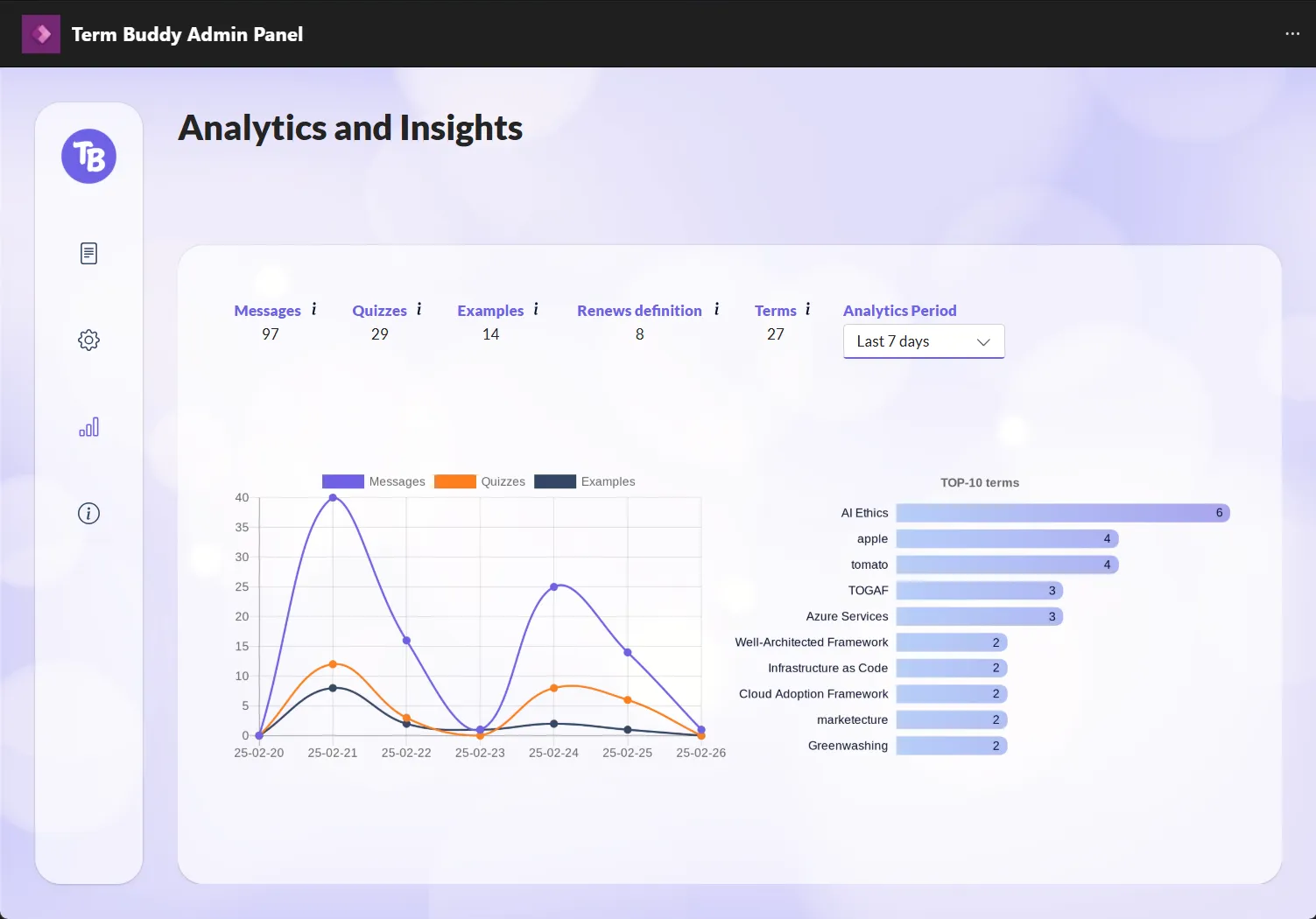
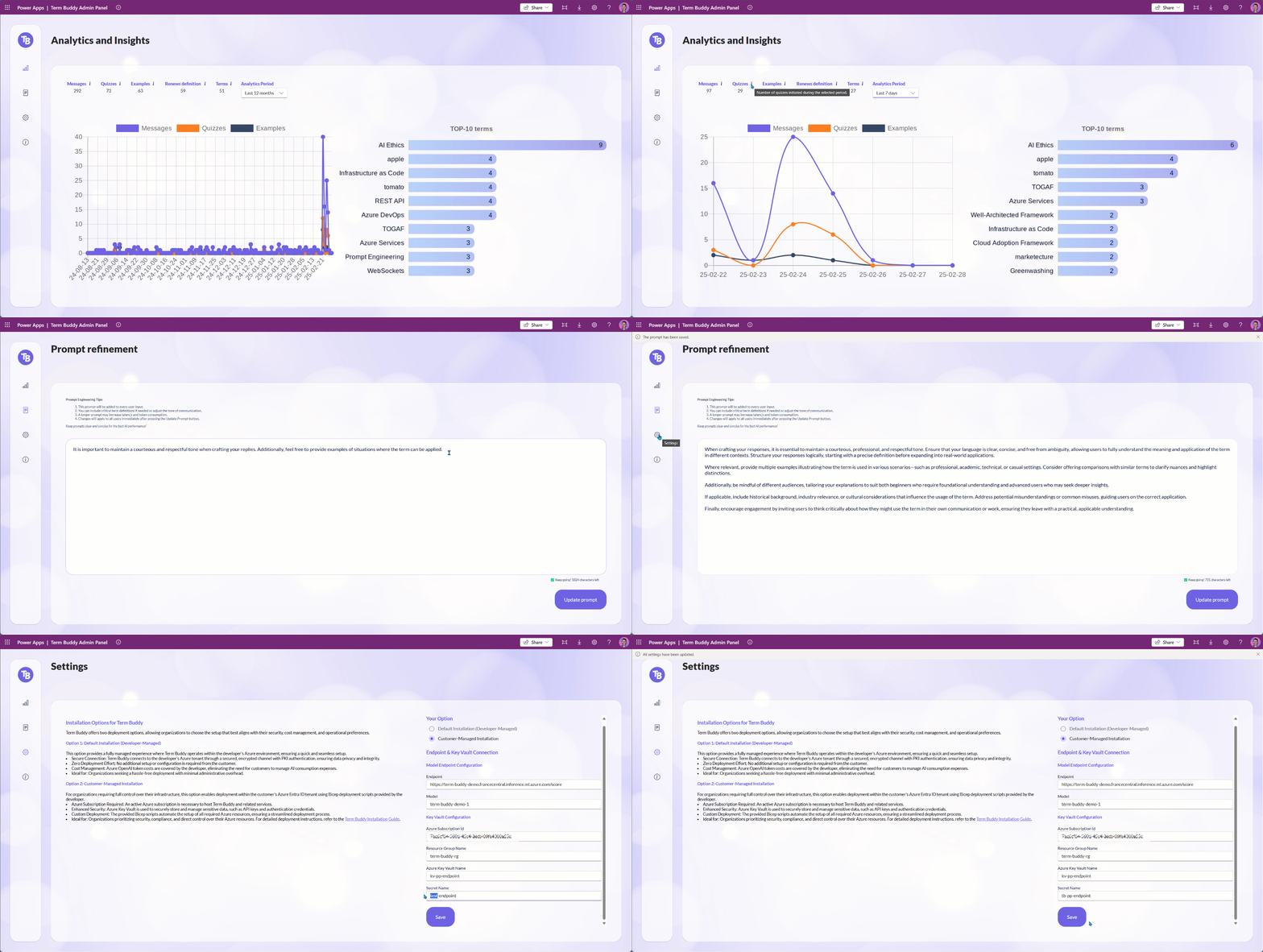
Provides a centralized Admin Panel for the Knowledge Manager to craft and update user prompts (which are added to the master prompt), switch between default installation and customer-managed installation, add configuration parameters, and view analytics and insights. Empowers administrators with real-time insights, the ability to refine AI responses, configure system behavior, and manage term databases without requiring developer intervention.
🔜 Future Enhancements & Expansion Potential
- Azure AI Search: For improved term retrieval from structured and unstructured data sources.
- Integration with Microsoft 365: Instant lookup within documents, emails, and Teams chats.
- API for External Systems: Allowing third-party applications to integrate with Term Buddy’s AI capabilities.
This tech stack ensures that Term Buddy is scalable, intelligent, and user-friendly, optimizing AI-powered terminology assistance for both users and knowledge managers. 🚀
⚙️ Installation Options for Term Buddy
Term Buddy offers two deployment options, allowing organizations to choose the setup that best aligns with their security, cost management, and operational preferences.
Option 1: Default Installation (Developer-Managed)
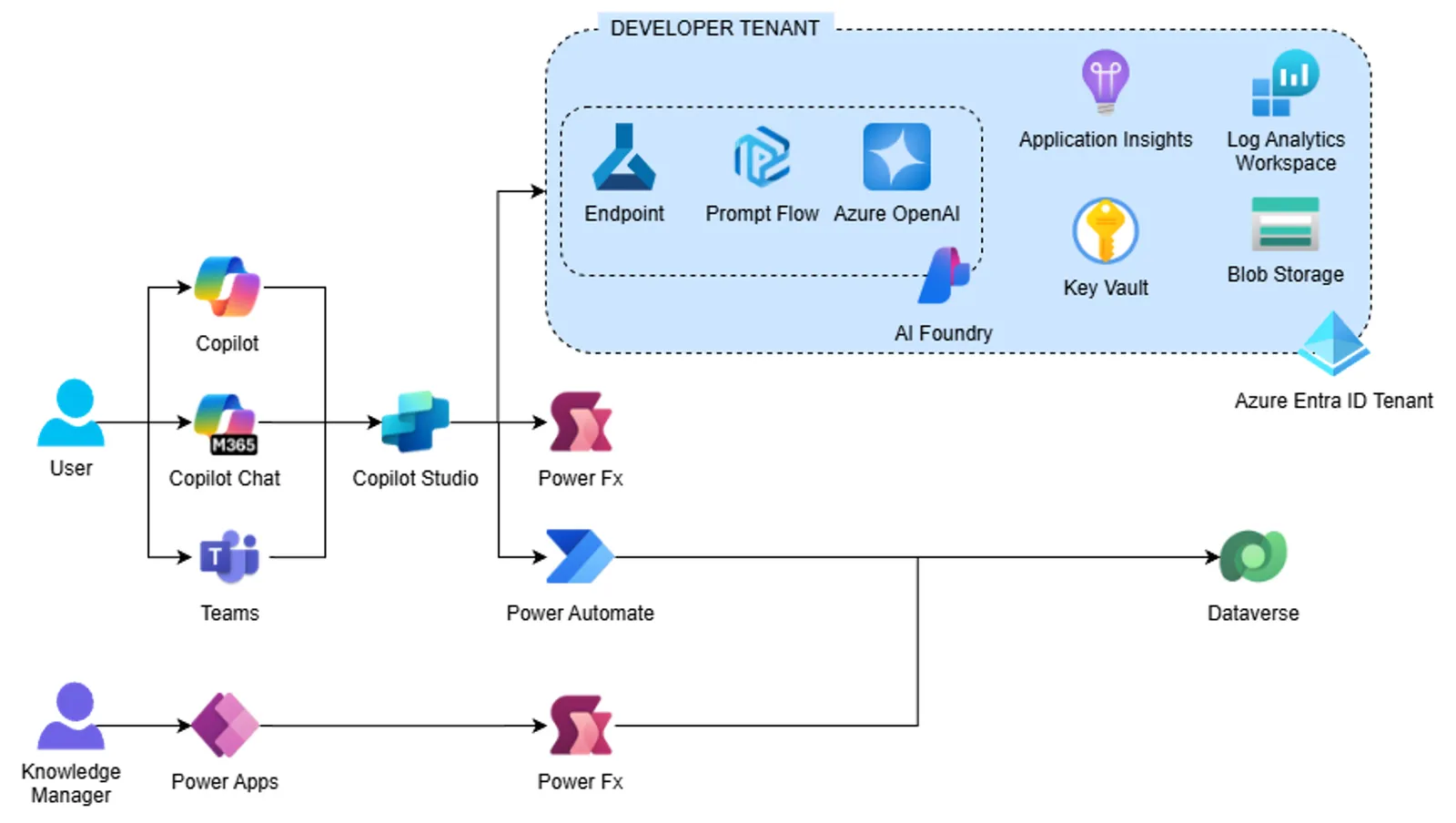
This option provides a fully managed experience where Term Buddy operates within the developer’s Azure environment, ensuring a quick and seamless setup.
- Secure Connection: Term Buddy connects to the developer’s Azure tenant through a secured, encrypted channel with PKI authentication, ensuring data privacy and integrity.
- Zero Deployment Effort: No additional setup or configuration is required from the customer.
- Cost Management: Azure OpenAI token costs are covered by the developer, eliminating the need for customers to manage AI consumption expenses.
Ideal for: Organizations seeking a hassle-free deployment with minimal administrative overhead.
Option 2: Customer-Managed Installation
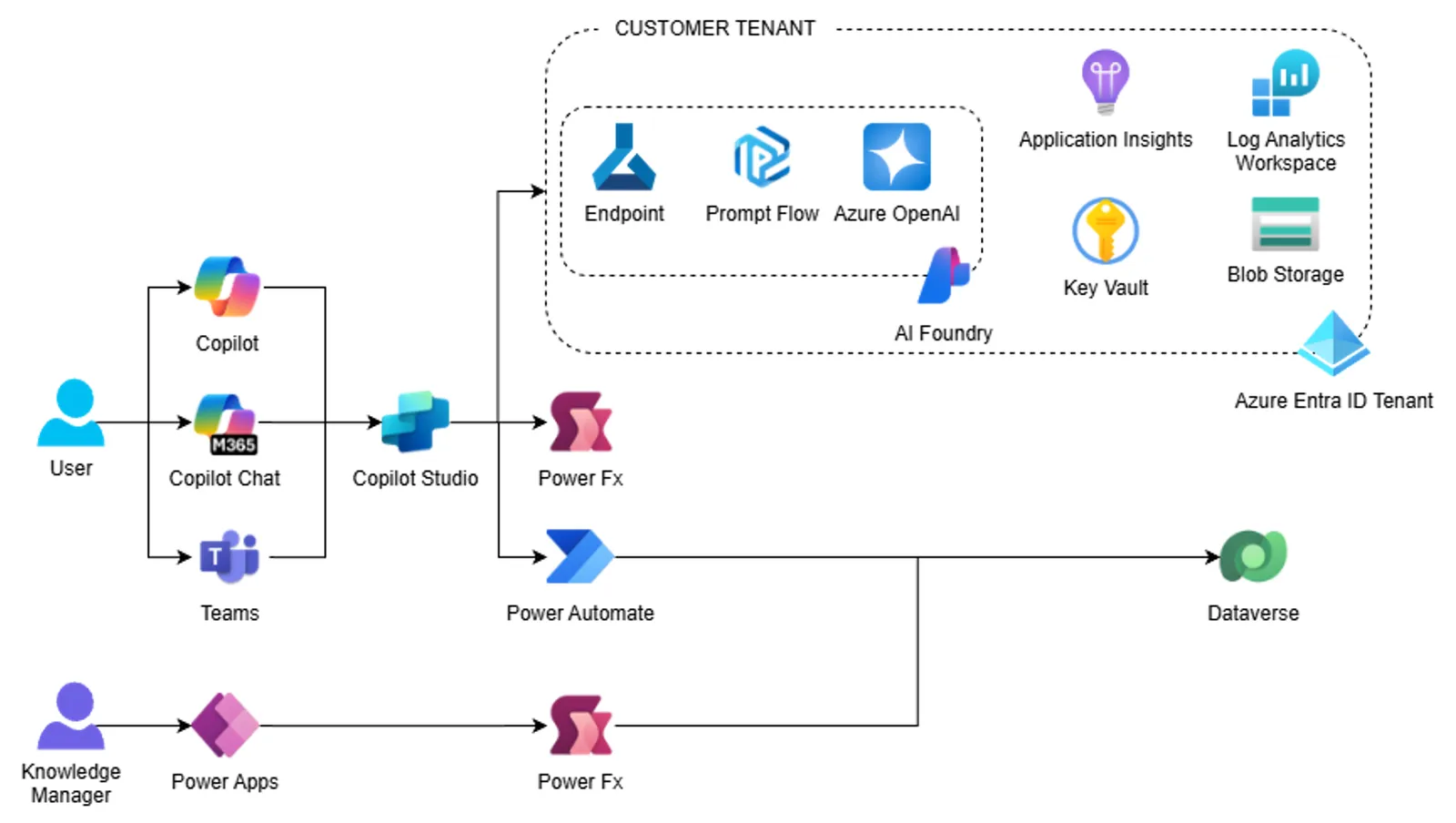
For organizations requiring full control over their infrastructure, this option enables deployment within the customer’s Azure Entra ID tenant using Bicep deployment scripts provided by the developer.
- Azure Subscription Required: An active Azure subscription is necessary to host Term Buddy and related services.
- Enhanced Security: Azure Key Vault is used to securely store and manage sensitive data, such as API keys and authentication credentials.
- Custom Deployment: The provided Bicep scripts automate the setup of all required Azure resources, ensuring a streamlined deployment process.
Ideal for: Organizations prioritizing security, compliance, and direct control over their Azure resources.
📝 Prerequisites
Common Prerequisites
Regardless of the deployment option, the following prerequisites are required for accessing and using Term Buddy:
- Power Platform Environment – A Power Platform environment with Dataverse enabled to store user interactions and configuration settings.
- Microsoft Teams Access – Users must have access to Microsoft Teams to interact with the Term Buddy agent.
- Power Apps License – Required for accessing the Admin Panel where configurations, analytics, and knowledge management take place.
- Copilot Studio Per User License – Should be assigned to individual users who need manage and publish agent.
- Copilot Studio Capacity - Must be allocated within the Power Platform environment to support bot execution.
Additional Prerequisites for Option 2 (Customer-Managed Installation)
For the full control over your infrastructure, the following prerequisites are required:
Azure Subscription – An active Azure subscription to host Azure AI and related services.
Core Azure resources - Deployed the following Azure resources:
- Azure Resource Group – Organizes all Term Buddy-related resources within a single logical container.
- Azure OpenAI – Provides GPT-based AI capabilities for generating responses.
- Azure OpenAI Model (GPT-4o) – Processes user queries and generates high-quality AI responses.
- Azure Key Vault – Secures API keys and authentication credentials.
- Azure Blob Storage – Stores logs from Azure AI Foundry Prompt Flow for quick retrieval and auditing.
- Azure Blob Storage Container – Structured storage for categorized term data, knowledge base content, and AI-generated logs.
- Log Analytics Workspace – Collects and analyzes logs from Term Buddy components to ensure monitoring and troubleshooting capabilities.
- Azure Application Insights – Tracks performance and user interactions to optimize system efficiency.
- AI Hub – Centralized service for managing AI Projects and related resources within the Azure environment.
- AI Project – Organizes AI-related Prompt Flows, evaluation, tracing, and facilitates experimentation, testing, and deployment.
Prompt Flow - Imported Prompt Flow type
chat.Endpoint - Deployed Prompt Flow to inference Endpoint so you can utilize it via API in Term Buddy agent.
Key Vault Secret - Stored Endpoint Authorization key in Azure Key Vault.
For detailed deployment instructions for this option (Customer-Managed Installation), see the Deployment Instructions section.
🔧 Minimal path to awesome
Prepare solution
Using the solution zip
Download the .zip from the solution folder
Using the source code
You can also use the Power Apps CLI to pack the source code by following these steps:
Clone the repository to a local drive
Pack the source files back into a solution
.zipfile:pac solution pack --zipfile pathtodestinationfile --folder pathtosourcefolder --processCanvasAppsMaking sure to replace
pathtosourcefolderto point to the path to this sample'ssourcecodefolder, andpathtodestinationfileto point to the path of this solution's.zipfile (located under thesolutionfolder)
Import the solution
Within Power Apps Studio, import the solution
.zipfile using Solutions > Import Solution and select the.zipfile you just downloaded.Provide value for environment variables and Import the solution.
# Environment Variable Expected value Comments 1 model -(for Option 1)<model-name>(for Option 2)The name of the model deployed at the endpoint for Prompt Flow.
The value is used for the Option 2 (Customer-Managed Installation).2 endpoint -(for Option 1)<endpoint-uri>(for Option 2)The URI of the endpoint for Prompt Flow.
The value is used for the Option 2 (Customer-Managed Installation).3 endpoint-secret keep blank(for Option 1)Path to Key Vault Secret(for Option 2)The path to the Azure Key Vault secret where the authentication key for accessing the primary API endpoint is securely stored.
The value is used for the Option 2 (Customer-Managed Installation).4 environments {"dev":"00000000-0000-0000-0000-000000000000", "uat":"00000000-0000-0000-0000-000000000000", "prod":"00000000-0000-0000-0000-000000000000"}Defines three available environments.
Required value. Provide ID of your three environments. If you have less than three environments - keep00000000-0000-0000-0000-000000000000for the rest5 demo-endpoint <endpoint-uri>The URI of the endpoint designed for demo purpose.
Keep the value, or replace with URI of your demo endpoint.6 demo-backend - no (for Option 1)
- yes (for Option 2)
The parameter used to determine whether to operate in the Developer-Managed ( no) or Customer-Managed (yes) environment.7 demo-model <model-name>The model deployed at the endpoint designed for demo purpose.
Keep the value, or replace with model name of your demo endpoint.8 color-schema {"Primary":"#6D62E4", "Secondary":"#FC7F1E", "Regular":"#07102C", "Light":"#EDF1FA", "White":"#FFFFFF", "Accent1":"#FCC648", "Accent2":"#354765", "Accent3":"#A8A4EE", "Accent4":"#BFE2FE"}Defines the color theme for the UI of the Canvas app.
Required value. Provide HEX values for all nine colors.9 demo-key <key>The authentication key required to access the endpoint designed for demo purpose.
Keep the value, or replace with model name of your demo endpoint.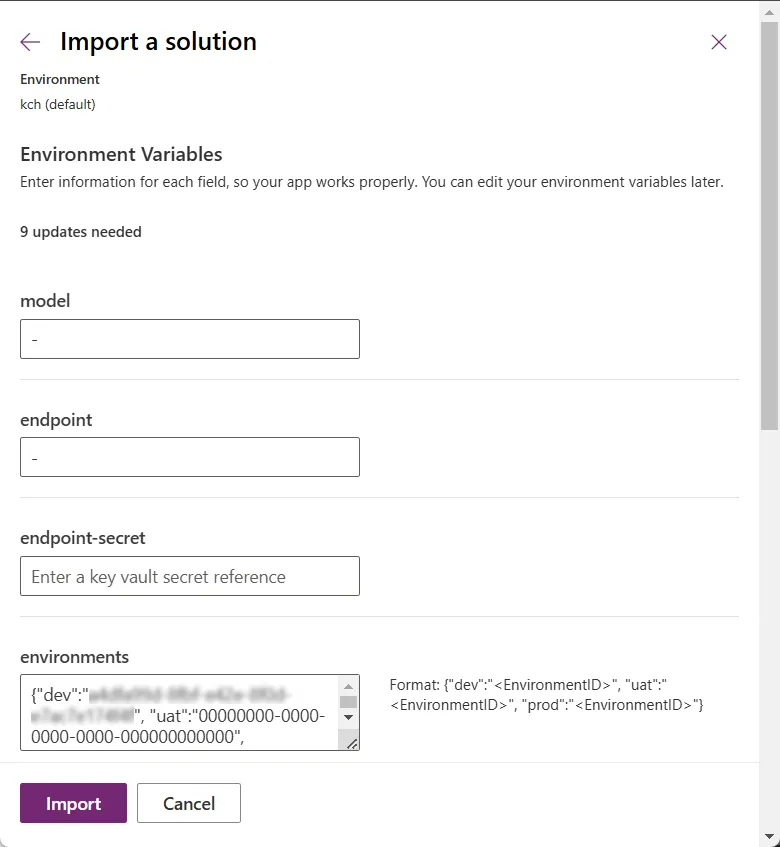
Once the solution has been successfully imported, complete the following steps:
- For the Canvas App (
Term Buddy Admin Panel):- Share the Term Buddy Admin Panel app with the target users in Power Apps.
- When sharing, ensure that all users are assigned the
termbuddy-usersecurity role to grant them the necessary access permissions.
- For the Agent (
Term Buddy):- Publish the Term Buddy agent to make it available for users.
- Add the agent to the Teams channel to enable user interactions.
- Share the agent with the target users to grant them access.
This ensures that both the Term Buddy Admin Panel and the AI agent Term Buddy are properly configured and accessible to users. ✅
- For the Canvas App (
Run the application and start using Term Buddy!
Import sample data (optional)
This step is optional. The sample data includes dummy data for the Analytics page. You can import it to explore how the Admin Panel functions. Follow the steps below to import the sample data.
Download the
.zipfrom thesample-datafolder.Make sure that you have version 1.40.4 (or newer) of Power Platform CLI.
To install the latest version:
pac install latestSee what tools are installed.
pac tool listDownload and launch the Configuration Migration Tool
pac tool CMT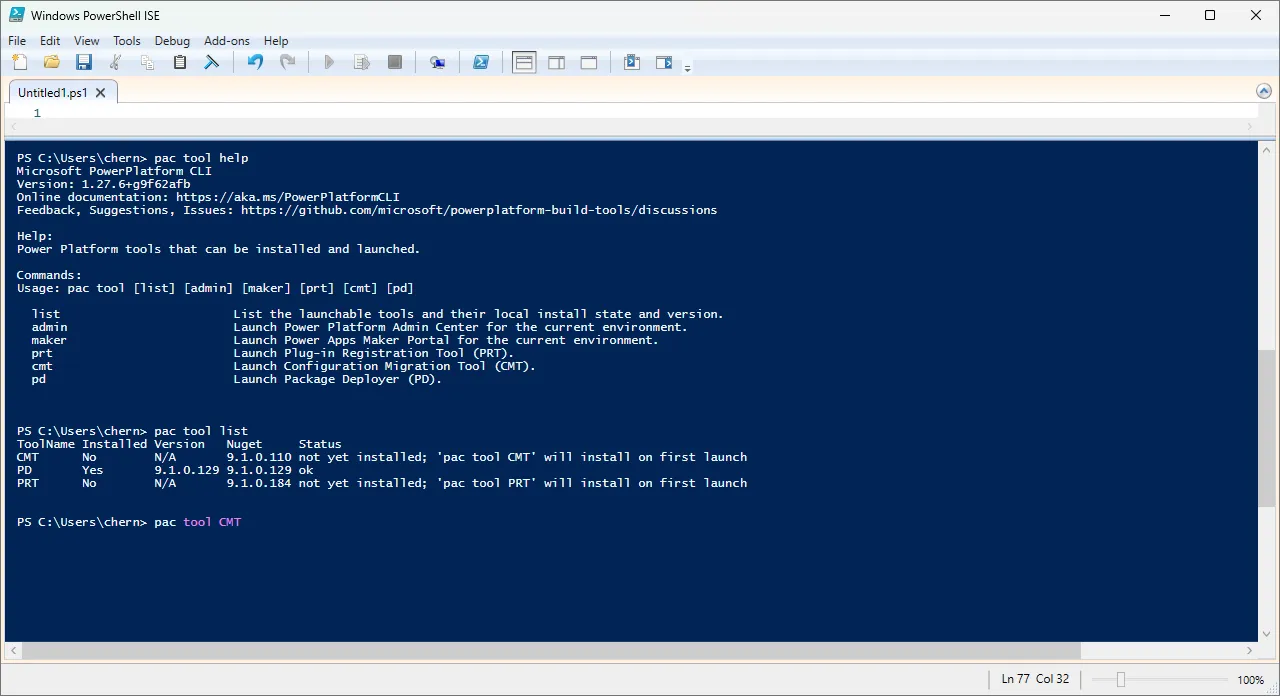
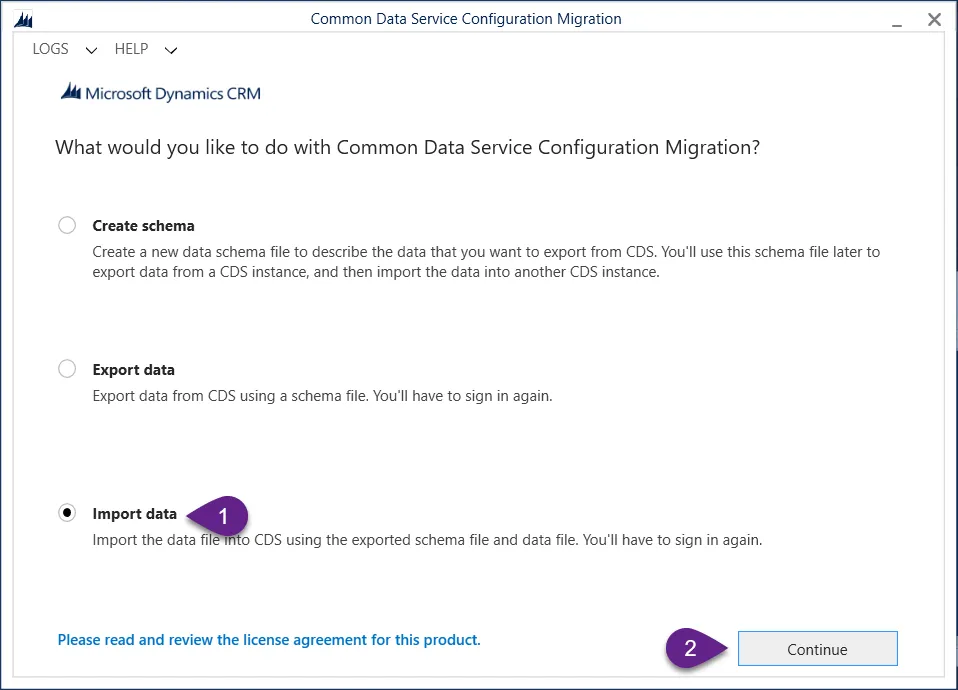
Select Import data and Continue
Select Office 365, check Display list of available organizations and select Login
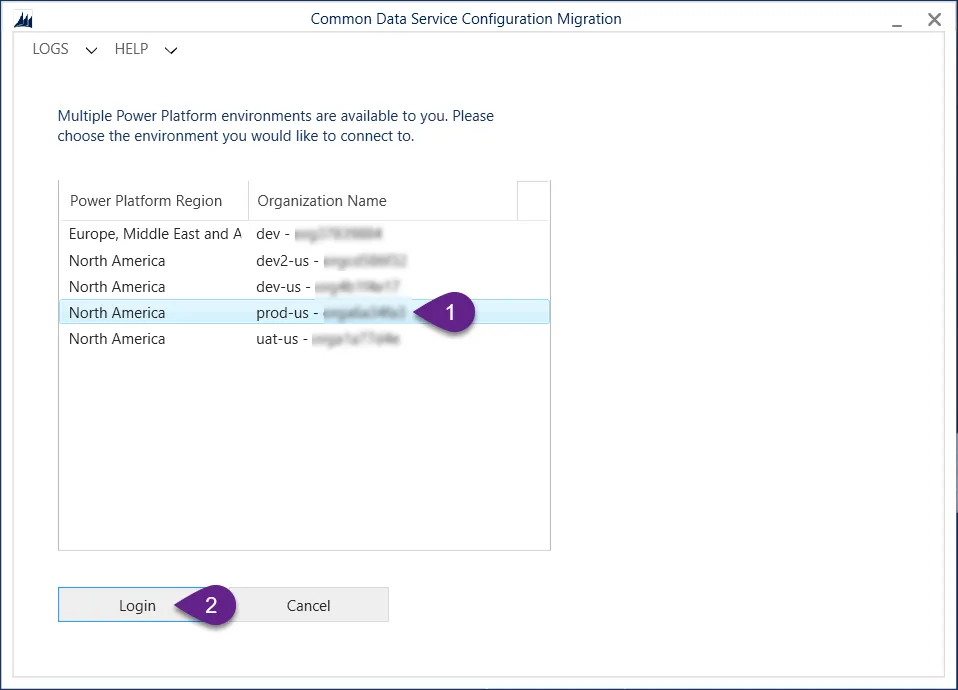
Select your target environment and select Login
In the field Zip File select term-buddy-sampledata.zip downloaded earlier, and select Import Data.
Once the import process will be completed, select Exit.
🎯 Future Enhancements
- Integration with Microsoft 365 for instant term lookup.
- Expansion to more specialized fields (medicine, law, engineering).
- API for third-party integrations.
📜 License
This project is licensed under the MIT License.
Help
We do not support samples, but this community is always willing to help, and we want to improve these samples. We use GitHub to track issues, which makes it easy for community members to volunteer their time and help resolve issues.
If you encounter any issues while using this sample, you can create a new issue.
For questions regarding this sample, create a new question.
Finally, if you have an idea for improvement, make a suggestion.
Disclaimer
THIS CODE IS PROVIDED AS IS WITHOUT WARRANTY OF ANY KIND, EITHER EXPRESS OR IMPLIED, INCLUDING ANY IMPLIED WARRANTIES OF FITNESS FOR A PARTICULAR PURPOSE, MERCHANTABILITY, OR NON-INFRINGEMENT.