
A community-built Power Platform sample
Get SharePoint information from environment variables
The Get Data Source List Info flow retrieves the site and list information
 Power Apps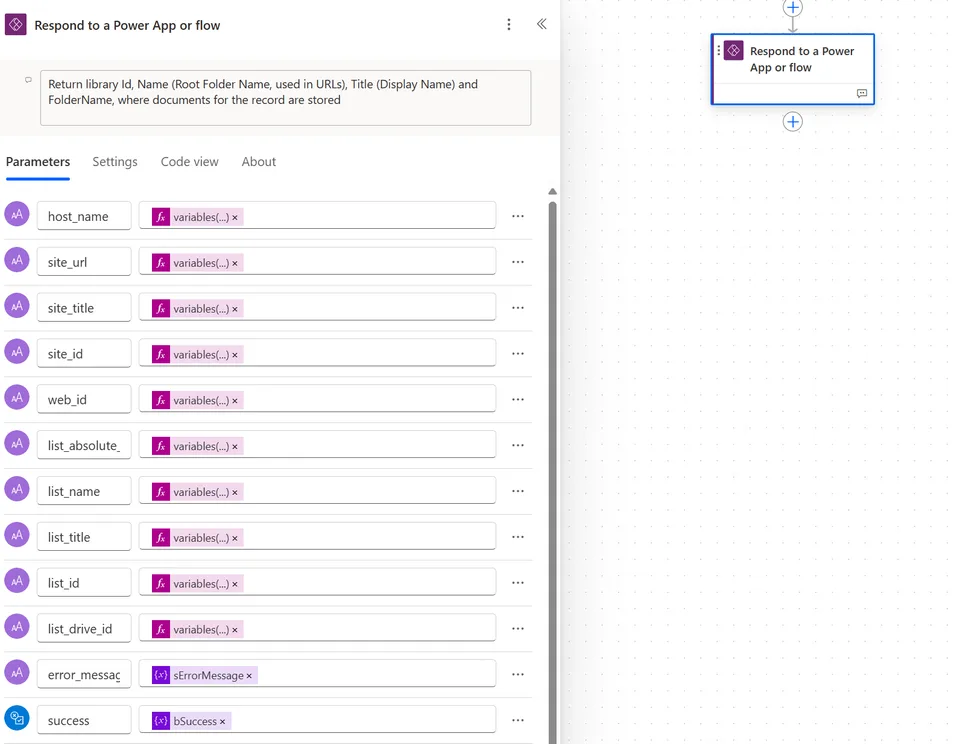
- Last updated
- Apr 22, 2025
- Category
- Cloud flows
- Premium license
- Not required
- Experimental features
- No
From idea to implementation
Make it your own.
Check this sample's prerequisites, permissions, and licensing before importing it. The documentation below comes directly from the sample README.
Summary
This sample first appeared in Data Source Environment Variables in Power Automate actions blog post.
Environment variables in Power Automate flows allow you to manage and reuse values across multiple flows, making updates easier and reducing hardcoding. They also simplify configuration management for different environments, enhancing flexibility and maintainability.
To create reference to a SharePoint site or a SharePoint list, you'd create environment variables of Data source type:
- SharePoint site: Parameter type =
Site, and choose a site from a drop down - SharePoint list or library: Parameter type =
List, and choose a list/library from a drop down.
The site reference is stored as URL, but the list references are stored as GUID.
In Power Automate, different actions reference SharePoint lists and libraries differently. See the Data Source Environment Variables in Power Automate actions post for examples of different actions and their parameters.
Sometimes, it will be list Title, sometimes the URL (a.k.a. RootFolder), and other times, an Id. When accessing document libraries using drives Graph API, the id is not in GUID format, but rather something like this: b!WqNS-yXl-EmB9E5tlOY2kP3B7PZTD8lCgoRdFoRzZnK_WYiyUTlZTptnb3lchjmk.
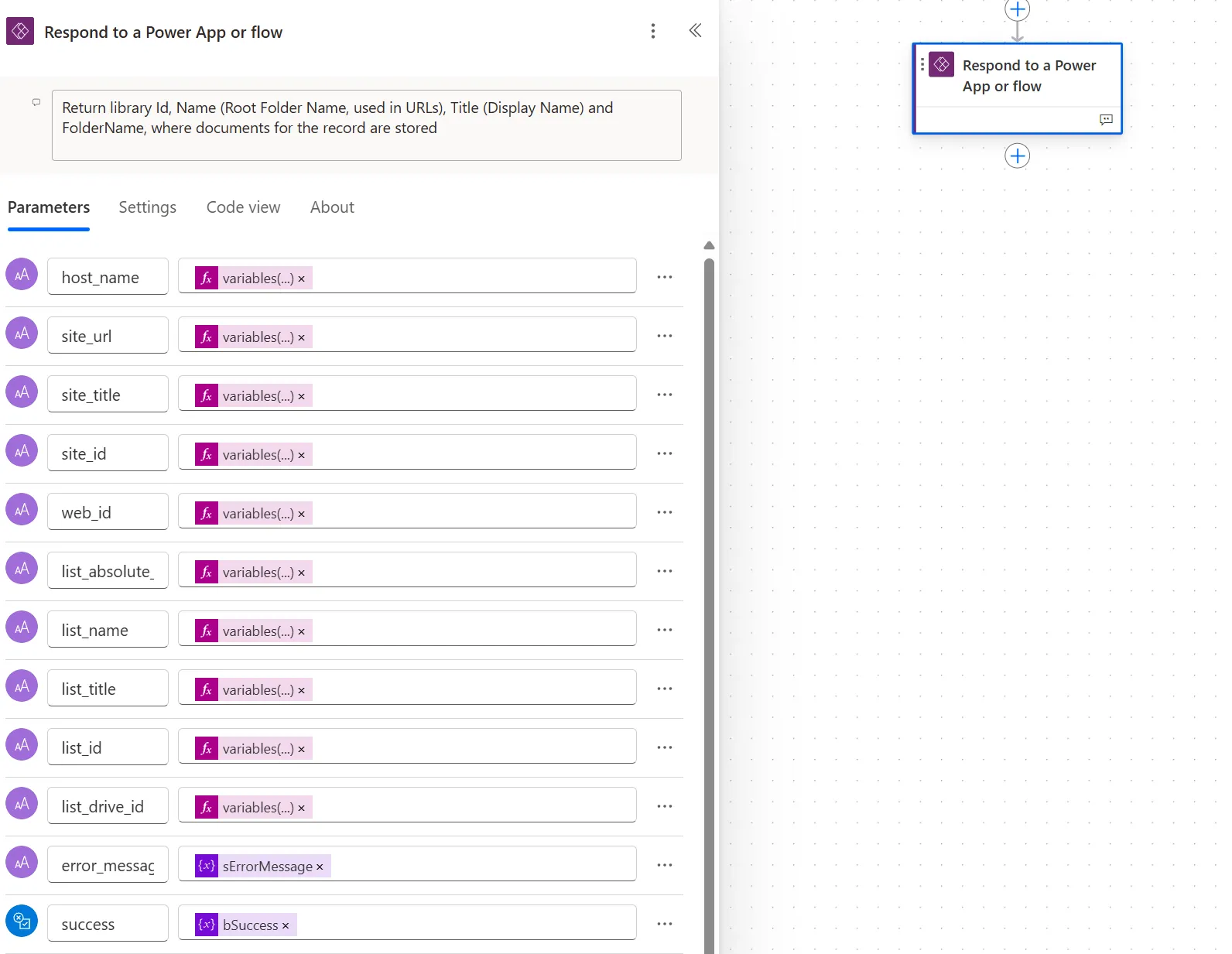
The "Get Data Source List Info" flow retrieves the following site and list information:
| parameter name | description | example |
|---|---|---|
host_name |
The URL of the root SharePoint site | contoso.sharepoint.com |
site_url |
The URL of the current SharePoint site, as defined in the site URL parameter. |
https://contoso.sharepoint.com/sites/XYZ |
site_title |
Title of the current SPO site | Project XYZ |
site_id |
The id of the current SPO site in a guid format. |
xxxxxxxx-xxxx-xxxx-xxxx-xxxxxxxxxxxx |
web_id |
The id of the current SPO web object in a guid format. |
yyyyyyyy-yyyy-yyyy-yyyy-yyyyyyyyyyyy |
list_absolute_url |
The full URL of the list. | https://contoso.sharepoint.com/sites/xyz/Archives or https://contoso.sharepoint.com/sites/xyz/Lists/Issue tracker |
list_name |
The RootFolder. Used in the URL, is generated automatically and cannot be changed by users. It can be changed with PowerShell. |
Archive |
list_title |
The title of the list. This property can be changed by the user. | The Archive Library |
list_id |
The value provided as List Id parameter |
zzzzzzzz-zzzz-zzzz-zzzz-zzzzzzzzzzzz |
list_drive_id |
Used by Graph API when referencing libraries. Only for document libraries. | b!S3SdNSBmTUGa4v5ffh_rslLJssoXH4xEuShkEO-uxKg9bblUMeoaTbQC5t69DJ-x |
error_message |
The error message if any of the actions failed, or empty string. | {"Error":"Send_an_HTTP_request_to_SharePoint:_get_Site_with_MS_Graph:[...]},{"Error":"Send_an_HTTP_request_to_SharePoint:_get_list_URL: \\"401 UNAUTHORIZED[...]\\""} |
success |
Result. If False, the error_message contains error description. Otherwise, error_message is an empty string. |
True or False |
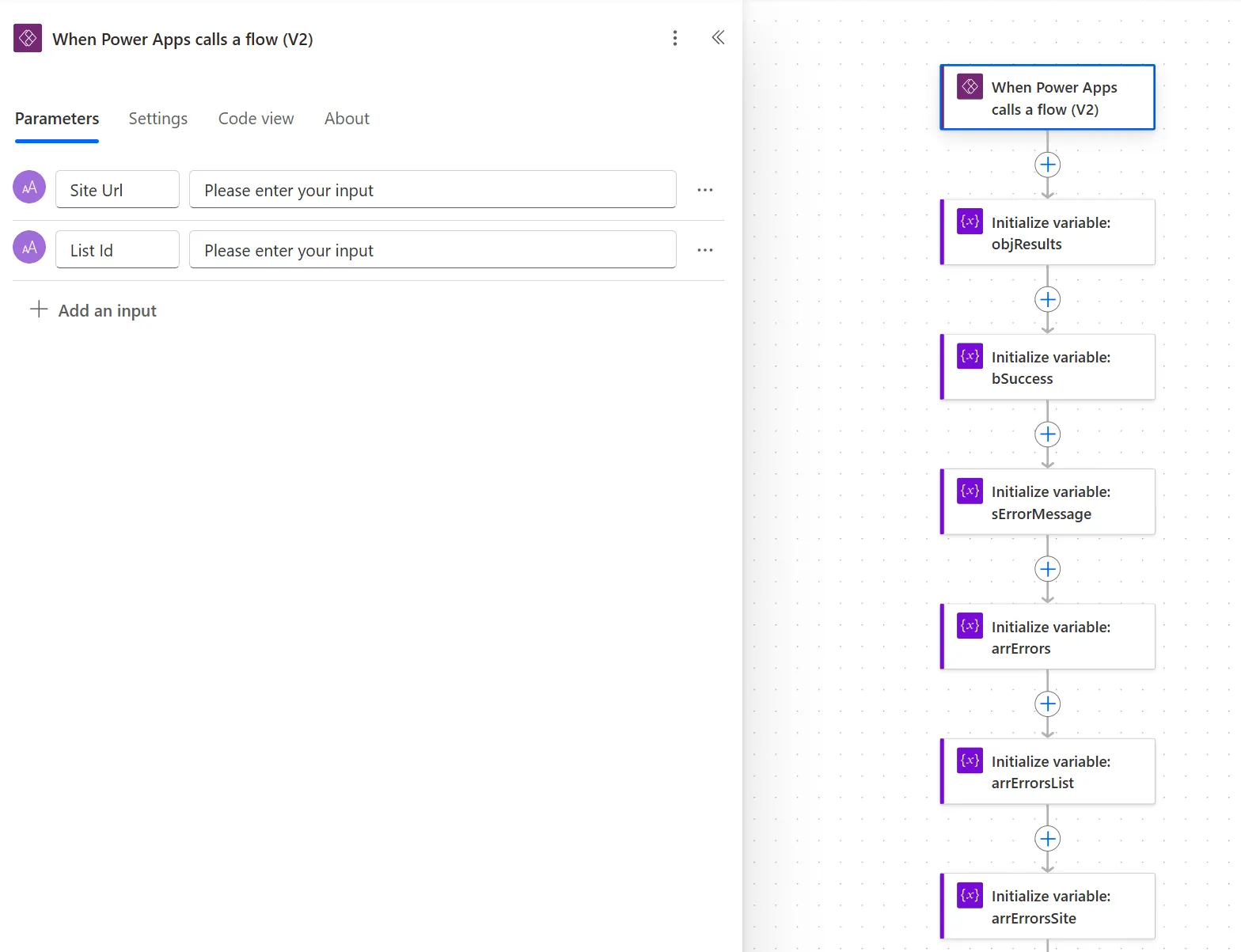
It is designed to be executed as a child flow and accepts two parameters: the site URL and library/list Id, as provided by the environment variables.
Workflow preview
Input parameters
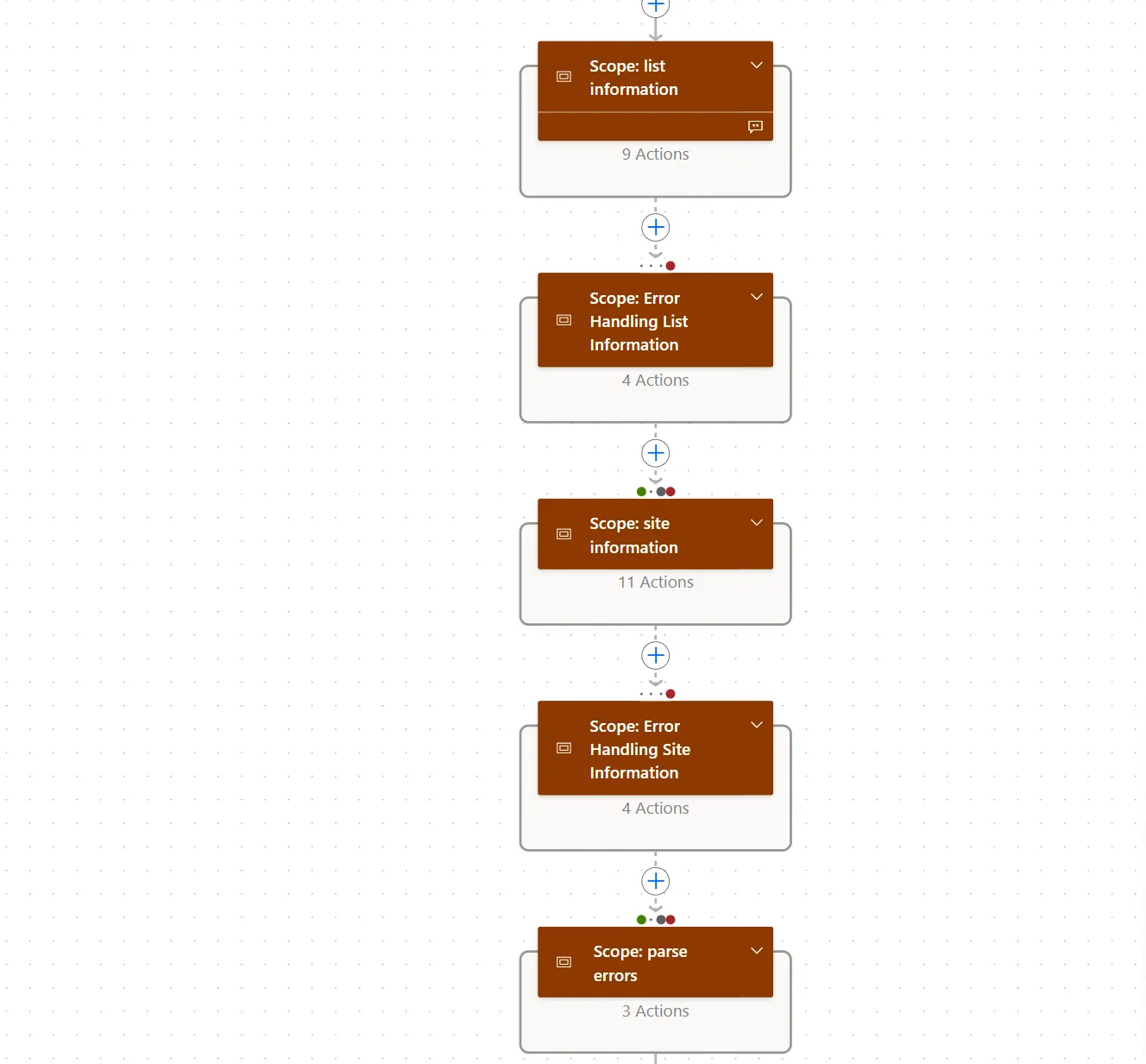
Main logic and error handling
Return parameters
Applies to









Compatibility


Contributors
Version history
| Version | Date | Comments |
|---|---|---|
| 1.0 | April 22, 2025 | Initial release |
Minimal path to awesome
Using the solution zip
- Download the
.zipfrom thesolutionfolder - Within Power Apps Studio, import the solution
.zipfile using Solutions > Import Solution and select the.zipfile you just packed. - During the import process, update the connection references and environment variables.
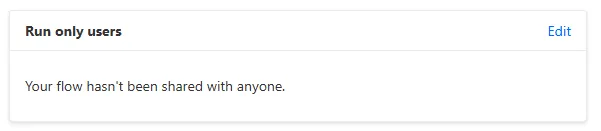
- If required, configure the flow to be executed as a child flow. Navigate the solution, select the Get Data Source List Info flow and on the details page, select Edit in the Run only users section.
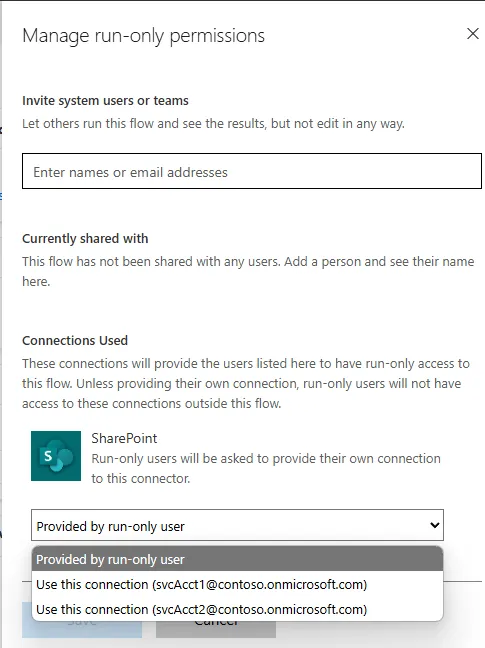
- Click on Edit link and change the connection in the Connections Used section
- Add a service principal as an additional owner to ensure business continuity.
Using the source code
You can also use the Power Apps CLI to pack the source code by following these steps:
Clone the repository to a local drive
Pack the source files back into a solution
.zipfile:pac solution pack --zipfile pathtodestinationfile --folder pathtosourcefolder --processCanvasAppsMaking sure to replace
pathtosourcefolderto point to the path to this sample'ssourcecodefolder, andpathtodestinationfileto point to the path of this solution's.zipfile (located under thesolutionfolder)Within Power Apps Studio, import the solution
.zipfile using Solutions > Import Solution and select the.zipfile you just packed.
Features
This solution illustrates the following concepts on top of the Power Platform:
- Retrieving SharePoint list/library information based on Data source environment variables
- Error handling for errors caused by API calls and flow actions
See the Data Source Environment Variables in Power Automate actions article for detailed explanation of this workflow.
Help
Note: don't worry about this section, we'll update the links.
We do not support samples, but this community is always willing to help, and we want to improve these samples. We use GitHub to track issues, which makes it easy for community members to volunteer their time and help resolve issues.
If you encounter any issues while using this sample, you can create a new issue.
For questions regarding this sample, create a new question.
Finally, if you have an idea for improvement, make a suggestion.
Disclaimer
THIS CODE IS PROVIDED AS IS WITHOUT WARRANTY OF ANY KIND, EITHER EXPRESS OR IMPLIED, INCLUDING ANY IMPLIED WARRANTIES OF FITNESS FOR A PARTICULAR PURPOSE, MERCHANTABILITY, OR NON-INFRINGEMENT.