
A reusable Power Platform snippet
Foreach (Topic)
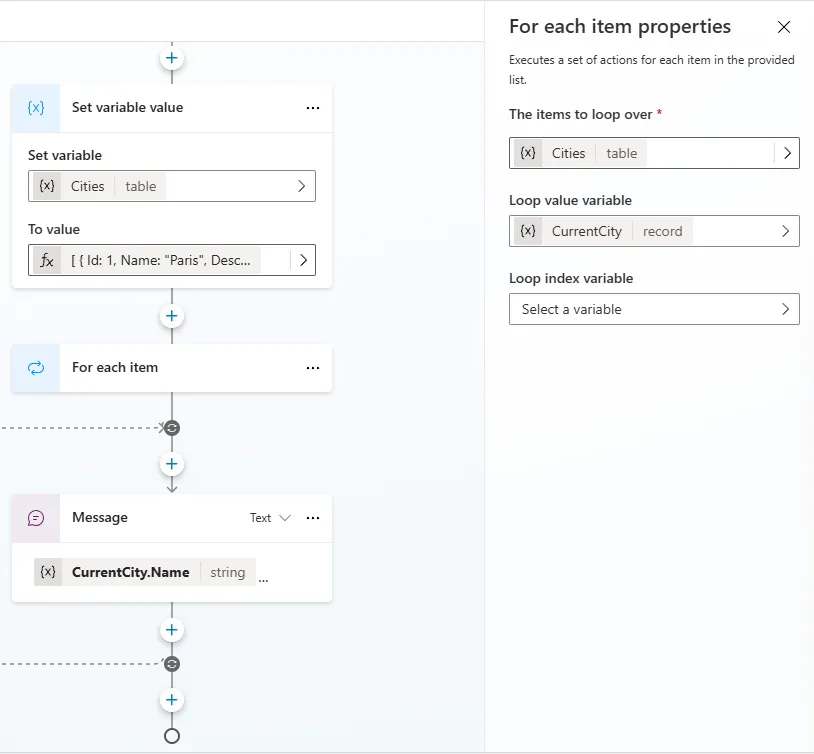
This is a snippet that demonstrates how to do a foreach loop in Copilot Studio.
 Copilot Studio

- Last updated
- Aug 7, 2024
- Category
- Community snippet
From idea to implementation
Make it your own.
Check this snippet's prerequisites, permissions, and licensing before using it. The documentation below comes directly from the snippet README.
This is a snippet that demonstrates how to do a foreach loop in Copilot Studio.
Today, the foreach node isn't exposed in the UX and isn't documented. Using it is hence not formally supported for production use.
Authors
| Snippet | Author(s) |
|---|---|
| Foreach (Topic) | Henry Jammes (@HenryJammes) |
Minimal path to awesome
Open a copilot in Copilot Studio
Select Topics
Select + Create
Select Topic
Select Create from blank
Select the ... in the upper right corner and select Open code editor
Click inside the code editor and CTL + A for Windows or Command-A for Mac to select all rows.
Paste the contents of the YAML-file inside the code editor.
Enter a Name for your Topic.
Select Save
Disclaimer
THIS CODE IS PROVIDED AS IS WITHOUT WARRANTY OF ANY KIND, EITHER EXPRESS OR IMPLIED, INCLUDING ANY IMPLIED WARRANTIES OF FITNESS FOR A PARTICULAR PURPOSE, MERCHANTABILITY, OR NON-INFRINGEMENT.