
A reusable Power Platform snippet
Progress Bar Gallery
This is a snippet that creates a progress bar for a canvas app as component.
 Power Apps

- Last updated
- Dec 2, 2024
- Category
- Community snippet
From idea to implementation
Make it your own.
Check this snippet's prerequisites, permissions, and licensing before using it. The documentation below comes directly from the snippet README.
This is a snippet that creates a progress bar for a canvas app. In the progress bar some icons indicates specific information on a specific step. It is a gallery in which some logic is added on displaying progress steps.

Authors
| Snippet | Author |
|---|---|
| Elianne Burgers | GitHub (@elianne_tweets ) |
Minimal path to awesome
- Open your canvas app in Power Apps
- Copy the contents of the YAML-file
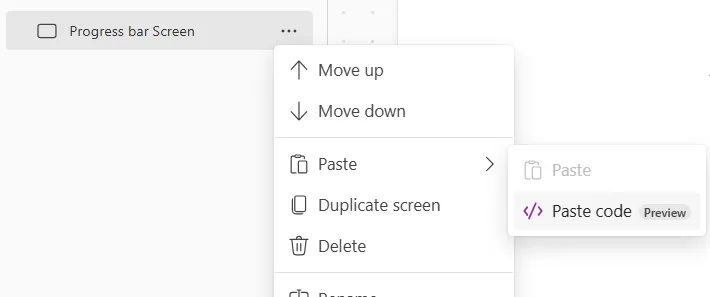
- Click on the three dots of the screen where you want to add the snippet and select "Paste" (previously "Paste code")
- Replace Items Property in the gallery with your data.
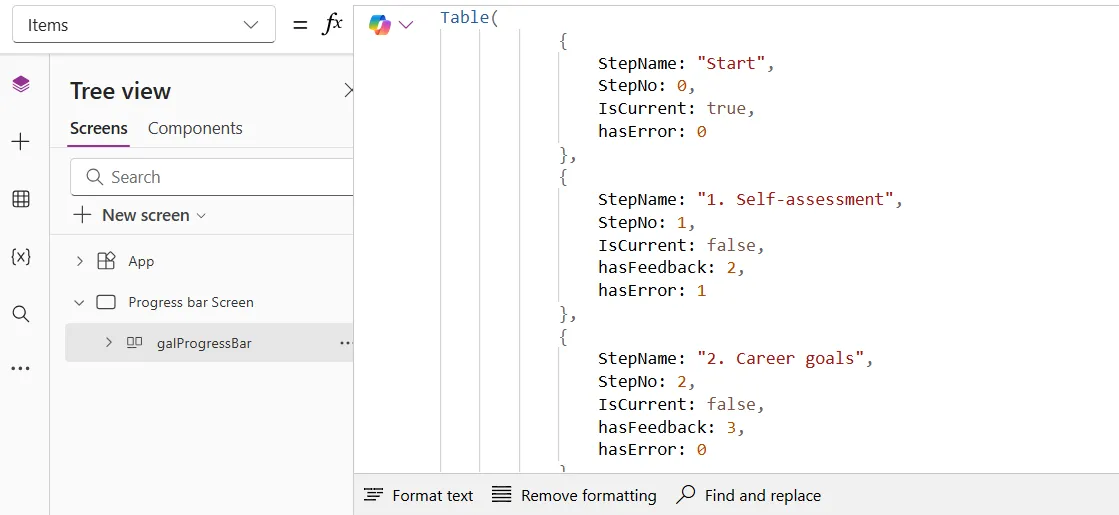
Example data
This is the collection, used in this example. Add this code to the OnVisible property of the screen so the collection is populated when the screen loads.
ClearCollect(colSteps, Table(
            {
                StepName: "Start",
                StepNo: 0,
                IsCurrent: true,
                hasError: 0
            },
            {
                StepName: "1. Self-assessment",
                StepNo: 1,
                IsCurrent: false,
                hasFeedback: 2,
                hasError: 1
            },
            {
                StepName: "2. Career goals",
                StepNo: 2,
                IsCurrent: false,
                hasFeedback: 3,
                hasError: 0
            },
            {
                StepName: "3. Learning & development",
                StepNo: 3,
                StepScreen: "Steps Screen",
                IsCurrent: false,
                hasFeedback: 0,
                hasError: 2
            },
            {
                StepName: "4. Work-life balance",
                StepNo: 4,
                IsCurrent: false,
                hasFeedback: 1,
                hasError: 0
            },
            {
                StepName: "Save & Submit",
                StepNo: 5,
                IsCurrent: false,
                hasError: 0
            }
        )
    );