
A reusable Power Platform snippet
Tile Gallery
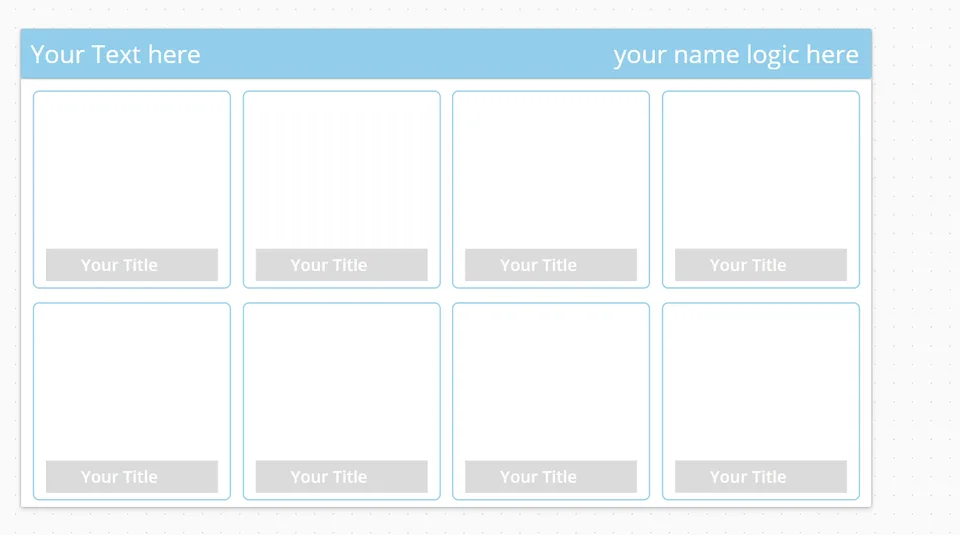
This snippet shows a tile like gallery screen. You can use that screen as a homescreen for example and navigate from there to different screens.
 Power Apps
- Last updated
- Aug 5, 2025
- Category
- Community snippet
From idea to implementation
Make it your own.
Check this snippet's prerequisites, permissions, and licensing before using it. The documentation below comes directly from the snippet README.
This snippet shows a tile like gallery screen. You can use that screen as a homescreen for example and navigate from there to different screens. The screen is fully responsive.
Authors
| Snippet | Author(s) |
|---|---|
| Markus Franz | Github (LinkedIN ) |
Minimal path to awesome
- Open your canvas app in Power Apps
- Copy the contents of the YAML-file
- Right click on the screen where you want to add the snippet and select "Paste"
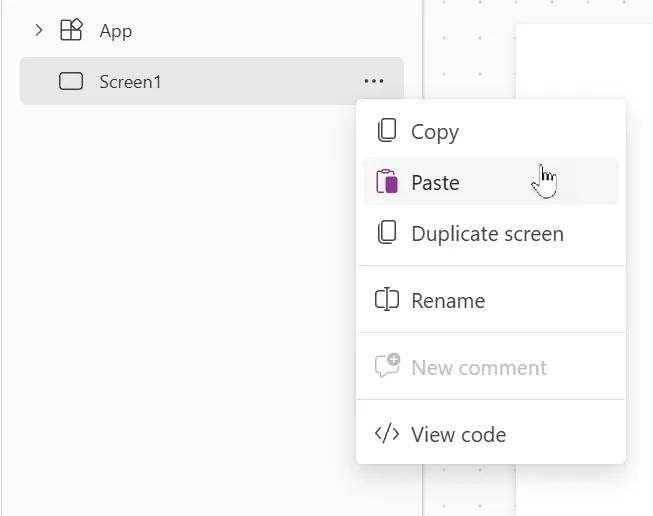
After you copied the Yaml to your screen make sure to turn the scale to fit setting off, so you can enjoy the full responsiveness.
In the Items Property set the right values for the table. Following is a sample code of what i used in a different app:
[
    {
        Title: "Word",
        Image: 'ms-word-svgrepo-com',
        Screen: GalleryScreen
    },
   {
        Title: "Excel",
        Image: 'ms-excel-svgrepo-com',
        Screen: GalleryScreen

    }
]
If you want more or less items in the gallery simply add or remove records from the table.
For the button OnSelect property (that is inserted over the image of the gallery) set it to: Navigate(ThisItem.Screen).
To show the respective images upload them to your app. Once you uploaded the images make sure to pick the right ones in your table (Items property of the gallery like shown above example: 'ms-excel-svgrepo-com'). Once you did that you can simply use ThisItem.Image in the Image property of your gallery control.
Also change the Text in the Text property of the labels in the header. I used the name of the app in the left one and the Name of the logged in user with User().FullName in the right one.
Disclaimer
THIS CODE IS PROVIDED AS IS WITHOUT WARRANTY OF ANY KIND, EITHER EXPRESS OR IMPLIED, INCLUDING ANY IMPLIED WARRANTIES OF FITNESS FOR A PARTICULAR PURPOSE, MERCHANTABILITY, OR NON-INFRINGEMENT.