
A reusable Power Platform snippet
Welcome Time of Day Message
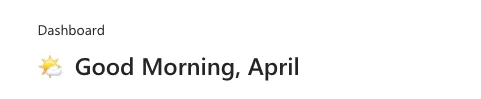
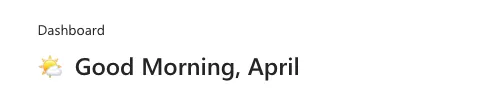
This snippet shows how to implement a welcome message in your app
 Power Apps
- Last updated
- Oct 29, 2024
- Category
- Community snippet
From idea to implementation
Make it your own.
Check this snippet's prerequisites, permissions, and licensing before using it. The documentation below comes directly from the snippet README.
This snippet shows how to implement a welcome message in your app that:
Incorporates the time of day in the welcome message (Morning, Afternoon, Even)
Displays a custom emoji for the time of day
Returns the current logged in user's first name
Authors
| Snippet | Author(s) |
|---|---|
| April Dunnam | GitHub (@aprildunnam ) |
Code
- TextCanvas3_1:
    Control: Text
    Properties:
      Size: =24
      Text: "=If(\n        Hour(Now()) >= 6 && Hour(Now()) < 12, \"\U0001F324️  Good Morning, \",\n        Hour(Now()) >= 12 && Hour(Now()) < 18, \"☀️  Good Afternoon, \",\n        \"\U0001F319  Good Night, \")\n & Left(User().FullName, Find(\" \", User().FullName) - 1)\n "
      Weight: ='TextCanvas.Weight'.Semibold
      Height: =40
      Width: =500
Minimal path to awesome
- Open your canvas app in Power Apps
- Copy the contents of the YAML-file or copy it from the code above.
- Right click on the screen where you want to add the snippet and select "Paste YAML"
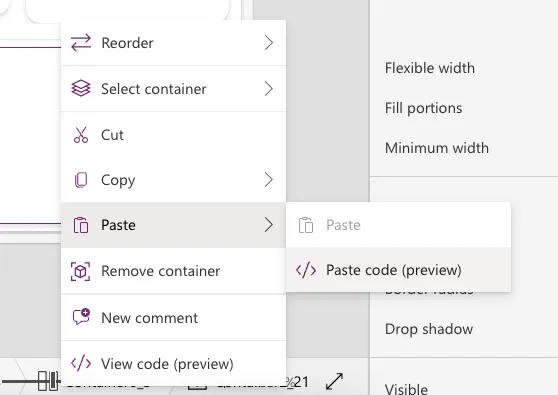
This will add the gallery and header to your screen and you can customize the items property to dynamically get data.
Disclaimer
THIS CODE IS PROVIDED AS IS WITHOUT WARRANTY OF ANY KIND, EITHER EXPRESS OR IMPLIED, INCLUDING ANY IMPLIED WARRANTIES OF FITNESS FOR A PARTICULAR PURPOSE, MERCHANTABILITY, OR NON-INFRINGEMENT.