
List out all Azure AD Apps along with their Credentials
This script is helpful to identify and inventorize all the Azure AD Applications registered in your tenant
 SRINIVAS VARUKALA
Summary
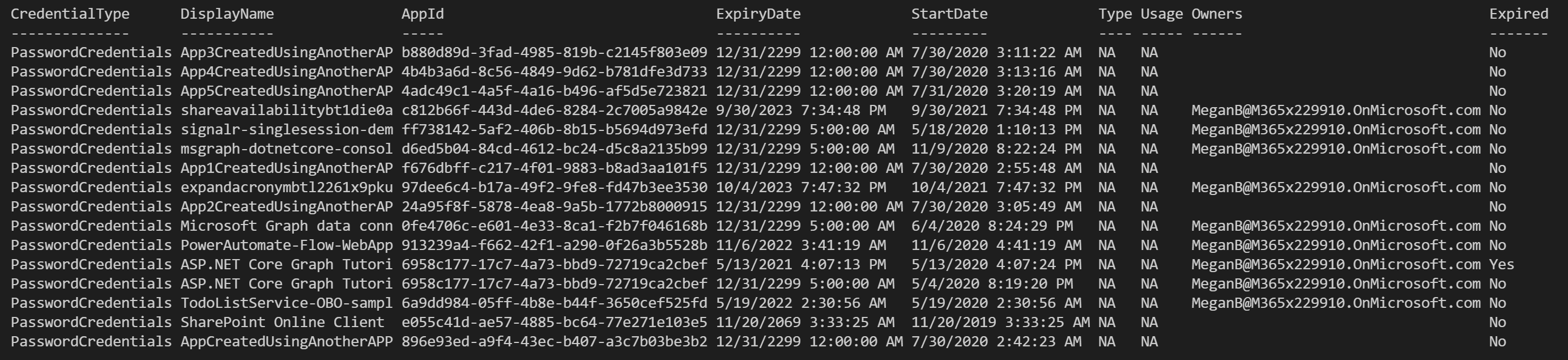
This script uses Microsoft Graph PowerShell SDK. It is helpful to identify and inventorize all the Azure AD Applications registered in your tenant. The script enumerates the KeyCredentials (Certificates) and PasswordCredentials (Client Secret) keys, expiration dates, owner and other useful information.
Connect-MgGraph -Scopes "User.Read.All","Group.ReadWrite.All","Application.Read.All", "Application.ReadWrite.All", "Directory.Read.All", "Directory.ReadWrite.All", "Directory.AccessAsUser.All"
$Apps = Get-MgApplication -All
$today = Get-Date
$credentials = @()

$Apps | %{
    $aadAppObjId = $_.Id
    $app = Get-MgApplication -ApplicationId $aadAppObjId
    $owner = Get-MgApplicationOwner -ApplicationId $aadAppObjId

    $app.KeyCredentials | %{
        #write-host $_.KeyId $_.DisplayName
        $credentials += [PSCustomObject] @{
            CredentialType = "KeyCredentials";
            DisplayName = $app.DisplayName;
            AppId = $app.AppId;
            ExpiryDate = $_.EndDateTime;
            StartDate = $_.StartDateTime;
            #KeyID = $_.KeyId;
            Type = $_.Type;
            Usage = $_.Usage;
            Owners = $owner.AdditionalProperties.userPrincipalName;
            Expired = (([DateTime]$_.EndDateTime) -lt $today) ? "Yes" : "No";
            }
    }


    $app.PasswordCredentials | %{
        #write-host $_.KeyId $_.DisplayName
        $credentials += [PSCustomObject] @{
            CredentialType = "PasswordCredentials";
            DisplayName = $app.DisplayName;
            AppId = $app.AppId;
            ExpiryDate = $_.EndDateTime;
            StartDate = $_.StartDateTime;
            #KeyID = $_.KeyId;
            Type = 'NA';
            Usage = 'NA';
            Owners = $owner.AdditionalProperties.userPrincipalName;
            Expired = (([DateTime]$_.EndDateTime) -lt $today) ? "Yes" : "No";
        }
    }
}

$credentials | FT -AutoSize

# Optionally export to a CSV file
#$credentials | Export-Csv -Path "AppsInventory.csv" -NoTypeInformation
Source Credit
Sample first appeared on List out all Azure AD Apps along with their KeyCredentials and PasswordCredentials along with Expiration
Contributors
| Author(s) |
|---|
| Srinivas Varukala |
Disclaimer
THESE SAMPLES ARE PROVIDED AS IS WITHOUT WARRANTY OF ANY KIND, EITHER EXPRESS OR IMPLIED, INCLUDING ANY IMPLIED WARRANTIES OF FITNESS FOR A PARTICULAR PURPOSE, MERCHANTABILITY, OR NON-INFRINGEMENT.
Tool documentation & references
- Want to learn more about Microsoft Graph PowerShell SDK and the cmdlets
Check out the Microsoft Graph PowerShell SDK documentation site to get started and for the reference to the cmdlets.
