
Script allow copy column format in SharePoint and apply to different column.
Copy column format from column or web sample and apply to different column
 Jasey Waegebaert
 Valeras Narbutas
Summary
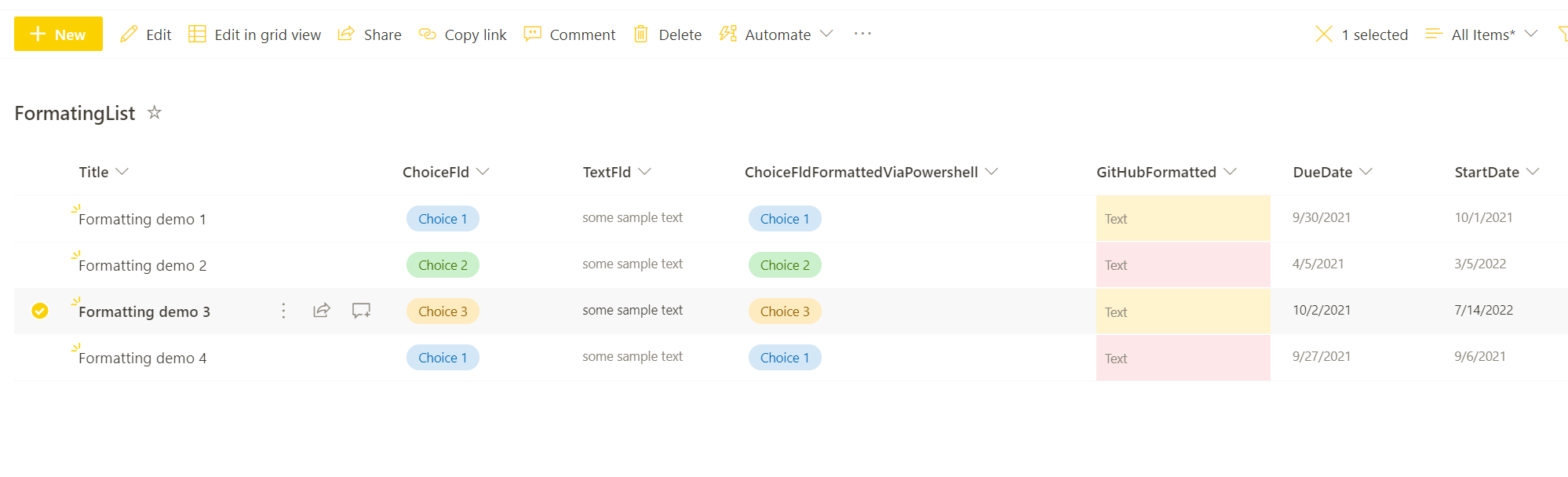
This sample script shows how to apply column format using:
- Existing column format
- Format added in script
- Getting format sample from GitHub sample page
Scenario inspired by Paul Bullock Blog post about column formatting
#site collection url
$url = "https://<tenant>.sharepoint.com"

#list to be exported
$listName = "ListTitle"

## Connect to SharePoint Online site
Connect-PnPOnline -Url $Url -Interactive

#----method 1 Apply formatting from existing column sample in sharepoint-------#
# field title with existing format - ChoiceFld
$field = Get-PnPField -Identity "ChoiceFld" -List $listName

#copy field format
$fieldFormat = $field.CustomFormatter

#apply field format to other column
# field title with no format - ChoiceFldFormattedViaPowershell
Set-PnPField -List $listName -Identity "ChoiceFldFormattedViaPowershell" -Values @{CustomFormatter=$fieldFormat}

#---method 2 Apply formatting directly from script
Set-PnPField -List $listName -Identity "ChoiceFldFormattedViaPowershell" -Values @{CustomFormatter=@'
{
  "$schema": "https://developer.microsoft.com/json-schemas/sp/column-formatting.schema.json",
  "elmType": "div",
  "style": {
    "position": "relative"
  },
  "children": [
    {
      "elmType": "div",
      "attributes": {
        "class": "=if([$DueDate] <= @now, 'sp-field-severity--severeWarning', if(1 - Number([$DueDate] - @now) / Number([$DueDate] - [$StartDate]) >= 0.7, 'sp-field-severity--war
ning', 'sp-field-severity--good'))"
      },
      "style": {
        "min-height": "inherit",
        "width": "=if([$DueDate] <= @now, '100%', (1 - Number([$DueDate] - @now) / Number([$DueDate] - [$StartDate])) * 100 + '%')"
      }
    },
    {
      "elmType": "span",
      "txtContent": "@currentField",
      "style": {
        "position": "absolute",
        "left": "8px"
      },
      "attributes": {
        "class": "ms-fontColor-neutralSecondary"
      }
    }
  ]
}
'@
}

#----method 3 Apply formatting using sample from github-------#
$webContent = Invoke-WebRequest -Uri 'https://raw.githubusercontent.com/pnp/List-Formatting/master/column-samples/date-range-rag/date-range-rag.json'
$fieldFormatFromGit = $webContent.Content

$fieldToFormat = Get-PnPField -Identity "GitHubFormatted" -List $listName
$fieldToFormat.CustomFormatter = $fieldFormatFromGit
$fieldToFormat.UpdateAndPushChanges($true)
#site collection url
$url = "https://<tenant>.sharepoint.com"

#list to be exported
$listName = "ListTitle"

## Connect to SharePoint Online
$m365Status = m365 status
if ($m365Status -match "Logged Out") {
  m365 login
}

#----method 1 Apply formatting from existing column sample in sharepoint-------#
# field title with existing format - ChoiceFld
$field = m365 spo field get --webUrl $url --listTitle $listName --fieldTitle "ChoiceFld" | ConvertFrom-Json

#copy field format
$fieldFormat = $field.CustomFormatter.Replace('"', '""')

#apply field format to other column
# field title with no format - ChoiceFldFormattedViaPowershell
m365 spo field set --webUrl $url --listTitle $listName --name "ChoiceFldFormattedViaPowershell" --CustomFormatter $fieldFormat

#---method 2 Apply formatting directly from script

$fieldFormat = @'
{
  "$schema": "https://developer.microsoft.com/json-schemas/sp/column-formatting.schema.json",
  "elmType": "div",
  "style": {
    "position": "relative"
  },
  "children": [
    {
      "elmType": "div",
      "attributes": {
        "class": "=if([$DueDate] <= @now, 'sp-field-severity--severeWarning', if(1 - Number([$DueDate] - @now) / Number([$DueDate] - [$StartDate]) >= 0.7, 'sp-field-severity--warning', 'sp-field-severity--good'))"
      },
      "style": {
        "min-height": "inherit",
        "width": "=if([$DueDate] <= @now, '100%', (1 - Number([$DueDate] - @now) / Number([$DueDate] - [$StartDate])) * 100 + '%')"
      }
    },
    {
      "elmType": "span",
      "txtContent": "@currentField",
      "style": {
        "position": "absolute",
        "left": "8px"
      },
      "attributes": {
        "class": "ms-fontColor-neutralSecondary"
      }
    }
  ]
}
'@

m365 spo field set --webUrl $url --listTitle $listName --name "ChoiceFldFormattedViaPowershell" --CustomFormatter $fieldFormat.Replace('"', '""')

#----method 3 Apply formatting using sample from github-------#
$webContent = Invoke-WebRequest -Uri 'https://raw.githubusercontent.com/pnp/List-Formatting/master/column-samples/date-range-rag/date-range-rag.json'
$fieldFormatFromGit = $webContent.Content

m365 spo field set --webUrl $url --listTitle $listName --name "GitHubFormatted" --CustomFormatter $fieldFormatFromGit.Replace('"', '""')
{
  "$schema": "https://developer.microsoft.com/json-schemas/sp/column-formatting.schema.json",
  "elmType": "div",
  "style": {
    "position": "relative"
  },
  "children": [
    {
      "elmType": "div",
      "attributes": {
        "class": "=if([$DueDate] <= @now, 'sp-field-severity--severeWarning', if(1 - Number([$DueDate] - @now) / Number([$DueDate] - [$StartDate]) >= 0.7, 'sp-field-severity--warning', 'sp-field-severity--good'))"
      },
      "style": {
        "min-height": "inherit",
        "width": "=if([$DueDate] <= @now, '100%', (1 - Number([$DueDate] - @now) / Number([$DueDate] - [$StartDate])) * 100 + '%')"
      }
    },
    {
      "elmType": "span",
      "txtContent": "@currentField",
      "style": {
        "position": "absolute",
        "left": "8px"
      },
      "attributes": {
        "class": "ms-fontColor-neutralSecondary"
      }
    }
  ]
}
Contributors
| Author(s) |
|---|
| Valeras Narbutas |
| Jasey Waegebaert |
Disclaimer
THESE SAMPLES ARE PROVIDED AS IS WITHOUT WARRANTY OF ANY KIND, EITHER EXPRESS OR IMPLIED, INCLUDING ANY IMPLIED WARRANTIES OF FITNESS FOR A PARTICULAR PURPOSE, MERCHANTABILITY, OR NON-INFRINGEMENT.
Tool documentation & references
- Want to learn more about PnP PowerShell and the cmdlets
Check out the PnP PowerShell site to get started and for the reference to the cmdlets.
- Want to learn more about CLI for Microsoft 365 and the commands
Check out the CLI for Microsoft 365 site to get started and for the reference to the commands.
