
List installed apps within Teams in a tenant
Exports the installed apps in Microsoft Teams teams
 Smita Nachan
 Nanddeep Nachan
Summary
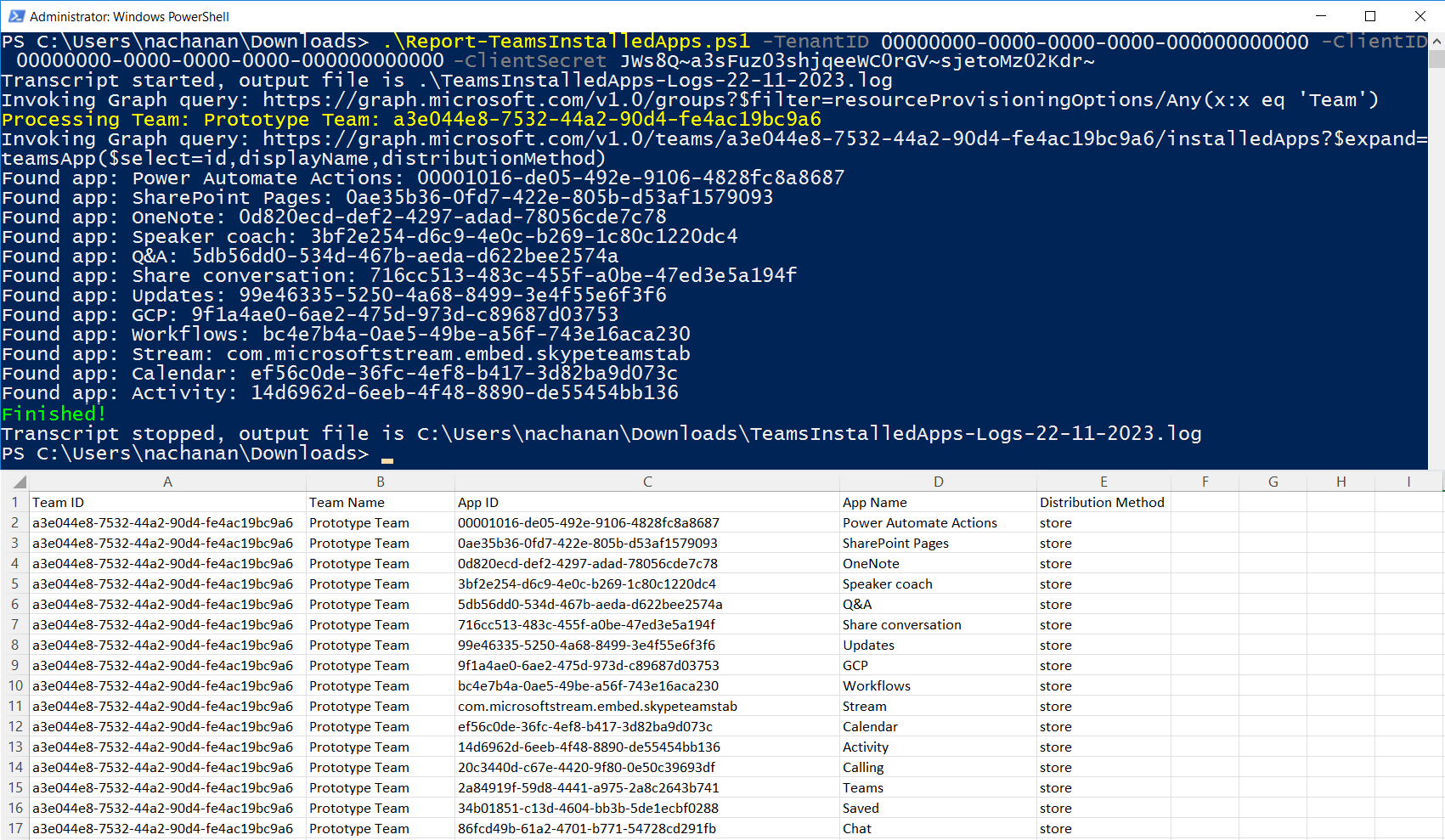
This script lists all installed apps in Microsoft Teams teams in the tenant and exports the results in a CSV.
Permissions
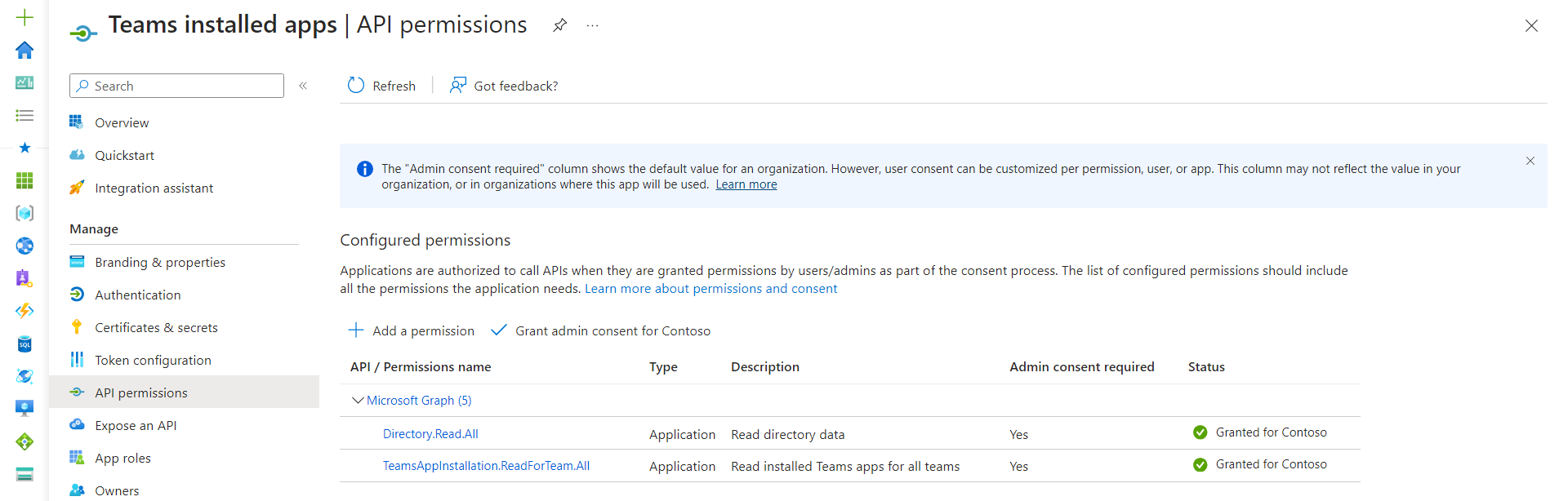
The PowerShell version of the script requires Microsoft Entra ID App Registration with the Application Permissions as follows:
- Directory.Read.All
- TeamsAppInstallation.ReadForTeam.All
Note: You can skip this step, if you are planning to use CLI for Microsoft 365.
Implementation
- Open Windows PowerShell ISE
- Create a new file
- Copy the code below
- Save the file and run it
[CmdletBinding()]
param (
    [parameter(Mandatory)][string] $TenantID,
    [parameter(Mandatory)][string] $ClientID,
    [parameter(Mandatory)][string] $ClientSecret
)

function Get-AccessToken {
    # Construct URI
    $uri = "https://login.microsoftonline.com/$TenantID/oauth2/v2.0/token"

    # Construct Body
    $body = @{
        client_id     = $ClientID
        client_secret = $ClientSecret
        scope         = 'https://graph.microsoft.com/.default'
        grant_type    = 'client_credentials'
    }

    # Fix for issue: The underlying connection was closed
    [Net.ServicePointManager]::SecurityProtocol = [Net.SecurityProtocolType]::Tls12

    # Get OAuth 2.0 Token
    $tokenRequest = Invoke-WebRequest -Method Post -Uri $uri -ContentType 'application/x-www-form-urlencoded' -Body $body -UseBasicParsing

    # Access Token
    return ($tokenRequest.Content | ConvertFrom-Json).access_token
}

function Get-GraphQueryOutput {
    param(
        [parameter(Mandatory = $true)][String] $Uri
    )

    $retryCount = 0
    $maxRetries = 3
    $pauseDuration = 2

    $token = Get-AccessToken

    $allRecords = @()
    while ($Uri) {
        try {
            Write-Host "Invoking Graph query: $($Uri)"
            $query = Invoke-RestMethod -Method Get -Uri $Uri -ContentType 'application/json;odata.metadata=none' -Headers @{Authorization = "Bearer $token" }
            $recordToAdd = ($query | Select-Object Value).Value

            if (-not $recordToAdd) {
                $recordToAdd = $query
            }

            $allRecords += $recordToAdd

            if ($query.'@odata.nextLink') {
                # set the url to get the next page of records
                $Uri = $query.'@odata.nextLink'
            }
            else {
                $Uri = $null
            }
        }
        catch {
            Write-Host "StatusCode: " $_.Exception.Response.StatusCode.value__
            Write-Host "StatusDescription:" $_.Exception.Response.StatusDescription

            if ($_.Exception.Response.StatusCode.value__ -eq 401) {
                $token = Get-AccessToken
            }

            if ($_.ErrorDetails.Message) {
                Write-Host "Inner Error: $_.ErrorDetails.Message" -ForegroundColor Red
            }

            if ($_.Exception.Response.StatusCode.value__ -eq 404) {
                # If the error is "Not Found", let us not retry
                $retryCount = $maxRetries + 1
            }

            if ($retryCount -ge $maxRetries) {
                # Not going to retry again
                $Uri = $null
                Write-Host "Not going to retry..." -ForegroundColor Red
            }
            else {
                $retryCount += 1
                $pauseDuration = $pauseDuration * 5
                Write-Host "Retry attempt $retryCount after a $pauseDuration second pause..." -ForegroundColor Yellow
                Start-Sleep -Seconds $pauseDuration
            }
        }
    }

    return $allRecords
}

Start-Transcript -Path ".\TeamsInstalledApps-Logs-$((Get-Date).toString("dd-MM-yyyy")).log"
$allTeams = Get-GraphQueryOutput -Uri "https://graph.microsoft.com/v1.0/groups?`$filter=resourceProvisioningOptions/Any(x:x eq 'Team')"

ForEach ($team in $allTeams) {
    Write-Host "Processing Team: $($team.displayName): $($team.id)" -ForegroundColor Yellow

    $installedApps = Get-GraphQueryOutput -Uri "https://graph.microsoft.com/v1.0/teams/$($team.id)/installedApps?`$expand=teamsApp(`$select=id,displayName,distributionMethod)"
    ForEach ($app in $installedApps) {
        Write-Host "Found app: $($app.teamsApp.displayName): $($app.teamsApp.id)"

        $reportLine = [PSCustomObject][Ordered]@{
            "Team ID"             = $team.id
            "Team Name"           = $team.displayName
            "App ID"              = $app.teamsApp.id
            "App Name"            = $app.teamsApp.displayName
            "Distribution Method" = $app.teamsApp.distributionMethod
        }

        $reportLine | Export-Csv -NoTypeInformation -Path ".\TeamsInstalledApps-$((Get-Date).toString("dd-MM-yyyy")).csv" -Encoding UTF8 -Append
    }
}

Write-Host "Finished!" -ForegroundColor Green
Stop-Transcriptbegin {
Write-Host "Connecting..." -ForegroundColor Yellow
$m365Status = m365 status
if ($m365Status -match "Logged Out") {
m365 login
}
}
process {
# Retrieve all teams in Microsoft Teams
$msTeams = m365 teams team list | ConvertFrom-Json
$msTeams | ForEach-Object {
Write-Host "Processing Team: $($_.displayName): $($_.ID)" -ForegroundColor Yellow
$installedApps = m365 teams team app list --teamId $_.ID | ConvertFrom-Json
ForEach ($app in $installedApps) {
Write-Host "Found app: $($app.teamsApp.displayName): $($app.teamsApp.id)"
$reportLine = [PSCustomObject][Ordered]@{
"Team ID" = $_.ID
"Team Name" = $_.displayName
"App ID" = $app.teamsApp.id
"App Name" = $app.teamsApp.displayName
"Distribution Method" = $app.teamsApp.distributionMethod
}
$reportLine | Export-Csv -NoTypeInformation -Path ".\TeamsInstalledApps-$((Get-Date).toString("dd-MM-yyyy")).csv" -Encoding UTF8 -Append
}
}
}
end {
Write-Host "Finished!" -ForegroundColor Green
}Contributors
| Author(s) |
|---|
| Smita Nachan |
| Nanddeep Nachan |
References
Disclaimer
THESE SAMPLES ARE PROVIDED AS IS WITHOUT WARRANTY OF ANY KIND, EITHER EXPRESS OR IMPLIED, INCLUDING ANY IMPLIED WARRANTIES OF FITNESS FOR A PARTICULAR PURPOSE, MERCHANTABILITY, OR NON-INFRINGEMENT.
Tool documentation & references
- Want to learn more about CLI for Microsoft 365 and the commands
Check out the CLI for Microsoft 365 site to get started and for the reference to the commands.
