Checks this SharePoint site's local skills before handling a request when no obvious local skill exists. Reviews skills already loaded or stored under AgentAssets/Skills first, so the agent doesn't reinvent an existing site procedure.
If no local skill matches, asks the user every time before searching the public PnP SharePoint Skills repo for a matching skill or pattern — prior approval in another turn does not carry over. Classifies any external result as a direct match, supporting match, or reference pattern, screens it for risk (over-broad triggers, unsafe HTML, destructive actions without confirmation, fabricated metadata), and recommends using, installing, adapting, or proceeding without it.
find-relevant-skill is a meta-skill for SharePoint AI agents: before handling a recurring or site-specific request, it checks whether this site already has a local skill that covers it, and — only with explicit, per-request confirmation — offers to search the public PnP SharePoint Skills repository for a reusable one. It then walks through a risk assessment before recommending that anything be installed, adapted, or referenced.
The goal is to stop agents from reinventing site-specific procedures that already exist — either locally or in the community catalog — while keeping any external repo access explicit and opt-in.
What you get
- Local-first discovery: Checks skills already loaded or stored in this site's local skill library before looking anywhere else.
- Explicit confirmation gate: Never searches or accesses the public PnP repo without asking the user first, every time — prior approval in another turn doesn't carry over.
- Tiered match evaluation: Classifies any external findings as a direct match, a supporting match, a reference pattern, or no match, and recommends a different action for each.
- Built-in risk review: Screens any skill found externally for over-broad triggers, unsafe HTML, destructive actions without confirmation, fabricated SharePoint metadata, and other risk types, then rates it Low/Medium/High before recommending use.
- No fabrication: If a tool check fails or returns nothing, the skill says so rather than inventing site skills, paths, or repo contents.
When to use
Ask things like:
- "Do we have a skill for this?"
- "Check site skills first"
- "Find a relevant skill"
- "Is there a local skill for this?"
It also self-triggers when a recurring or site-specific task comes up and no loaded or local skill obviously covers it. It's not meant to fire on one-off questions or small talk that don't call for a reusable procedure.
Best suited to any SharePoint site running an AI agent with its own local skill library, where you want the agent to check for — and safely reuse — existing procedures before improvising or building something new from scratch.
Demo content
This skill has no bundled demo files — it operates on whatever local skills and PnP repo content already exist for your site, so there's nothing meaningful to ship as a static sample.
SharePoint Skill
| Solution | Author(s) |
|---|---|
| find-relevant-skill | James Dellow (WebVine) | GitHub |
Version history
| Version | Date | Comments |
|---|---|---|
| 1.0 | August 2026 | Initial Release |
Disclaimer
THIS CODE IS PROVIDED AS IS WITHOUT WARRANTY OF ANY KIND, EITHER EXPRESS OR IMPLIED, INCLUDING ANY IMPLIED WARRANTIES OF FITNESS FOR A PARTICULAR PURPOSE, MERCHANTABILITY, OR NON-INFRINGEMENT.
Package
Ready to install
The ZIP contains only the upload-ready inner skill folder.
View SKILL.md
---
name: find-relevant-skill
description: |-
  Check this SharePoint site's local skills before handling a request when no obvious local skill exists; ask every time before searching the PnP SharePoint Skills repo, assess risks in found skills, then recommend using, installing, adapting, or proceeding without one.

  Use when the user says:
    - "Do we have a skill for this?"
    - "Check site skills first"
    - "Find a relevant skill"
    - "Is there a local skill for this?"
    - When a recurring or site-specific task comes up and no loaded or local skill obviously covers it
---
# find-relevant-skill

## When to use
Use this skill when the user asks whether this site has a skill for a task, or when the agent is about to handle a recurring or site-specific procedure and no loaded or listed local skill obviously covers it. Don't use it for one-off questions or small talk that don't call for a reusable procedure — the check adds a step that only pays off when a skill could plausibly exist.

This skill helps avoid missing reusable site-specific procedures before doing work directly.

## Inputs
Use or infer:
- The user's current task or request
- The current site context
- Any skills already listed in the conversation context
- Site skills stored wherever this site keeps its local skill library (commonly `AgentAssets/Skills`, but confirm the actual location for this site rather than assuming), when available
- Optional external reference: PnP SharePoint Skills repo at `https://github.com/pnp/sharepoint-skills/tree/main/Skills`

## Steps
1. Restate the task in one short phrase.

2. Check known skills first.
   - Review loaded skills and site skills already present in context.
   - If a clearly relevant skill exists, activate it (however this environment loads a skill) and follow it.

3. If no known local skill clearly applies, inspect this site's skills.
   - Look for skill folders or `SKILL.md` files in this site's local skill library.
   - Read candidate skill descriptions or `SKILL.md` files as needed.
   - Don't guess skill names or claim a skill exists without finding it.

4. If no local skill matches, ask before checking the PnP SharePoint Skills repo.
   - Use the repo as a known external source for possible reusable skill patterns: `https://github.com/pnp/sharepoint-skills/tree/main/Skills`.
   - Always ask the user before searching or accessing the PnP repo, even if they previously approved web search in another turn.
   - Ask exactly: "Want me to search the PnP SharePoint Skills repo for a matching skill?"
   - Do not search or access the public web unless the user explicitly confirms for this specific check.
   - If the user confirms, search the web for the task plus the repo URL.
   - Don't claim an external skill exists unless it was found through an allowed web search or already provided in conversation.

5. Evaluate PnP repo results in this order.
   - Direct match: a PnP skill clearly solves the user's task. Recommend creating a local site version before using it.
   - Supporting match: no direct PnP skill solves the task, but one or more skills provide useful capabilities, safety rules, formats, patterns, or reusable guidance. Recommend installing those supporting skills locally when they'll be reused.
   - Reference pattern: no supporting skill should be installed, but a PnP skill contains a useful pattern. Apply the relevant pattern while creating a new local skill or proceeding with tools.
   - No match: nothing useful was found. Recommend creating a new skill from scratch or proceeding directly.

6. Check risks in any PnP skills or patterns before recommending installation or reuse.
   - Review the skill content, description, examples, and tool guidance when available.
   - Flag risks clearly for the user before creating or installing anything.
   - Look for these risk types:
     - Over-broad triggers that may fire on unrelated requests.
     - Instructions that bypass local site checks or ignore site context.
     - Instructions that encourage public web access without explicit user confirmation.
     - Tool names that don't exist in this environment or look mismatched.
     - Destructive or high-impact actions without confirmation, such as delete, overwrite, permissions changes, approvals, bulk edits, sharing, or publishing.
     - Guidance that could fabricate SharePoint IDs, URLs, paths, fields, list names, or file names.
     - Large or vague instructions that may inflate token usage or reduce reliability.
     - Duplicate or overlapping intent with existing local skills.
     - Unsafe HTML, external scripts, external CSS, remote images, or content that may not render under SharePoint CSP.
     - Missing output format, verification steps, or error handling.
   - Classify risk as Low, Medium, or High.
   - If risk is High, recommend adapting only the safe parts or not installing the skill.
   - If risk is Medium, recommend installing only after tightening triggers, adding confirmations, or removing risky instructions.
   - If risk is Low, mention any minor caveats and proceed with the recommendation.

7. Avoid reinventing the wheel.
   - Prefer installing/adapting relevant supporting skills from PnP over writing all guidance from scratch.
   - If creating a new local skill from scratch, include any relevant PnP-derived patterns in the instructions and cite them in the recommendation summary.
   - If multiple PnP skills are useful, separate them as: direct skill, supporting skill, and reference pattern.
   - Don't install broad or unrelated skills just because they sound similar.

8. Decide the best path.
   - If a relevant local skill exists, recommend it and activate it.
   - If a nearby local skill exists but doesn't fully cover the task, say what it covers and what's missing.
   - If a direct PnP skill exists, recommend creating a local site skill from it.
   - If supporting PnP skills exist, recommend installing/adapting them locally before creating the task-specific skill.
   - If only reference patterns exist, recommend applying those patterns to the new skill or direct work.
   - If risks are identified, include the risk rating and mitigation in the recommendation.
   - If no relevant skill or pattern exists, recommend creating a new skill from scratch or proceeding directly with tools.

9. If the user wants a new, supporting, or imported skill, create or adapt it directly.
   - If this site has its own dedicated skill-creation process already loaded or listed, use that; otherwise build the skill yourself following this site's normal skill format (frontmatter with `name` and `description`, then instructions).
   - Confirm purpose, triggers, output format, and verifiability before creating it.
   - If adapting a PnP skill, generalize it for this site and preserve only the relevant safe instructions.
   - If installing a supporting skill, keep its scope reusable and don't overfit it to the current task.
   - Remove or rewrite risky instructions before saving locally.

10. If tool checks fail or return empty, say so plainly.
   - Don't invent site skills, paths, tool results, PnP skill names, repository contents, or risk findings.

## Output format
```markdown
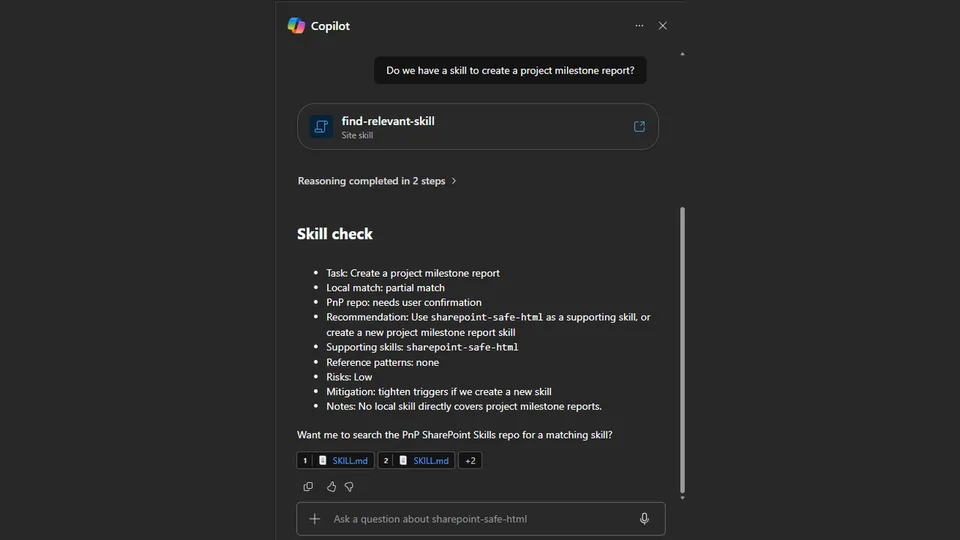
## Skill check
- Task: <short task summary>
- Local match: <skill name | no matching local skill found | partial match>
- PnP repo: <not checked | checked: direct match | checked: supporting skills found | checked: reference patterns found | checked: no match found | needs user confirmation>
- Recommendation: <load/use local skill | create local skill from PnP | install supporting skills | apply reference patterns | create new skill | proceed directly>
- Supporting skills: <skill names or none>
- Reference patterns: <skill names/patterns or none>
- Risks: <none found | Low | Medium | High - brief reason>
- Mitigation: <none | tighten triggers | remove risky instructions | require confirmation | adapt safe parts only | don't install>
- Notes: <brief reason>
```

If a skill is loaded, add:
```markdown
Loaded `<skill-name>` and I'll use it for this request.
```

If PnP repo confirmation is needed, ask:
```markdown
Want me to search the PnP SharePoint Skills repo for a matching skill?
```

## Examples

### User asks: "Do we have a skill for styling this list?"
Output:
```markdown
## Skill check
- Task: Style a SharePoint list
- Local match: list-formatting
- PnP repo: not checked
- Recommendation: Load and use local skill
- Supporting skills: none
- Reference patterns: none
- Risks: none found
- Mitigation: none
- Notes: It covers list/library formatting, status indicators, progress bars, and dashboards.
```

### User asks: "Can you help me build a release readiness checklist?"
If no local matching skill is found:
```markdown
## Skill check
- Task: Build a release readiness checklist
- Local match: no matching local skill found
- PnP repo: needs user confirmation
- Recommendation: Check PnP repo or proceed directly
- Supporting skills: unknown until checked
- Reference patterns: unknown until checked
- Risks: unknown until checked
- Mitigation: unknown until checked
- Notes: I didn't find a local reusable procedure for this task.

Want me to search the PnP SharePoint Skills repo for a matching skill?
```

### PnP repo has no direct skill but has useful patterns
```markdown
## Skill check
- Task: Create a live HTML list report
- Local match: no matching local skill found
- PnP repo: checked: supporting skills found
- Recommendation: Install supporting skills and create a task-specific skill
- Supporting skills: sharepoint-safe-html, exec-report
- Reference patterns: safe HTML rendering, dashboard layout, KPI cards
- Risks: Medium - HTML guidance may include unsafe external assets or broad report-generation triggers
- Mitigation: adapt safe HTML-only patterns, remove external resources, and tighten triggers before saving locally
- Notes: No single PnP skill fully solves the task, but these skills avoid reinventing report and safe HTML guidance.
```

### PnP skill has high-risk behavior
```markdown
## Skill check
- Task: Automate bulk permission changes
- Local match: no matching local skill found
- PnP repo: checked: reference patterns found
- Recommendation: Apply reference patterns only
- Supporting skills: none
- Reference patterns: confirmation checklist, dry-run summary
- Risks: High - found guidance touches permissions and bulk changes without enough confirmation steps
- Mitigation: don't install as-is; adapt only the confirmation and audit pattern
- Notes: High-impact SharePoint changes need explicit confirmation and verifiable targets.
```
References
- agentskills.io specification
The specification that SharePoint AI skills follow for installation and discovery.
Discuss this skill
Ask a question, share how you used it, or suggest an improvement with the community.
Open GitHub Discussions