
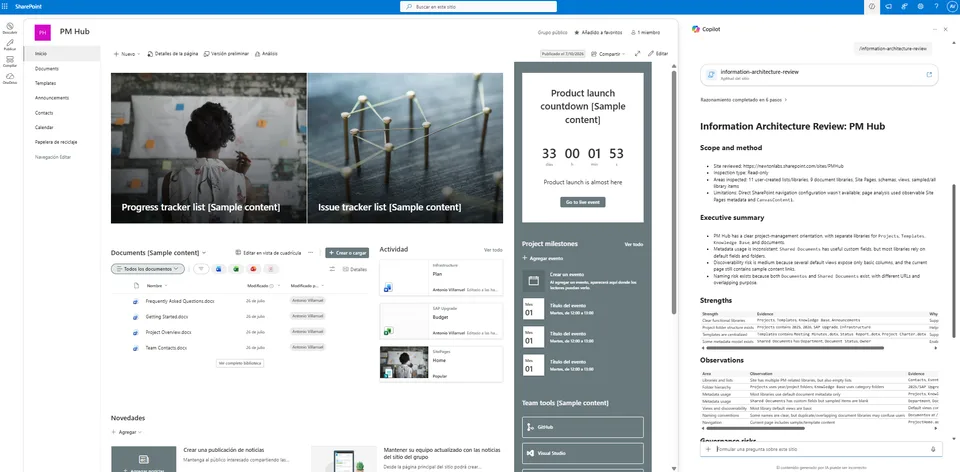
Information Architecture Review performs a read-only assessment of a SharePoint site to evaluate how information is organized across document libraries, folders, metadata, pages, and navigation.
The skill identifies strengths, governance risks, and opportunities to improve discoverability, consistency, and scalability. It generates practical, evidence-based recommendations without modifying SharePoint content.
Well-designed information architecture helps people find information faster, improves governance, and keeps SharePoint sites scalable over time.
Information Architecture Review performs a read-only assessment of a SharePoint site and evaluates how information is organized across document libraries, folders, metadata, pages, and navigation.
The skill generates an evidence-based assessment with strengths, observations, governance risks, and practical recommendations—without modifying SharePoint content.
What you get
- Overall Information Architecture assessment
- Review of document libraries
- Folder hierarchy analysis
- Metadata usage assessment
- Naming convention review
- Navigation structure observations
- Discoverability assessment
- Governance risks and improvement opportunities
- Prioritized recommendations based on observed evidence
When to use
Ask Copilot things like:
- "Review the information architecture of this SharePoint site."
- "Evaluate how this SharePoint site is organized."
- "Analyze this site's document organization."
- "Assess the site's information architecture."
- "Review libraries, folders, and metadata."
- "Generate an information architecture assessment."
- "How well organized is this SharePoint site?"
This skill is especially useful before:
- Site redesign projects
- SharePoint migrations
- Governance initiatives
- Metadata projects
- Information architecture workshops
- Content reorganization efforts
- SharePoint health assessments
Read-only by Design
This skill is intentionally read-only.
It never:
- Creates content
- Deletes content
- Renames files
- Moves documents
- Changes metadata
- Updates navigation
- Creates libraries
- Changes permissions
- Configures SharePoint settings
Instead, it provides an evidence-based assessment that helps site owners and administrators make informed decisions.
Example Output
text Information Architecture Assessment
Overall Rating Moderate Maturity
Strengths ✓ Clear separation between business libraries ✓ Consistent top-level folder structure ✓ Metadata available for key content
Observations • Deep folder hierarchy detected in Projects • Some generic file names reduce discoverability • Metadata adoption appears inconsistent
Recommendations ✓ Increase metadata usage ✓ Simplify deep folder structures ✓ Standardize naming conventions ✓ Review navigation to improve discoverability
Why this skill?
As SharePoint sites evolve, their information architecture often becomes inconsistent.
This skill helps identify opportunities to improve:
- Organization
- Discoverability
- Scalability
- Governance
- User experience
Think of it as an architecture review for your SharePoint site.
SharePoint Skill
| Solution | Author(s) |
|---|---|
| information-architecture-review | Antonio Villarruel | GitHub |
Version history
| Version | Date | Comments |
|---|---|---|
| 1.0 | November 2026 | Initial Release |
Disclaimer
THIS CODE IS PROVIDED AS IS WITHOUT WARRANTY OF ANY KIND, EITHER EXPRESS OR IMPLIED, INCLUDING ANY IMPLIED WARRANTIES OF FITNESS FOR A PARTICULAR PURPOSE, MERCHANTABILITY, OR NON-INFRINGEMENT.
Package
Ready to install
The ZIP contains only the upload-ready inner skill folder.
525e97f317f71593801fbd8996bc81f32a6137b9b256c3d1f0971ff6700c8bccView SKILL.md
---
name: information-architecture-review
description: |-
  Evaluate a SharePoint site's information architecture using read-only inspection and produce an evidence-backed Markdown assessment with strengths, observations, governance risks, and prioritized recommendations.

  Use when the user says:
    - "Information Architecture Review"
    - "review this site's information architecture"
    - "assess our SharePoint IA"
    - "evaluate document libraries, metadata, folders, navigation, and discoverability"
    - "give me governance risks and recommendations for this SharePoint site"
---
# Information Architecture Review

## When to use
Use this skill when the user asks for a read-only information architecture assessment of the current SharePoint site, including document libraries, folder hierarchy, metadata usage, content organization, naming conventions, navigation structure, and discoverability.

Do not use this skill for requests to create, modify, move, rename, delete, configure, automate, or remediate SharePoint content. If the user asks for changes, provide recommendations only unless they explicitly request a separate implementation task.

## Inputs
- Current SharePoint site context, including site URL and current page when available.
- Optional user focus areas, such as libraries, metadata, navigation, governance, findability, or naming.
- Optional scope limit, such as one library or one site section. If no scope is provided, review the whole current site as far as read-only tools allow.

## Steps
1. Confirm scope from the current SharePoint site context. If the site context is missing, ask for it.
2. Apply the read-only constraint: never call tools that create, update, delete, move, copy, rename, share, unshare, configure, format, approve, restore, or otherwise change SharePoint content.
3. Inventory site structure using read-only inspection:
   - Use tools such as `discover_sharepoint_lists`, `get_list_schema`, `list_items`, `get_views_of_list`, `get_view_definition`, `find_items`, and `cat_file` only for inspection.
   - Capture lists and libraries, titles, types, item counts, URLs if returned, hidden/system status if available, document libraries, Site Pages, and major process lists.
4. Inspect schemas for key libraries and lists:
   - Review columns, required fields, managed metadata, lookup/person/date/choice fields, content types, versioning, and approval settings if visible.
   - Identify whether metadata appears purposeful or mostly default/system generated.
5. Inspect organization and folder hierarchy:
   - Sample top-level folders and files.
   - Note depth, inconsistent folder use, empty or overloaded folders, duplicate structures, and libraries with high item counts but little visible classification.
   - Avoid exhaustive traversal when a library is large; state sample size and criteria.
6. Inspect views and discoverability signals:
   - Review default views, grouped/sorted/filter views, columns exposed in views, and whether views support common discovery paths.
   - Inspect Site Pages and current page content where accessible for links, page titles, web part text, and navigation cues.
7. Evaluate naming conventions:
   - Assess library/list names, folder names, page names, file names in samples, view names, and column names.
   - Look for clarity, consistency, audience alignment, unexplained abbreviations, duplicate concepts, date/version patterns, and vague buckets like “Misc”, “General”, or “Archive” without context.
8. Evaluate navigation structure only from observable evidence:
   - Use current page content, Site Pages, page/link titles, library/list names, and any navigation data exposed by read-only tools.
   - If global/quick-launch navigation isn't available through tools, say that direct navigation configuration couldn't be inspected.
9. Assess governance risks:
   - Tie every risk to evidence such as unclear ownership signals, inconsistent metadata, shallow/default views, deep folders, duplicate libraries, poor naming, large unsorted libraries, missing required metadata, or reliance on manual folder conventions.
   - Don't claim policy violations unless policy evidence is available.
10. Prioritize recommendations:
   - Give practical actions ranked by impact and urgency.
   - Phrase recommendations as proposed changes, not completed work.
   - Separate quick wins from structural improvements where useful.
11. Support every conclusion with observable evidence:
   - Cite inspected artifact names, counts, column/view names, folder examples, page names, or tool limitations.
   - If evidence is partial, label the conclusion as tentative.

## Edge cases and failure handling
- If the site has no accessible libraries or lists, state that and provide only general next-step recommendations based on the limitation.
- If permission blocks inspection, identify which areas couldn't be reviewed and don't draw conclusions about them.
- If a library is very large, sample a reasonable subset, state the sample size and criteria, and avoid claiming full coverage.
- If folders are absent, evaluate metadata/views as the primary organization model instead of treating no folders as a flaw.
- If metadata is absent but the library is small and purpose-specific, treat risk as proportional rather than automatically severe.
- If naming reflects known acronyms but no glossary is available, mark interpretation as uncertain.
- If navigation configuration isn't exposed by tools, assess only page/link evidence and explicitly state that configured navigation couldn't be verified.
- If tool outputs conflict, report the conflict and rely only on consistent facts.
- If a read-only tool fails or returns empty, say so plainly — don't invent content.

## Constraints
- Read-only inspection only.
- Never create, modify, move, rename, delete, restore, share, unshare, approve, reject, configure, format, or automate SharePoint content.
- Don't require custom configuration or organization-specific metadata.
- Work on any SharePoint site using available lists, libraries, pages, views, schemas, and sampled content.
- Every finding must include evidence.
- Use confidence levels when evidence is sampled or incomplete.
- Use plain professional language.
- Don't invent site structure, ownership, policies, navigation, or user behavior.

## Output format
Produce a professional Markdown assessment with this structure:

```markdown
# Information Architecture Review: <Site name>

## Scope and method
- Site reviewed: <site URL or name>
- Inspection type: Read-only
- Areas inspected: <libraries, lists, pages, views, schemas, samples>
- Limitations: <permissions, sampling, unavailable navigation config, tool failures, none>

## Executive summary
- <summary point>
- <summary point>
- <summary point>

## Strengths
| Strength | Evidence | Why it matters |
|---|---|---|
| <strength> | <observable evidence> | <impact> |

## Observations
| Area | Observation | Evidence | Confidence |
|---|---|---|---|
| Libraries and lists | <finding> | <names/counts/schema/view examples> | High/Medium/Low |
| Folder hierarchy | <finding> | <folder/file samples> | High/Medium/Low |
| Metadata usage | <finding> | <columns/content types/required fields> | High/Medium/Low |
| Views and discoverability | <finding> | <view names/default views/visible columns> | High/Medium/Low |
| Naming conventions | <finding> | <name examples> | High/Medium/Low |
| Navigation | <finding or limitation> | <page/link evidence or limitation> | High/Medium/Low |

## Governance risks
| Priority | Risk | Evidence | Potential impact |
|---|---|---|---|
| High/Medium/Low | <risk> | <observable evidence> | <impact> |

## Prioritized recommendations
| Rank | Recommendation | Priority | Effort | Evidence addressed |
|---:|---|---|---|---|
| 1 | <recommendation> | High/Medium/Low | Low/Medium/High | <evidence> |

## Uncertainties and assumptions
- <Explicit uncertainty, missing evidence, or sampling limitation.>

## Suggested next review checkpoints
- <What to inspect after changes or with broader permissions.>
```

## Sample output
```markdown
# Information Architecture Review: Example Project Site

## Scope and method
- Site reviewed: Example Project Site
- Inspection type: Read-only
- Areas inspected: 4 libraries, 2 lists, 9 views, library schemas, top-level folder samples, Site Pages
- Limitations: Direct quick-launch/global navigation configuration wasn't available through read-only inspection.

## Executive summary
- The site has a clear separation between project documents and reference pages.
- Metadata usage is light: the main document library relies mostly on folders and default columns.
- Discoverability risk is medium because default views expose few classification fields and several folders use broad names.

## Strengths
| Strength | Evidence | Why it matters |
|---|---|---|
| Dedicated project library | `Project Documents` contains project files rather than mixing them with pages | Supports clearer ownership and search scope |

## Observations
| Area | Observation | Evidence | Confidence |
|---|---|---|---|
| Metadata usage | Classification appears limited | `Project Documents` schema shows default columns only; no required business metadata observed | High |
| Navigation | Configured navigation couldn't be directly inspected | Only Site Pages and page content were available | Medium |

## Governance risks
| Priority | Risk | Evidence | Potential impact |
|---|---|---|---|
| Medium | Folder-only organization may not scale | Top-level folders include `General` and `Archive`; no required metadata observed | Users may depend on local knowledge to find content |

## Prioritized recommendations
| Rank | Recommendation | Priority | Effort | Evidence addressed |
|---:|---|---|---|---|
| 1 | Define 3–5 required metadata fields for the main project library | High | Medium | Default-only schema and folder-heavy organization |

## Uncertainties and assumptions
- Navigation findings are limited because direct navigation settings weren't available.
- Folder findings are based on sampled top-level contents, not exhaustive traversal.

## Suggested next review checkpoints
- Recheck default views after metadata is added.
- Validate navigation with a site owner who can inspect configured menus.
```

## Quality bar
Before answering, verify:
- Every conclusion has evidence.
- Any uncertainty is explicit.
- No write/configuration tools were used.
- Recommendations are prioritized and framed as proposed actions.
References
- agentskills.io specification
The specification that SharePoint AI skills follow for installation and discovery.
Discuss this skill
Ask a question, share how you used it, or suggest an improvement with the community.
Open GitHub Discussions