
 Preview unavailable
The idea behind the sample
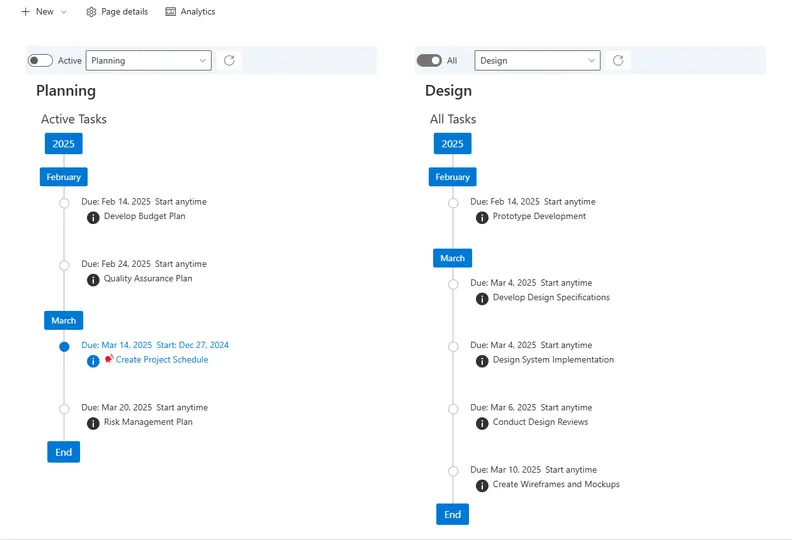
The purpose of this web part sample is to render M365 Group Plan tasks in a timeline ordered by the task due date with tags for years and months in a vertical stack. There are filter options to filter out completed tasks and tender tasks by a plan bucket. A task's detail can be viewed by clicking the (i) icon below the "Due Date" popping up a callout dialog with task details. It Should be noted that a M365 Group Planner can have 0 to 200 plans assigned to M365 Group. The web part needs to be configured in the web part's property pane you must select the plan to be rendered, along with options for the plan bucket and completed task filter. These setting will be used when the web part renders on the page. The configuration of multiple web parts on hte page for different plans and buckets is supported.
Make it your own
Start with the author's setup instructions, explore the implementation, and adapt the pattern to your environment. Sample code stays in its original repository, together with its requirements, license and contribution history.
Read the source documentationKeep exploring
- Build your first SharePoint client-side web part — Client-side web parts are client-side components that run in the context of a SharePoint page. Client-side web parts can be deployed to SharePoint environments that support the SharePoint Framework. You can also use modern JavaScript web frameworks, tools, and libraries to build them.
View 1 source metadata note
- thumbnails[0].alt: Replace generic alt text with a description of the sample.
