
 Preview unavailable
The idea behind the sample
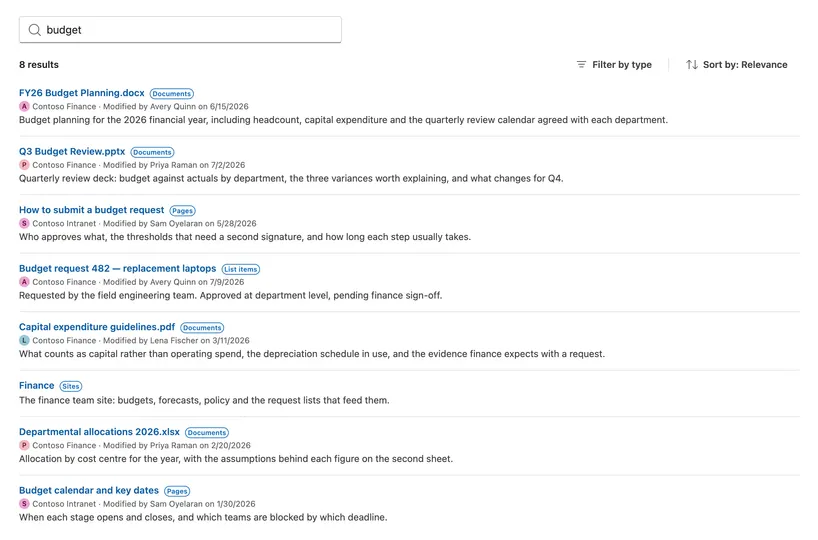
Searches documents, pages, sites and list items through the Microsoft Search API in Microsoft Graph, from one search box, with a single Sites.Read.All permission.
The sample exists for the case where the search that comes with SharePoint does not fit the problem and somebody has to write code: a page where search belongs among the other content, a portal where only certain sites matter, or results that need the organisation's own context on them.
What it demonstrates is the architecture. Query building and result normalisation are pure functions; concurrency lives in one service, with debounce, a short cache, superseded responses discarded and paging; the interface is composed from Fluent UI v9 with the SharePoint theme bridged onto it, and a denied permission, an expired sign-in, throttling and a service error each get a state of their own rather than one generic failure.
Built on SPFx 1.23.2 with the Heft toolchain. 163 unit tests cover the query building, result normalisation, cache, service and search state, including the races between debounce, superseded responses and unmount.
Make it your own
Start with the author's setup instructions, explore the implementation, and adapt the pattern to your environment. Sample code stays in its original repository, together with its requirements, license and contribution history.
Read the source documentationKeep exploring
- Use the Microsoft Search API to query data — How to scope a search request by entity type, page the results and select the properties that come back.
- Use the MSGraphClientV3 to connect to Microsoft Graph — The client the SharePoint Framework provides for calling Microsoft Graph, and how to get hold of it.
- Manage access to Microsoft Entra ID-secured APIs — How an administrator approves the permission a solution requests, and which role is required to approve Microsoft Graph.
- Supporting section backgrounds — The SPFx ThemeProvider service, which is how a web part follows the theme of the section it sits in.
