
 Preview unavailable
The idea behind the sample
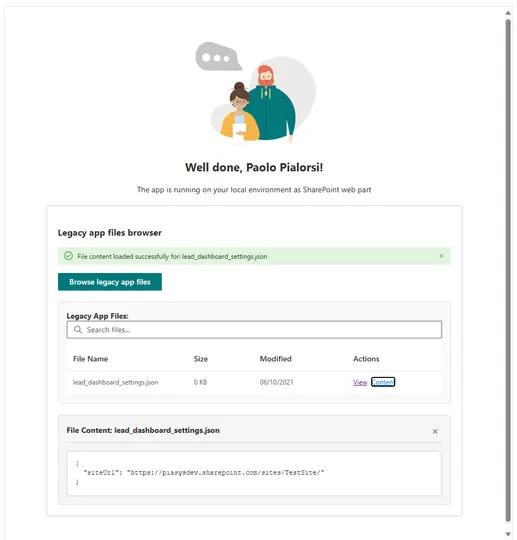
This sample demonstrates how to build a simplified interface for browsing and viewing files stored in the legacy 'SharePoint Online Client Extensibility Web Application Principal' folder using the native SPFx MSGraphClientV3. The web part provides a clean, professional interface for listing legacy app files and viewing their text content directly within the SharePoint page, making it easy to examine and migrate legacy SharePoint application data without custom authentication complexity.
Make it your own
Start with the author's setup instructions, explore the implementation, and adapt the pattern to your environment. Sample code stays in its original repository, together with its requirements, license and contribution history.
Read the source documentationKeep exploring
- Build your first SharePoint client-side web part — Client-side web parts are client-side components that run in the context of a SharePoint page. Client-side web parts can be deployed to SharePoint environments that support the SharePoint Framework. You can also use modern JavaScript web frameworks, tools, and libraries to build them.
- Changes on SharePoint Framework (SPFx) permission grants in Microsoft Entra ID — Article explaining a set of changes to the way API permissions are managed in SharePoint Online by Tenant Administrators in SharePoint Framework (SPFx) starting from March 2025.
- Microsoft Graph Special Folders — Learn how to use Microsoft Graph special folders, such as the 'approot' folder, to store and manage user-specific files and settings in OneDrive for Business in a secure and isolated way.
- Use Microsoft Graph in your SharePoint Framework solution — Learn how to use Microsoft Graph APIs within SharePoint Framework solutions using the native MSGraphClientV3 for seamless authentication and API access.
- Microsoft Graph Files API — Explore the Microsoft Graph Files API to access and manage files stored in OneDrive for Business, including special folders and legacy application data.
View 1 source metadata note
- thumbnails[0].alt: Replace generic alt text with a description of the sample.
