
 Preview unavailable
The idea behind the sample
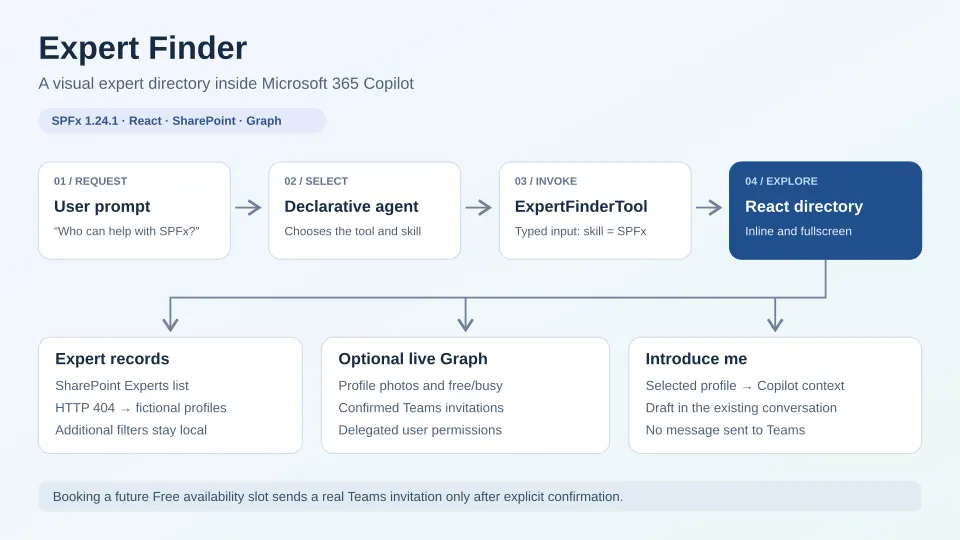
An SPFx 1.24.1 Copilot UX component that renders an expert directory inline and in fullscreen using React, Fluent UI v9 and a SharePoint Experts list.
Explore local filters, delegated Graph photos and free/busy availability, confirmed calendar-backed Teams meetings, and selected-profile introduction drafting in the Copilot conversation.
Learn component-to-Copilot context publishing: Introduce me awaits updateModelContextAsync with a minimal selected-profile snapshot, then uses sendFollowUpMessageAsync to request a draft in the existing conversation.
A missing Experts list selects bundled fictional profiles with local portraits. Mock profiles make no Graph calls, and live meetings require explicit confirmation.
Make it your own
Start with the author's setup instructions, explore the implementation, and adapt the pattern to your environment. Sample code stays in its original repository, together with its requirements, license and contribution history.
Read the source documentationKeep exploring
- Copilot UX components — Build interactive experiences in Microsoft 365 Copilot with the SharePoint Framework.
- Develop and deploy Copilot UX components — Understand component deployment, baseline agent synchronization and updates.
- Provide Copilot with context from your component — Publish selected component state and request user-triggered conversational follow-ups through the Copilot Bridge.
