
Back to column formats
Column formattingSharePoint Online

Highlight non-empty folder

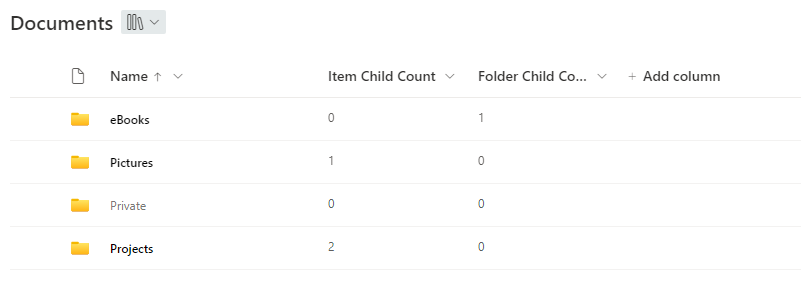
This sample shows how folders can be highlighted or grayed out depending on whether they are empty or not

Highlight non-empty folder formatting preview
Sample preview · View original image

Copy. Apply. Make it yours.

Get this format

2 definitions

Review the requirements below, then paste this JSON into the matching formatting panel. Show me where.

Use your list's internal column names and replace any tenant-specific URLs or flow IDs. Formatting is presentation, not a way to secure data.

Column formatting
Download JSON
{
  "$schema": "https://developer.microsoft.com/json-schemas/sp/v2/column-formatting.schema.json",
  "elmType": "div",
  "attributes": {
    "class": "ms-fontColor-white ms-fontColor-neutralDark--hover"
  },
  "style": {
    "display": "flex",
    "align-items": "center",
    "justify-content": "space-between"
  },
  "children": [
    {
      "elmType": "div",
      "txtContent": "@currentField",
      "customRowAction": {
        "action": "defaultClick"
      },
      "style": {
        "display": "flex",
        "justify-content": "space-between"
      },
      "attributes": {
        "class": "='ms-Link '+if(((indexOf([$ContentTypeId],'0x0120')) == 0), if([$FolderChildCount] > 0 || [$ItemChildCount] > 0 , 'ms-fontColor-black ms-fontWeight-semibold', 'ms-fontColor-gray120'),'ms-fontColor-black')"
      }
    },
    {
      "elmType": "div",
      "style": {
        "display": "flex",
        "align-items": "center",
        "justify-content": "flex-end"
      },
      "children": [
        {
          "elmType": "div",
          "attributes": {
            "iconName": "Share",
            "class": "ms-bgColor-gray60--hover"
          },
          "style": {
            "padding": "7px",
            "font-size": "11pt",
            "cursor": "pointer"
          },
          "customRowAction": {
            "action": "share"
          },
          "customCardProps": {
            "formatter": {
              "elmType": "div",
              "txtContent": "Share this item with other people",
              "style": {
                "font-size": "12px",
                "padding": "3px"
              }
            },
            "openOnEvent": "hover",
            "directionalHint": "bottomCenter",
            "isBeakVisible": true,
            "beakStyle": {
              "backgroundColor": "white"
            }
          }
        },
        {
          "elmType": "div",
          "attributes": {
            "iconName": "FabricFolderLink",
            "class": "ms-bgColor-gray60--hover"
          },
          "style": {
            "padding": "5px",
            "cursor": "text"
          },
          "customCardProps": {
            "formatter": {
              "elmType": "div",
              "txtContent": "To add a shortcut to OneDrive use the button in the command bar",
              "style": {
                "font-size": "12px",
                "padding": "3px"
              }
            },
            "openOnEvent": "hover",
            "directionalHint": "bottomCenter",
            "isBeakVisible": true,
            "beakStyle": {
              "backgroundColor": "white"
            }
          }
        },
        {
          "elmType": "div",
          "attributes": {
            "iconName": "More",
            "class": "ms-bgColor-gray60--hover"
          },
          "style": {
            "padding": "7px",
            "font-size": "11pt",
            "cursor": "pointer"
          },
          "customRowAction": {
            "action": "openContextMenu"
          },
          "customCardProps": {
            "formatter": {
              "elmType": "div",
              "txtContent": "Show more actions for this item",
              "style": {
                "font-size": "12px",
                "padding": "3px"
              }
            },
            "openOnEvent": "hover",
            "directionalHint": "bottomCenter",
            "isBeakVisible": true,
            "beakStyle": {
              "backgroundColor": "white"
            }
          }
        }
      ]
    }
  ]
}

From the contributor

How to use this sample

Summary

This sample shows how folders can be highlighted or grayed out depending on whether they are empty or not. It uses the 'Folder Child Count' and 'Item Child Count' columns to check if a folder is empty or not.
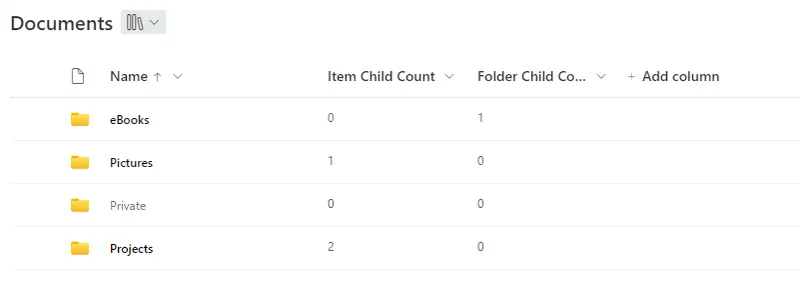
screenshot of the sample

Update

Added a second version (filename-highlight-non-empty-folders-with-buttons.json) which brings back the buttons and functions a vanilla name column has. It's possible to share the folder and to open the context menu.

Unfortunately, customRowAction doesn't support creating a shortcut to OneDrive yet. Therefore the 'OneDrive' button is only a placeholder which points out an alternative to create a shortcut. Clicking the button itself has no effect.
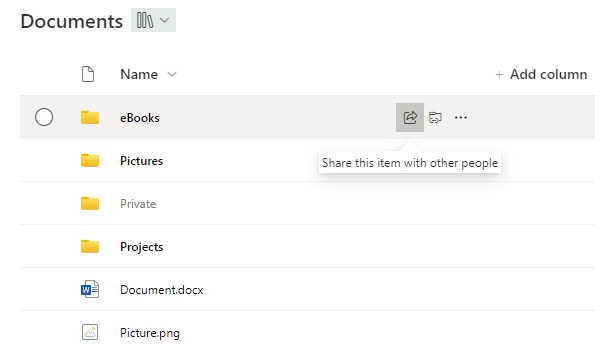
screenshot of the sample with hidden columns

Note - The sample can be easily adjusted to support only one of the columns. Just delete or replace the '||' and the according column in the json file

View requirements

  • This format can be applied to Name column in a document library

Sample

Solution Author(s)
filename-highlight-non-empty-folders.json Moritz Lickert
filename-highlight-non-empty-folders-with-buttons.json Moritz Lickert

Version history

Version Date Comments
1.0 October 6, 2023 Initial release
2.0 January 24, 2024 Included 2nd version with Buttons

Disclaimer

THIS CODE IS PROVIDED AS IS WITHOUT WARRANTY OF ANY KIND, EITHER EXPRESS OR IMPLIED, INCLUDING ANY IMPLIED WARRANTIES OF FITNESS FOR A PARTICULAR PURPOSE, MERCHANTABILITY, OR NON-INFRINGEMENT.