
From the contributor
How to use this sample
Summary
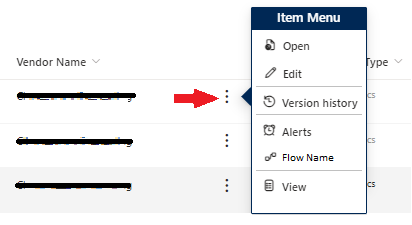
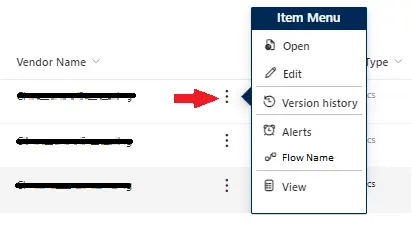
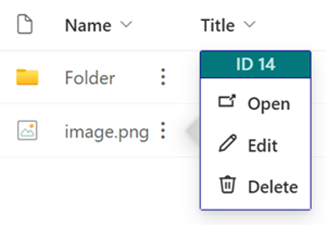
The sample is a simple version of the current context menu. It allows you to customize the menu options and link to the most user of visited links. You can add links to Flows, web pages, or other items specific the the item it is on. It can be added to any customizable field, but adding it to the Title field helps eliminate confusion.
Setting Up for Sample Usage
To use this sample, you need to modify __LIST ID__ and __FLOW ID__ in generic-context-menu.json according to your environment. __LIST ID__" is specified on lines 178 and 224, and __FLOW ID__ is specified on line 264.
For
__LIST ID__, set the value between %7B and %7D after List= in the URL of the list settings screen.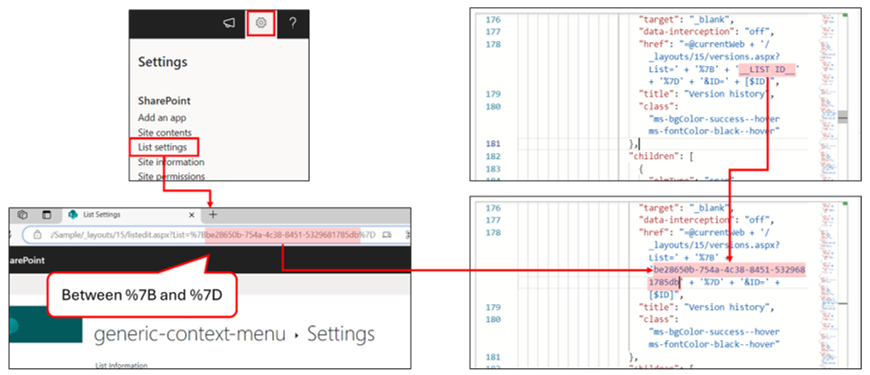
For
__FLOW ID__, get the flow identifier from the flow screen you want to execute and set that. (Reference: Advanced formatting concepts - Create a button to launch a Flow)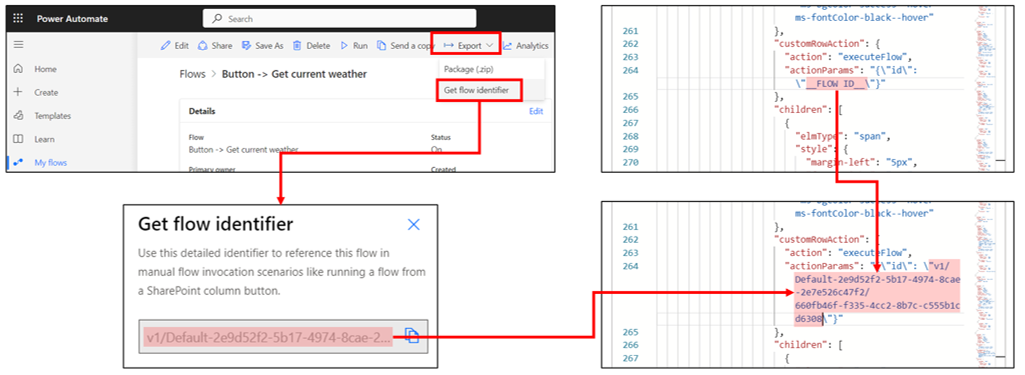
View requirements
This format can be applied to any column type.
Sample
| Solution | Author(s) |
|---|---|
| generic-context-menu.json | Larry Pfaff |
| generic-context-menu-minimal.json | Watana |
Version history
| Version | Date | Comments |
|---|---|---|
| 1.0 | April 2, 2024 | Initial release |
| 1.1 | February 17, 2025 | Added generic-context-menu-minimal.json |
Disclaimer
THIS CODE IS PROVIDED AS IS WITHOUT WARRANTY OF ANY KIND, EITHER EXPRESS OR IMPLIED, INCLUDING ANY IMPLIED WARRANTIES OF FITNESS FOR A PARTICULAR PURPOSE, MERCHANTABILITY, OR NON-INFRINGEMENT.