

From the contributor
How to use this sample
Summary
The Fluent UI icons are easy to use in column formatting by simply specifying the name in the iconName attribute. However, the available selection of icons may not always meet your needs.
Fortunately, you can use inline SVG elements with custom paths. This means you can use icons from sources like Font Awesome that provide SVG versions of their icons!
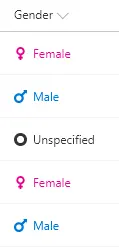
This sample uses the value of the current field to show a custom icon and color. The icon is specified through the d attribute of the path element. The paths have been scaled and extracted from Font Awesome icons. This sample uses gender and provides a default display when neither Male nor Female is selected.
| Value | Icon | Color |
|---|---|---|
| Female | venus | #e3008c |
| Male | mars | #0078d7 |
| DEFAULT | genderless | #333333 |
The pattern of using nested conditional operators with equality operators is the column formatting equivalent of a switch statement. The same logic is used 3 times in this sample. First for the svg's fill style attribute to determine the color of the icon. Next, it is used for the d attribute of the svg element's path element to change the icon. Finally, it is used for the span's color style attribute to ensure the text color is also changed.
View requirements
- This format can be applied to a text/choice column and uses the values Female, Male, or anything else
Sample
| Solution | Author(s) |
|---|---|
| generic-svgicon-format.json | Chris Kent |
Version history
| Version | Date | Comments |
|---|---|---|
| 1.0 | March 26, 2018 | Initial release |
| 1.1 | August 20, 2018 | Switched to Excel-style expressions |
Disclaimer
THIS CODE IS PROVIDED AS IS WITHOUT WARRANTY OF ANY KIND, EITHER EXPRESS OR IMPLIED, INCLUDING ANY IMPLIED WARRANTIES OF FITNESS FOR A PARTICULAR PURPOSE, MERCHANTABILITY, OR NON-INFRINGEMENT.
Additional notes
The icons used were adapted from Font Awesome which is available under the Creative Commons Attribution 4.0 International license.
An additional version using Abstract Tree Syntax (AST) is also provided for environments where the Excel-style expressions are not supported.