
Back to column formats
Column formattingSharePoint Online

Multi-Choice Icons

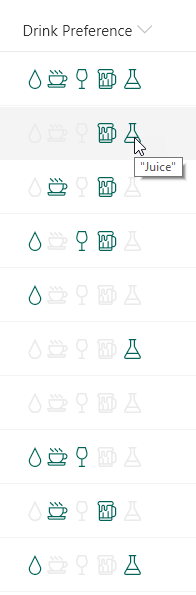
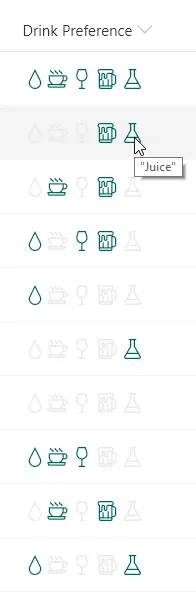
This sample demonstrates using the indexOf and join functions (O365 only) to test if a multi-select choice field has a selected choice. Providing icons of the known choices and applying themed colors based on if the given choice is selected or not creates an intuitive, easy to understand visualization that doesn't suffer from varying item order or text formatting issues.
Multi-Choice Icons formatting preview
Sample preview · View original image

Copy. Apply. Make it yours.

Get this format

1 definition

Review the requirements below, then paste this JSON into the matching formatting panel. Show me where.

Use your list's internal column names and replace any tenant-specific URLs or flow IDs. Formatting is presentation, not a way to secure data.

Column formatting
Download JSON
{
  "$schema": "https://developer.microsoft.com/json-schemas/sp/v2/column-formatting.schema.json",
  "elmType": "div",
  "style": {
    "font-size": "16px"
  },
  "children": [
    {
      "elmType": "span",
      "attributes": {
        "title": "Water",
        "iconName": "Precipitation",
        "class": "='ms-fontColor-' + if(indexOf(join(@currentField,''),'Water') != -1, 'themeDark', 'neutralLight')"
      },
      "style": {
        "padding": "0 2px"
      }
    },
    {
      "elmType": "span",
      "attributes": {
        "title": "Coffee",
        "iconName": "CoffeeScript",
        "class": "='ms-fontColor-' + if(indexOf(join(@currentField,''),'Coffee') != -1, 'themeDark', 'neutralLight')"
      },
      "style": {
        "padding": "0 2px 0 0"
      }
    },
    {
      "elmType": "span",
      "attributes": {
        "title": "Wine",
        "iconName": "Wines",
        "class": "='ms-fontColor-' + if(indexOf(join(@currentField,''),'Wine') != -1, 'themeDark', 'neutralLight')"
      },
      "style": {
        "padding": "0 2px"
      }
    },
    {
      "elmType": "span",
      "attributes": {
        "title": "Beer",
        "iconName": "BeerMug",
        "class": "='ms-fontColor-' + if(indexOf(join(@currentField,''),'Beer') != -1, 'themeDark', 'neutralLight')"
      },
      "style": {
        "padding": "0 2px"
      }
    },
    {
      "elmType": "span",
      "attributes": {
        "title": "\"Juice\"",
        "iconName": "TestBeaker",
        "class": "='ms-fontColor-' + if(indexOf(join(@currentField,''),'\"Juice\"') != -1, 'themeDark', 'neutralLight')"
      },
      "style": {
        "padding": "0 2px"
      }
    }
  ]
}

From the contributor

How to use this sample

Summary

This sample demonstrates using the indexOf and join functions (O365 only) to test if a multi-select choice field has a selected choice. Providing icons of the known choices and applying themed colors based on if the given choice is selected or not creates an intuitive, easy to understand visualization that doesn't suffer from varying item order or text formatting issues.

screenshot of the sample

This sample also demonstrates how to use double-quotes within your values. To include double quotes, you'll need to escape them using standard JSON syntax where you place a slash in front of the double quote: "\"Juice\""

The indexOf function returns the index where a given value is found within a string (indexes start at 0). If the value is not found in the text, the result is -1.

To evaluate if text contains a given value, we want to know if the index of the value within the string is anything but -1. So we can use the function like this:

"=if(indexOf(@currentField,'dog') != -1, 'Yes', 'No')"

Some example values and the result using the function above:

@currentField result
A dog Yes
a Dog No
dog's are nice Yes
bark dog bark Yes

Notice that the indexOf function is case-sensitive. You can do a case-insensitive check by adding the toLowerCase function like this:

"=if(indexOf(toLowerCase(@currentField),'dog') != -1, 'Yes', 'No')"

When it comes to an array of values (such as a multi-select choice or person column) we can't use indexOf directly because it expects a string value. Using it directly on multi-select fields will always result in -1.

We can use the join or toString functions on the value first and then nest those within the indexOf call:

"=if(indexOf(join(@currentField,''),'dog') != -1, 'Yes', 'No')

View requirements

  • This format can be applied to a Multi-Select Choice column
  • This format uses operators only available in SharePoint Online and cannot be used in SharePoint 2019

Sample Choice Values

  • Water
  • Coffee
  • Wine
  • Beer
  • "Juice"

Sample

Solution Author(s)
multi-choice-icons.json Chris Kent

Version history

Version Date Comments
1.0 February 5, 2019 Initial release

Disclaimer

THIS CODE IS PROVIDED AS IS WITHOUT WARRANTY OF ANY KIND, EITHER EXPRESS OR IMPLIED, INCLUDING ANY IMPLIED WARRANTIES OF FITNESS FOR A PARTICULAR PURPOSE, MERCHANTABILITY, OR NON-INFRINGEMENT.


Additional notes

The indexOf and join functions are not available in SharePoint 2019