
Back to column formats
Column formattingSharePoint 2019SharePoint Online

Quiz Results with Emoji

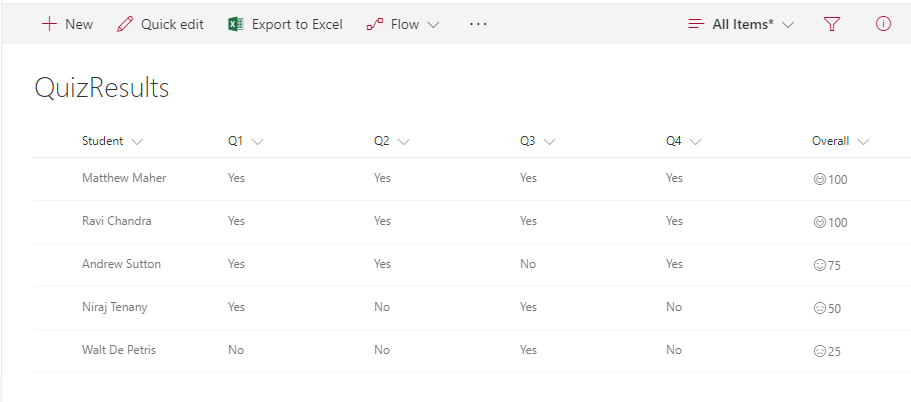
This allows teachers to show smiley faces next to quiz results similar to how they do it on paper. The number (based on a 0-100 score) will indicate if its a smiley or frown, which come from the Offie UI Fabric Icon set. If the number is above 90 the student gets a super smiley (`Emoji`), above 75 regular smile (`Emoji2`), above 60 neutral smiley (`EmojiNeutral`), below 60 a frown (`EmojiDisappointed`), and anything else gets an `Unknown`.

Quiz Results with Emoji formatting preview
Sample preview · View original image

Copy. Apply. Make it yours.

Get this format

2 definitions

Review the requirements below, then paste this JSON into the matching formatting panel. Show me where.

Use your list's internal column names and replace any tenant-specific URLs or flow IDs. Formatting is presentation, not a way to secure data.

Column formatting
Download JSON
{
  "$schema": "https://developer.microsoft.com/json-schemas/sp/v2/column-formatting.schema.json",
  "elmType": "div",
  "children": [
    {
      "elmType": "span",
      "style": {
        "display": "inline-block",
        "padding": "0 2px"
      },
      "attributes": {
        "iconName": "=if(@currentField >= 90, 'Emoji', if(@currentField >= 75, 'Emoji2', if(@currentField >= 60, 'EmojiNeutral', if(@currentField >= 0, 'EmojiDisappointed', 'Unknown'))))"
      }
    },
    {
      "elmType": "span",
      "txtContent": "@currentField"
    }
  ]
}

From the contributor

How to use this sample

Summary

This allows teachers to show smiley faces next to quiz results similar to how they do it on paper. The number (based on a 0-100 score) will indicate if its a smiley or frown, which come from the Offie UI Fabric Icon set. If the number is above 90 the student gets a super smiley (Emoji), above 75 regular smile (Emoji2), above 60 neutral smiley (EmojiNeutral), below 60 a frown (EmojiDisappointed), and anything else gets an Unknown.
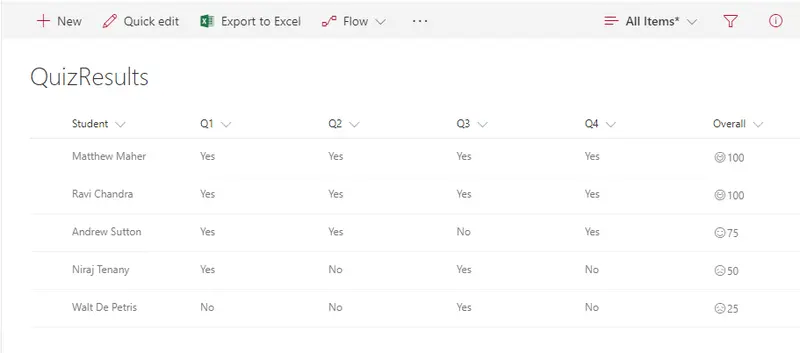
screenshot of the sample

View requirements

  • This format can be applied to a Number column

Sample

Solution Author(s)
number-quiz-smiley-face.json Matt Maher

Version history

Version Date Comments
1.0 December 1, 2017 Initial release
1.1 August 18, 2018 Switched to Excel-style expression

Disclaimer

THIS CODE IS PROVIDED AS IS WITHOUT WARRANTY OF ANY KIND, EITHER EXPRESS OR IMPLIED, INCLUDING ANY IMPLIED WARRANTIES OF FITNESS FOR A PARTICULAR PURPOSE, MERCHANTABILITY, OR NON-INFRINGEMENT.


Additional notes

This sample uses icons from the Office UI Fabric

An additional version using Abstract Tree Syntax (AST) is also provided for environments where the Excel-style expressions are not supported.