
From the contributor
How to use this sample
Summary
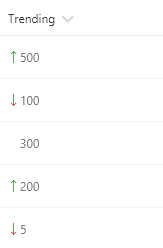
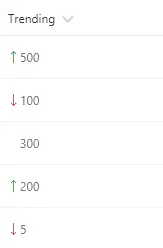
These formats rely on two number fields, Before and After, for which the values can be compared. They show the appropriate trending icon next to the value of the After field, depending on that field's value compared to the value in Before. The sp-field-trending--up class is used when After's value is higher; the sp-field-trending--down class is used when After's value is lower. No icon is shown when they are equal (padding is added to keep consistent alignment).
Trending Icons (number-trending-icon.json)
| Condition | Class | Icon | Style |
|---|---|---|---|
| After > Before | sp-field-trending--up | SortUp | padding-left:0 |
| After < Before | sp-field-trending--down | SortDown | padding-left:0 |
| After = Before | padding-left:12px |
Trending Icons with Value Difference (number-trending-icon-with-difference.json)
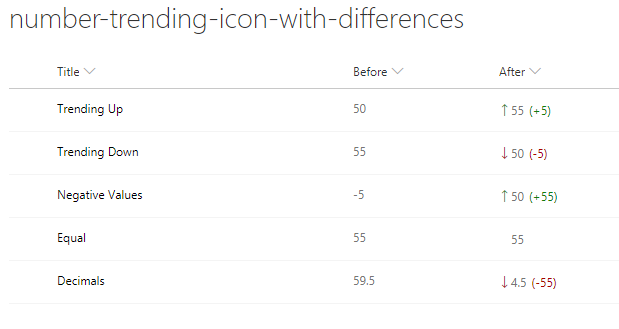
This format also displays the difference in value between the Before and After values. If the After value is larger then the Before value, the numeric value difference will be displayed with a (+XX). If the After value is smaller then the Before value, the numeric value difference will be displayed with a (-XX).
The difference values are in a <span>, separate from the After <span>, allowing for unique properties to be applied without altering the After value.
Difference Calculation
| Condition | Expression | Class |
|---|---|---|
| After > Before | After - Before | sp-field-trending--up |
| After < Before | Before - After | sp-field-trending--down |
| After = Before | No Expression Performed |
View requirements
- This format can be applied to any column
- This format expects a Number column with an internal name of
After - This format expects a Number column with an internal name of
Before
Sample
| Solution | Author(s) |
|---|---|
| number-trending-icon.json | SharePoint Team |
| number-trending-icon-with-difference.json | David Warner II |
Version history
| Version | Date | Comments |
|---|---|---|
| 1.0 | November 2, 2017 | Initial release |
| 1.1 | March 20, 2018 | Added equal value styling |
| 1.2 | June 12, 2018 | With Difference format added |
| 1.3 | August 20, 2018 | Updated to use Excel-style expressions |
Disclaimer
THIS CODE IS PROVIDED AS IS WITHOUT WARRANTY OF ANY KIND, EITHER EXPRESS OR IMPLIED, INCLUDING ANY IMPLIED WARRANTIES OF FITNESS FOR A PARTICULAR PURPOSE, MERCHANTABILITY, OR NON-INFRINGEMENT.
Additional notes
This sample is also covered in the main documentation around Column Formatting.
A similar template is also included in the Column Formatter webpart.
Additional versions using Abstract Tree Syntax (AST) are also provided for environments where the Excel-style expressions are not supported.