
From the contributor
How to use this sample
Summary
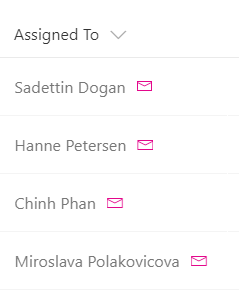
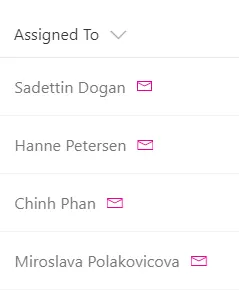
You can use column formatting to render quick action links next to fields. This sample, intended for a person field, renders two elements inside the parent <div /> element:
- A
<span />element that contains the person’s display name. - An
<a />element that opens a mailto: link that creates an email with a subject and body populated dynamically via item metadata. The<a />element is styled using thesp-field-quickActionsclass and uses theiconNameattribute to make it a clickable email icon.
View requirements
- This format expects to be applied to a Person column
Sample
| Solution | Author(s) |
|---|---|
| person-mailto.json | SharePoint Team |
Version history
| Version | Date | Comments |
|---|---|---|
| 1.0 | November 2, 2017 | Initial release |
| 1.1 | August 18, 2018 | Changed from generic-action-button to person-mailto and switched to Excel-style expressions |
Disclaimer
THIS CODE IS PROVIDED AS IS WITHOUT WARRANTY OF ANY KIND, EITHER EXPRESS OR IMPLIED, INCLUDING ANY IMPLIED WARRANTIES OF FITNESS FOR A PARTICULAR PURPOSE, MERCHANTABILITY, OR NON-INFRINGEMENT.
Additional notes
This sample is also covered in the main documentation around Column Formatting
A similar wizard is also included in the Column Formatter webpart that allows full customization.
An additional version using Abstract Tree Syntax (AST) is also provided for environments where the Excel-style expressions are not supported.