
From the contributor
How to use this sample
Summary
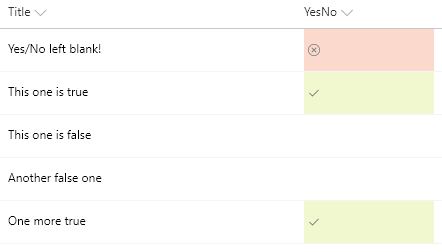
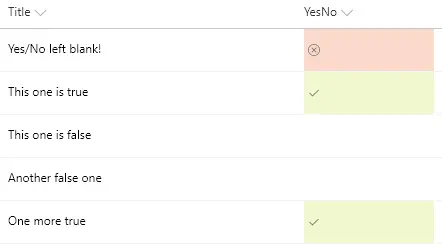
You can apply conditional formatting to Yes/No fields. This sample applies different classes depending on whether the value of the field is Yes (true), No (false), or Blank. This example applies one of the column formatting predefined classes (sp-field-severity--good,sp-field-severity--low, or sp-field-severity--blocked) to the root <div /> based on the field's value. This is what determines the element's background color. A class of ms-fontColor-neutralSecondary is always applied to ensure the text color is legible in both light and dark themes. Then, it outputs a <span /> element with an iconName attribute that shows a Fluent UI icon inside that element.
| Value | Class | Icon |
|---|---|---|
| Yes | sp-field-severity--good | Checkmark |
| No | sp-field-severity--low | |
| Blank | sp-field-severity--blocked | ErrorBadge |
Note: the
sp-field-severity--lowclass has a transparent background and since no icon is shown, it is expected that false values will appear to have no display
View requirements
- This format can be applied to a Yes/No column
Sample
| Solution | Author(s) |
|---|---|
| yesno-checkmark-format.json | Aaron Miao |
Version history
| Version | Date | Comments |
|---|---|---|
| 1.0 | November 22, 2017 | Initial release |
| 1.1 | March 22, 2018 | Simplified logic and added blank value icon |
| 1.2 | August 20, 2018 | Switched to Excel-style expression and added theme fontColor |
Disclaimer
THIS CODE IS PROVIDED AS IS WITHOUT WARRANTY OF ANY KIND, EITHER EXPRESS OR IMPLIED, INCLUDING ANY IMPLIED WARRANTIES OF FITNESS FOR A PARTICULAR PURPOSE, MERCHANTABILITY, OR NON-INFRINGEMENT.
Additional notes
An additional version using Abstract Tree Syntax (AST) is also provided for environments where the Excel-style expressions are not supported.