

From the contributor
How to use this sample
Summary
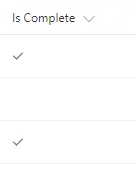
This example displays a check mark when the value of a Yes/No column is equal to Yes. This field uses the iconName attribute to display the CheckMark Office UI Fabric predefined icon.
View requirements
- This format can be applied to a Yes/No column
Sample
| Solution | Author(s) |
|---|---|
| yesno-checkmark.json | Travis Lingenfelder |
Version history
| Version | Date | Comments |
|---|---|---|
| 1.0 | November 27, 2017 | Initial release |
| 1.1 | March 22, 2018 | Simplified logic |
| 1.2 | August 20, 2018 | Switched to Excel-style expression |
Disclaimer
THIS CODE IS PROVIDED AS IS WITHOUT WARRANTY OF ANY KIND, EITHER EXPRESS OR IMPLIED, INCLUDING ANY IMPLIED WARRANTIES OF FITNESS FOR A PARTICULAR PURPOSE, MERCHANTABILITY, OR NON-INFRINGEMENT.
Additional notes
For more information on using this custom formatting see the article Check Mark SharePoint Modern List Column Format
An additional version using Abstract Tree Syntax (AST) is also provided for environments where the Excel-style expressions are not supported.