
Back to view formats
View formattingSharePoint Online

Book Template Card Formatter

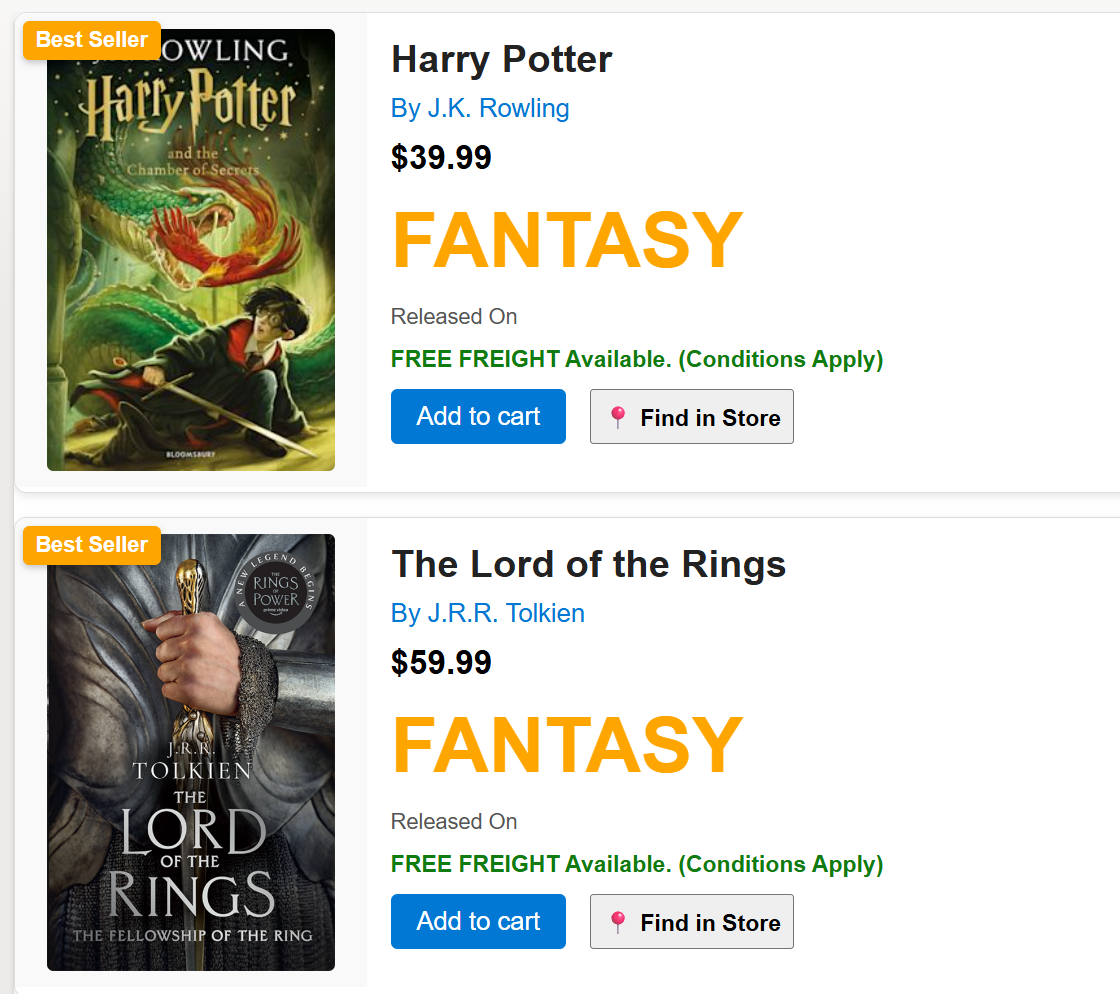
This SharePoint JSON view formatting sample transforms your list items into visually rich book cards.

Book Template Card Formatter formatting preview
Sample preview ยท View original image

Copy. Apply. Make it yours.

Get this format

1 definition

Review the requirements below, then paste this JSON into the matching formatting panel. Show me where.

Use your list's internal column names and replace any tenant-specific URLs or flow IDs. Formatting is presentation, not a way to secure data.

View formatting
Download JSON
{
  "$schema": "https://developer.microsoft.com/json-schemas/sp/v2/view-formatting.schema.json",
  "hideSelection": true,
  "hideColumnHeader": true,
  "rowFormatter": {
    "elmType": "div",
    "style": {
      "display": "flex",
      "flex-direction": "row",
      "align-items": "flex-start",
      "background-color": "#fff",
      "border": "1px solid #ddd",
      "border-radius": "8px",
      "overflow": "hidden",
      "font-family": "Arial, sans-serif",
      "margin-bottom": "15px",
      "box-shadow": "0 2px 6px rgba(0,0,0,0.1)"
    },
    "children": [
      {
        "elmType": "div",
        "style": {
          "width": "200px",
          "background-color": "#f9f9f9",
          "display": "flex",
          "align-items": "center",
          "justify-content": "center",
          "padding": "10px",
          "position": "relative"
        },
        "children": [
          {
            "elmType": "img",
            "attributes": {
              "src": "[$BookCoverUrl]"
            },
            "style": {
              "width": "180px",
              "height": "auto",
              "object-fit": "contain",
              "border-radius": "4px"
            }
          },
          {
            "elmType": "div",
            "style": {
              "position": "absolute",
              "top": "5px",
              "left": "5px",
              "background-color": "orange",
              "color": "white",
              "padding": "4px 8px",
              "border-radius": "4px",
              "font-size": "0.85rem",
              "font-weight": "bold",
              "box-shadow": "0 2px 4px rgba(0,0,0,0.2)",
              "display": "=if([$IsBestSeller] == true, 'block', 'none')"
            },
            "txtContent": "Best Seller"
          }
        ]
      },
      {
        "elmType": "div",
        "style": {
          "flex-grow": "1",
          "padding": "15px",
          "display": "flex",
          "flex-direction": "column"
        },
        "children": [
          {
            "elmType": "div",
            "style": {
              "font-size": "1.5rem",
              "font-weight": "bold",
              "color": "#222",
              "margin-bottom": "8px"
            },
            "txtContent": "[$Title]"
          },
          {
            "elmType": "div",
            "style": {
              "font-size": "1rem",
              "color": "#0078d4",
              "margin-bottom": "10px"
            },
            "txtContent": "= 'By ' + [$BookAuthor]"
          },
          {
            "elmType": "div",
            "style": {
              "font-size": "1.3rem",
              "font-weight": "bold",
              "color": "#000",
              "margin-bottom": "12px"
            },
            "txtContent": "= '$' + [$Price]"
          },
          {
            "elmType": "div",
            "style": {
              "color": "orange",
              "width": "200px",
              "border": "none",
              "border-radius": "5px",
              "font-size": "3rem",
              "font-weight": "bold",
              "cursor": "pointer",
              "margin-bottom": "12px",
              "text-transform": "uppercase"
            },
            "txtContent": "[$Category]"
          },
          {
            "elmType": "div",
            "style": {
              "font-size": "0.85rem",
              "color": "#555",
              "margin-bottom": "10px"
            },
            "txtContent": "= 'Released On ' + [$ReleaseDate.displayValue]"
          },
          {
            "elmType": "div",
            "style": {
              "font-size": "0.9rem",
              "color": "#107c10",
              "font-weight": "bold",
              "margin-bottom": "10px"
            },
            "txtContent": "=if([$Price] > 19.99, 'FREE FREIGHT Available. (Conditions Apply)', 'Shipping: $10')"
          },
          {
            "elmType": "div",
            "style": {
              "display": "flex",
              "gap": "15px",
              "margin-bottom": "15px"
            },
            "children": [
              {
                "elmType": "button",
                "customRowAction": {
                  "action": "setValue",
                  "actionInput": {
                    "AddToCart": "=if([$AddToCart] == true, false, true)"
                  }
                },
                "txtContent": "=if([$AddToCart] == true, 'Remove from cart', 'Add to cart')",
                "style": {
                  "background-color": "#0078d4",
                  "color": "#ffffff",
                  "border": "none",
                  "border-radius": "4px",
                  "padding": "8px 16px",
                  "font-size": "16px",
                  "cursor": "pointer"
                }
              },
              {
                "elmType": "a",
                "attributes": {
                  "href": "[$FindInStoreUrl]",
                  "class": "ms-bgColor-gray40 ms-bgColor-gray60--hover"
                },
                "style": {
                  "font-size": "0.9rem",
                  "color": "#000",
                  "text-decoration": "none",
                  "font-weight": "bold",
                  "cursor": "pointer",
                  "display": "flex",
                  "align-items": "center",
                  "padding": "0px 10px",
                  "border": "1px solid"
                },
                "txtContent": "๐Ÿ“ Find in Store"
              }
            ]
          },
          {
            "elmType": "div",
            "style": {
              "font-size": "0.9rem",
              "color": "#333",
              "line-height": "1.4"
            },
            "txtContent": "[$BookAbstract]"
          }
        ]
      }
    ]
  }
}

From the contributor

How to use this sample

Summary

This SharePoint JSON view formatting sample transforms your list items into visually rich book cards. Each card displays a book cover, title, author, price, category, release date, best seller badge, and more. It is ideal for book catalogues, libraries, or online bookstore lists.
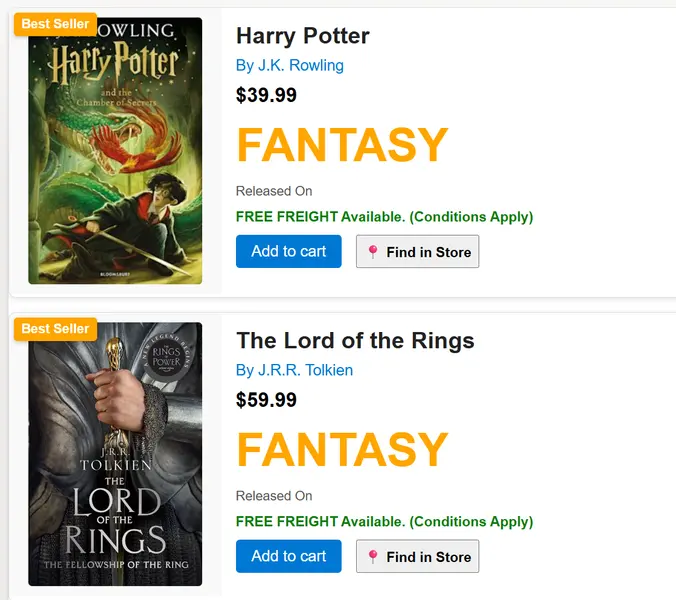
screenshot of the sample

View requirements

SharePoint List Columns

Column Name Type Description
Title Single line of text Book title
BookAuthor Single line of text Author of the book
BookAbstract Multiple lines of text Short extract or summary of the book
Category Single line of text Book category (e.g., Fantasy, Classic)
Price Single line of text Price of the book
BookCoverUrl Single line of text URL to the book cover image
IsBestSeller Yes/No Indicates if the book is a best seller
ReleaseDate Date and Time Book release date
FindInStoreUrl Single line of text Link to find the book in a store (e.g., map)
AddToCart Yes/No Add to cart flag

[!NOTE]

  • When using an external image URL in the BookCoverUrl column, the image may not be displayed. This happens when attempting to retrieve images from a domain that is not allowed. you'll need to configure the HTML Field Security settings. For more details, refer to Allow or restrict the ability to embed content on SharePoint pages.
  • A PowerShell Script is provided in the assets folder to provision the list and add sample data.
  • This script uses PnP PowerShell and requires an environment ready for PnP PowerShell.

Sample

Solution Author(s)
book-template.json Sudeep Ghatak

Version history

Version Date Comments
1.0 Aug 31, 2025 Initial release

Disclaimer

THIS CODE IS PROVIDED AS IS WITHOUT WARRANTY OF ANY KIND, EITHER EXPRESS OR IMPLIED, INCLUDING ANY IMPLIED WARRANTIES OF FITNESS FOR A PARTICULAR PURPOSE, MERCHANTABILITY, OR NON-INFRINGEMENT.


Additional notes

  • This sample includes a visually rich card layout for books, with best seller highlighting and store location links.