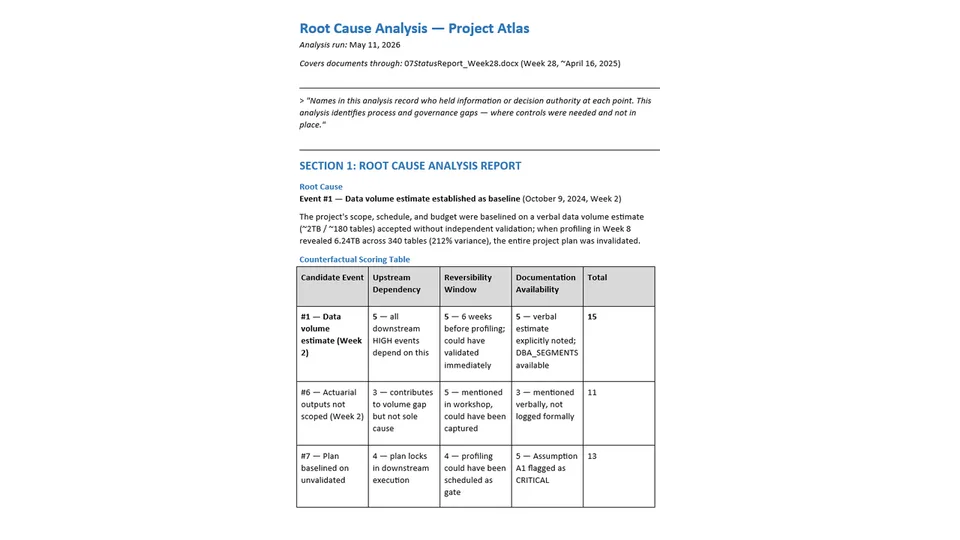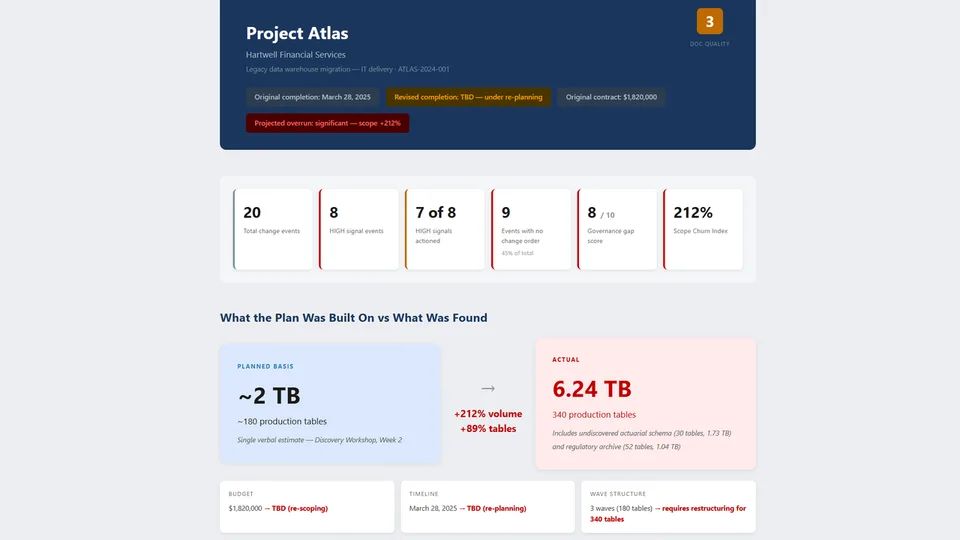
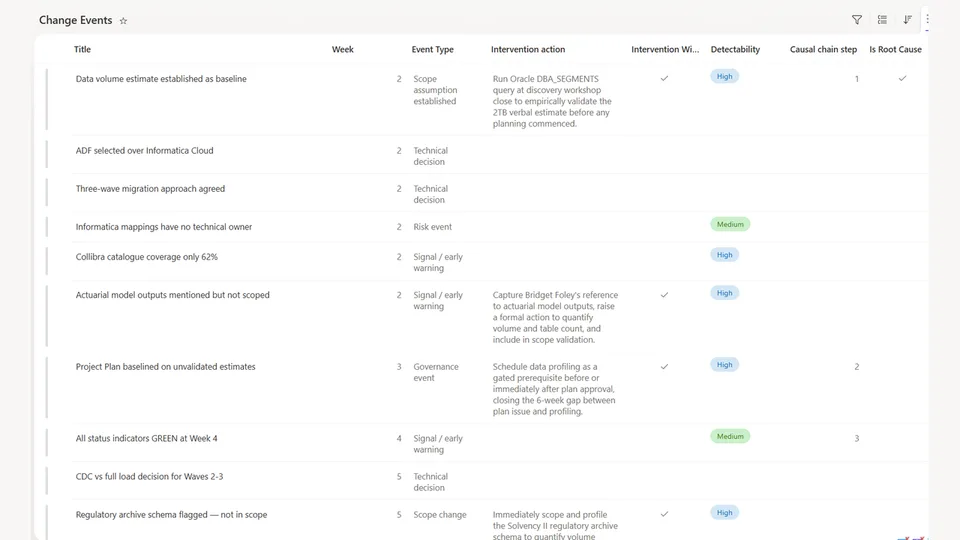
Change Event Extraction is the first stage of the Project Intelligence Engine. It reads every document in the Project Documents library — status reports, workshop notes, change requests, risk logs, and appendices — and extracts every event that affected, or should have affected, the project's scope, timeline, budget, or technical approach.
Each event is written to a Change Events SharePoint list across 16 structured fields, categorized by type and signal strength, with governance flags for missing change orders, approvers, and rationale. The output is the factual foundation that the Root Cause Analysis and Timeline Dashboard skills build on.
Reads every document in a SharePoint project library and writes a complete, structured change-event log to a SharePoint list — the factual foundation of the Project Intelligence Engine.
What you get
- A fully populated Change Events SharePoint list — one row per event, 16 structured fields
- Every event categorized (scope, risk, governance, budget, schedule, technical, signal) with HIGH/MEDIUM/LOW signal strength
- Headline metrics — HIGH-signal events, governance gap score, and Scope Churn Index
- A Missing Information summary of the documentation gaps a well-run engagement would not have
- Three summary levels (ultra-short, get-me-up-to-speed, detailed) plus a Project Intelligence Dashboard
Prerequisites — site setup
Before the first run, create a Change Events SharePoint list on the project site with the columns below. This one list is shared by all three Project Intelligence Engine skills — the first 16 columns are populated by this skill, and the last 7 are written back by Root Cause Analysis — so set it up once, up front.
| Column | Type | Populated by |
|---|---|---|
| Event # | Number (unique) | Change Event Extraction |
| Date | Single line of text | Change Event Extraction |
| Week | Number | Change Event Extraction |
| Event Type | Choice | Change Event Extraction |
| Source Document | Single line of text | Change Event Extraction |
| Title | Single line of text (item title) | Change Event Extraction |
| Description | Multiple lines of text | Change Event Extraction |
| Parameter Changed | Single line of text (store as before → after) |
Change Event Extraction |
| Reason / Rationale | Multiple lines of text | Change Event Extraction |
| Raised By | Single line of text | Change Event Extraction |
| Approved / Acknowledged By | Single line of text | Change Event Extraction |
| Action Taken | Single line of text | Change Event Extraction |
| Missing Information | Multiple lines of text | Change Event Extraction |
| Impact | Multiple lines of text | Change Event Extraction |
| Change Order Raised | Choice (Yes / No / Pending / N/A) | Change Event Extraction |
| Signal Strength | Choice (HIGH / MEDIUM / LOW) | Change Event Extraction |
| Is Root Cause | Yes/No | Root Cause Analysis |
| Root Cause Statement | Multiple lines of text | Root Cause Analysis |
| Causal Chain Step | Number | Root Cause Analysis |
| Intervention Window | Yes/No | Root Cause Analysis |
| Intervention Action | Multiple lines of text | Root Cause Analysis |
| Early Warning Signal | Yes/No | Root Cause Analysis |
| Detectability | Choice (HIGH / MEDIUM / LOW) | Root Cause Analysis |
The skill also reads and writes a SHAREPOINT.md site context file that persists results across sessions — it is created and maintained at runtime, so no setup is required for it.
SharePoint Skill
| Solution | Author(s) |
|---|---|
| project-intelligence-change-event-extraction | Matt Wolodarsky | GitHub |
Version history
| Version | Date | Comments |
|---|---|---|
| 1.0 | July 2026 | Initial Release |
Disclaimer
THIS CODE IS PROVIDED AS IS WITHOUT WARRANTY OF ANY KIND, EITHER EXPRESS OR IMPLIED, INCLUDING ANY IMPLIED WARRANTIES OF FITNESS FOR A PARTICULAR PURPOSE, MERCHANTABILITY, OR NON-INFRINGEMENT.
Package
Ready to install
The ZIP contains only the upload-ready inner skill folder.
6f06cf23701dc387f3d8abcb452aba42cdd2da61c9efe3fe45dea2997310b824View SKILL.md
---
name: project-intelligence-change-event-extraction
description: >
  Reads every document in a SharePoint project library and compiles a complete, structured record of every change event — scope assumptions, scope changes, technical decisions, client requests, risks, budget and schedule events, governance events, and early-warning signals — writing each to the Change Events SharePoint list with signal strength and governance flags. Use when the user asks to "extract change events from the project", "build the project change log", "find the signals in these project documents", "populate the Change Events list", or "start the Project Intelligence Engine on this site". First stage of the Project Intelligence Engine; its output feeds Root Cause Analysis.
---

# Change Event Extraction

## Purpose
Read every document in this project library and compile a complete, structured record of every event that affected — or should have affected — the project's scope, timeline, budget, or technical approach. This is the factual foundation for all subsequent analysis. Be thorough: a signal buried in a footnote is as important as a formal change request.

---

## Step 1 — Read all documents
Process ALL documents in the Project Documents library. Note each document's title, author (if stated), and date. Do not skip or skim any document. Read attachments, appendices, and meeting notes as carefully as the main body.

---

## Step 2 — Identify change events
For each document, identify every instance of the following event types:

| Event type | What qualifies |
|---|---|
| **Scope assumption established** | A baseline, estimate, or assumption that the project plan, budget, or timeline depends on — especially if unvalidated |
| **Scope change** | Addition, reduction, or modification to agreed deliverables, data, or work |
| **Technical decision** | Architecture or technology choice made or changed during delivery |
| **Client request** | Any instruction or request from the client affecting scope, approach, schedule, or budget — formal or informal |
| **Risk event** | Risk identified, rating changed, risk materialising, risk dismissed, or risk downgraded below its true severity |
| **Budget event** | Cost variance, overrun, approved financial change, or budget assumption set |
| **Schedule event** | Milestone slippage, date change, sprint replan, or timeline extension |
| **Governance event** | Change request raised, steering committee decision, approval, escalation, or missed change control step |
| **Signal / early warning** | Any observation, comment, or flagged item that indicated potential future risk — even if not formally escalated |

---

## Step 3 — Extract all fields for every event

For each event, extract every field in the table below. If a field is not documented, state "Not documented" — do not omit the field or leave it blank.

| Field | What to capture | If not available |
|---|---|---|
| **#** | Sequential event number | |
| **Date** | Exact date if stated | Approximate (e.g. "~Week 5") |
| **Week** | Engagement week number | Derive from date if possible |
| **Event type** | One of the categories above | |
| **Source document** | File name and section or heading | |
| **Title** | Short descriptive title, 5–8 words | |
| **Description** | One factual sentence — exactly what happened | |
| **Parameter changed** | Specific value that changed, with before/after (e.g. "Data volume: 2 TB → 6.24 TB") | "N/A — no parameter change" |
| **Reason / rationale** | Why did this happen? What drove the change or decision? Quote the source if available | "Not documented" |
| **Raised by** | Name and role of person who raised, flagged, or initiated the event | "Not documented" |
| **Approved / acknowledged by** | Name and role of person who formally approved or acknowledged, or "Not required" / "Not obtained" | "Not documented" |
| **Action taken** | What was done in response — CR raised, risk logged, observation noted, escalated, ignored | "No action documented" |
| **Missing information** | What should have been captured, validated, or escalated but was not — be specific | "None identified" |
| **Impact** | Downstream consequence this event had or could have had — be specific and quantify if possible | |
| **Change order raised?** | Yes / No / Pending / Not Applicable | |
| **Signal strength** | HIGH = project-threatening if unresolved; MEDIUM = concerning, warrants escalation; LOW = noted for awareness | |

---

## Step 4 — Write to the Change Events list

For each event extracted in Step 3, create one item in the **Change Events** list on this SharePoint site. Use the exact column names defined in SHAREPOINT.md. Populate every column for every event. Do not skip any event.

If an item for this event already exists in the list (matched by Title and Date), update it rather than creating a duplicate.

After all items are written, confirm the count: *"N events written to the Change Events list."*

---

## Output — produce the following in chat

---

### SECTION 1: CHAT SUMMARY

Begin with the following framing statement, exactly as written:

> *"Names in this log record who held information or decision authority at each event point. This analysis identifies process and governance gaps — where controls were needed and not in place."*

Then produce the following:

**Change Events list:** State the total count — *"[N] change events have been written to the Change Events list on this site."* Do not reproduce the full change log table in chat.

**Headline metrics:**
- HIGH signal events: list each by title
- Events with no change order raised: count and % of total
- Governance gap score: N / 10
- Scope Churn Index: N%

**Missing Information Summary:** a bulleted list of the most significant documentation gaps across all events — things that should exist in a well-run engagement but were absent. Be direct and specific. Examples: "No formal validation of the Week 2 data volume estimate is documented anywhere in the project record." or "Risk R-009 was rated Medium/Low but no quantitative basis for that rating is recorded."

---

### SECTION 2: THREE SUMMARY LEVELS

Produce all three of the following, clearly labelled:

---

#### ULTRA-SHORT SUMMARY
*For: executive slide decks, steering committee updates, RAID log entries*

Write 4–6 bullet points. Each bullet is one sentence. Cover only the most consequential events — decisions made, things that went wrong, and outcomes. A reader should be able to read this in 20 seconds and understand the project's critical path of failure. No background, no process detail.

---

#### GET ME UP TO SPEED
*For: a new project manager stepping in, a delivery director being briefed, a client asking "what happened"*

Write 3–5 paragraphs as a coherent narrative. Chronological. Imagine you are briefing someone intelligent who knows nothing about this project and has 3 minutes. Cover: what the project was, the key decisions and assumptions made, what signals appeared and how they were handled, when the failure became visible, and what the current situation is. Include specific dates, numbers, names, and document references. Write in plain English — no jargon, no passive voice.

---

#### DETAILED FULL HISTORY
*For: post-mortem reviews, governance audits, contract disputes, lessons learned*

A structured narrative with one paragraph per major phase or cluster of events. This is the complete record — every event matters. Include all rationale recorded, who knew what and when, what was actioned and what was not, and where the documentation record falls short. Do not summarise away detail. This section should be suitable for use in a formal project review or as background for a legal review.

---

### SECTION 3: PROJECT INTELLIGENCE DASHBOARD

Produce this section under the heading `## PROJECT INTELLIGENCE DASHBOARD`.

#### Change Event KPIs

| KPI | Value | Commentary |
|---|---|---|
| Total change events extracted | | |
| Events with no change order raised | | Include % of total |
| Events with undocumented or missing rationale | | Include % of total |
| Events with no named approver | | Include % of total |
| HIGH signal strength events | | |
| HIGH signal events that were formally actioned | | State as "N of N" |
| Weeks between first HIGH signal and impact event | | Quantifies how long the window was open |
| Change concentration period | | The engagement week range with highest event density |
| Governance gap score | | Rate 0–10: 0 = all changes properly governed; 10 = none |

#### Change Type Breakdown
State the count of events by type. Example format: `3 scope events · 4 risk events · 2 governance events · 1 budget event · 2 schedule events`

#### Scope Churn Index
For every project parameter that changed between baseline and actual (data volume, table count, budget, timeline, team size, etc.):

| Parameter | Baseline value | Source of baseline | Actual value | Source of actual | Variance | Variance % |
|---|---|---|---|---|---|---|

Sum the absolute variance percentages and divide by the number of parameters — this is the overall **Scope Churn Index**. A score above 50% indicates a project that was significantly mispriced or misscoped at inception.

#### Top 3 Governance Gaps
The three most consequential instances where a change, risk, or assumption should have triggered formal governance but did not. Each gap on one line: what it was, when it was present, and what the correct governance action should have been.

1. [Gap description — date — correct action]
2. [Gap description — date — correct action]
3. [Gap description — date — correct action]

#### Documentation Quality Rating
Rate the overall quality of the project's change management documentation on a scale of 1–5:
- **5** — Complete: every change has rationale, approver, and action documented
- **4** — Good: most changes documented; minor gaps
- **3** — Partial: key decisions documented but rationale and approvals often missing
- **2** — Poor: events can be inferred but documentation is sparse and inconsistent
- **1** — Inadequate: significant events reconstructed from context; major gaps in record

State the rating and one sentence explaining the primary reason for the score.
References
- agentskills.io specification
The specification that SharePoint AI skills follow for installation and discovery.
Discuss this skill
Ask a question, share how you used it, or suggest an improvement with the community.
Open GitHub Discussions