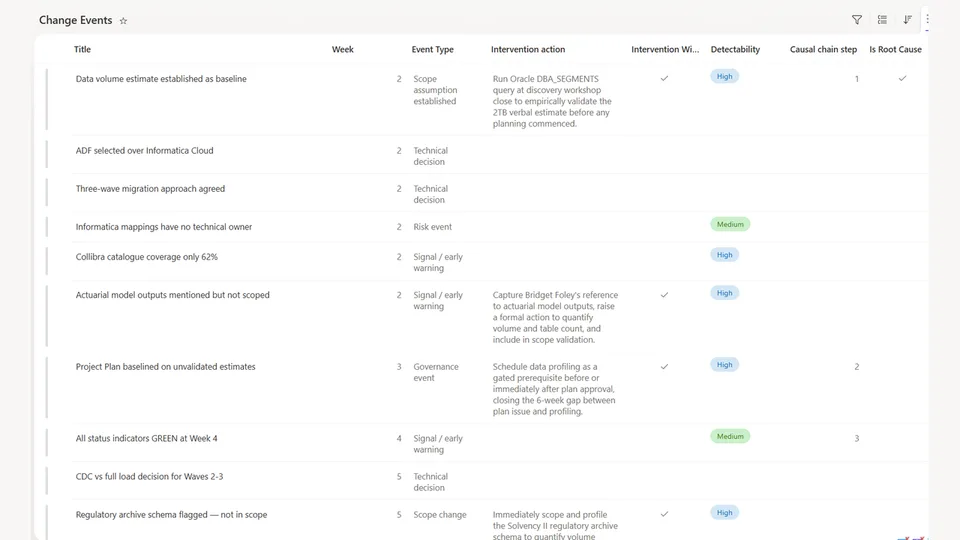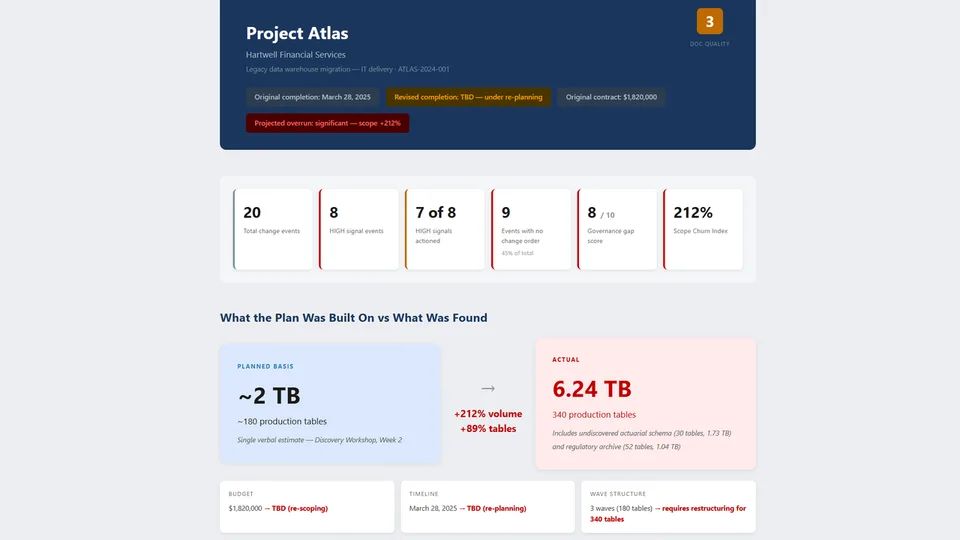
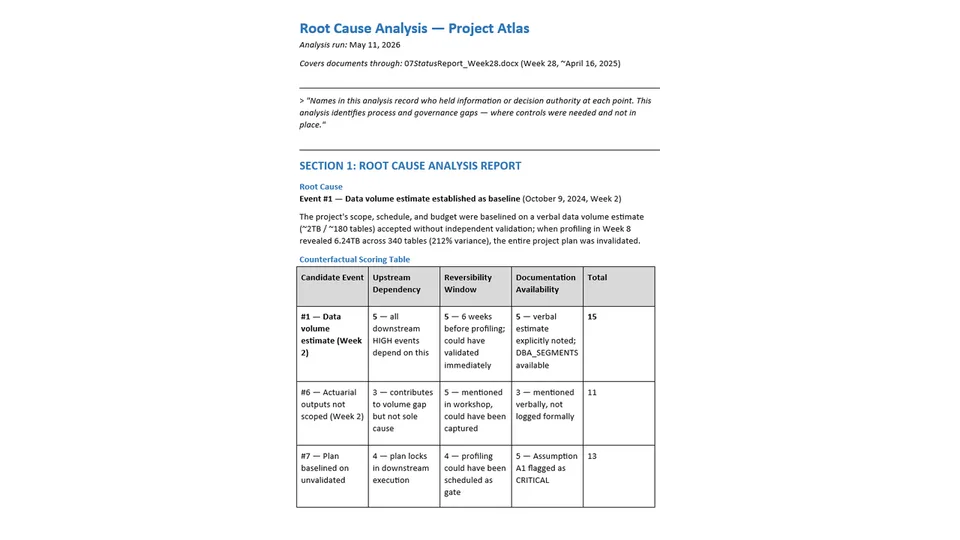
Root Cause Analysis is the second stage of the Project Intelligence Engine. It reads the Change Events list produced by Change Event Extraction and applies a counterfactual root-cause test to identify the single event that most determined the outcome, then traces the causal chain forward to the impact event.
It maps every intervention window that was open, analyzes early-warning signals by detectability, classifies the failure type, and produces one structured, specific recommendation. Every finding is traceable to an event number, and results are persisted back to the Change Events list, a dated analysis document, and the site context file.
Turns the Change Events list into a full causal analysis — root cause, causal chain, intervention windows, and early-warning signals — with one actionable recommendation.
What you get
- The primary root cause identified via a counterfactual test, with the full scoring table
- The causal chain from root cause to impact, with intervention windows marked
- Early-warning signal analysis with detectability ratings and lag statistics
- A failure classification and a single, structured, implementable recommendation
- Findings persisted to the Change Events list, a dated analysis document, and the site context file
Prerequisites
Runs after Change Event Extraction, which populates the Change Events list this skill analyses and writes its findings back to. See the Change Event Extraction skill's README for the one-time list setup and column schema.
SharePoint Skill
| Solution | Author(s) |
|---|---|
| project-intelligence-root-cause-analysis | Matt Wolodarsky | GitHub |
Version history
| Version | Date | Comments |
|---|---|---|
| 1.0 | July 2026 | Initial Release |
Disclaimer
THIS CODE IS PROVIDED AS IS WITHOUT WARRANTY OF ANY KIND, EITHER EXPRESS OR IMPLIED, INCLUDING ANY IMPLIED WARRANTIES OF FITNESS FOR A PARTICULAR PURPOSE, MERCHANTABILITY, OR NON-INFRINGEMENT.
Package
Ready to install
The ZIP contains only the upload-ready inner skill folder.
04bf57e46b930fa58966ff2b8ce4c23a909d1f7fa09928bb139cb6e008e650e5View SKILL.md
---
name: project-intelligence-root-cause-analysis
description: >
  Reads the Change Events list and produces a full causal analysis of a project failure — a counterfactual root-cause test, the causal chain, intervention windows, and early-warning signal analysis — ending in one actionable recommendation, persisted back to SharePoint. Use when the user asks to "find the root cause", "run root cause analysis on the project", "what went wrong and when did we know", "trace the causal chain", or "analyze the change log". Second stage of the Project Intelligence Engine; requires the Change Events list populated by Change Event Extraction.
---

# Root Cause Analysis

## Purpose
Take the change log in the Change Events list and produce a complete causal analysis: the root cause, the chain of events that followed from it, the signals that were present but not acted on, and a clear verdict on what could have prevented the outcome. Every finding must be traceable to a specific event number in the list.

---

## Inputs Required
This skill reads from the **Change Events** list on this SharePoint site, populated by the Change Event Extraction skill. If the list is empty, run Change Event Extraction first.

---

## Step 1 — Apply the Counterfactual Root Cause Test

For each HIGH signal-strength event in the change log, apply the following test:

> *"If this event had been handled correctly — escalated, change-ordered, validated, or resolved — would the downstream impact events still have occurred?"*

Score each candidate event on three dimensions:

| Dimension | Question | Score 1–5 |
|---|---|---|
| **Upstream dependency** | How many subsequent HIGH/MEDIUM events depend on this event being unresolved? | 5 = many downstream, 1 = isolated |
| **Reversibility window** | How long after this event was it still possible to take corrective action before the impact became unavoidable? | 5 = long window, 1 = immediate lock-in |
| **Documentation availability** | Was the information needed to recognise this as a problem present in the record at the time? | 5 = fully documented, 1 = not visible |

The event with the highest combined score is the **primary root cause**. If two events score equally, prefer the earlier one (earlier failures compound more).

State which event number from the change log is the root cause, and show the scoring table.

---

## Step 2 — Trace the Causal Chain

Starting from the root cause event, trace the forward sequence of events that led to the impact event (the moment the failure became visible or unavoidable).

For each step in the chain:
- Reference the event number from the change log
- State what happened
- State why it followed from the previous step
- Identify whether there was an **intervention window** at this step — a point at which the chain could still have been broken

Maximum 8 steps. If the chain is shorter, do not pad it.

Format:
```
[Event #N] → [What happened] → [Why this followed] → Intervention window: [Yes/No — if yes, what would have closed it]
```

---

## Step 3 — Map Intervention Windows

For each point in the causal chain where intervention was still possible, produce a structured entry:

| # | Date | Intervention point | What the record showed | Action that was available | Who held the authority | Why it was not taken (as documented) |
|---|---|---|---|---|---|---|

For the **"Why not taken"** column: use only what the documents say. If there is no documented reason, state "Not documented — possible reasons include [infer from context, max 2 options]".

---

## Step 4 — Early Warning Signal Analysis

From the change log, identify every event that was a signal of the eventual failure — regardless of whether it was labelled as such at the time.

For each signal, complete the following table:

| # | Date | Week | Signal | Source event # | Disposition at the time | What should have been done | Who could have acted | Detectability |
|---|---|---|---|---|---|---|---|---|
| | | | | | | | | HIGH / MEDIUM / LOW |

**Detectability** — was the signal visible to a normally attentive PM or delivery lead?
- **HIGH**: the signal was explicit and named in a document
- **MEDIUM**: the signal required connecting two or more documented facts
- **LOW**: the signal was present only in hindsight, or buried in a technical appendix unlikely to be read

After the table, state:
- Total signals identified
- Signals with HIGH detectability that were not acted on (these represent the clearest governance failures)
- Average lag in weeks between first HIGH-detectability signal and the impact event

---

## Step 5 — Failure Classification

Classify the failure on two axes:

**Primary failure type** — select the most accurate:
- **Scope creep**: undocumented additions to agreed deliverables
- **Assumption failure**: a baseline assumption was accepted without validation and proved materially wrong
- **Governance failure**: change control processes were not followed when they should have been
- **Technical underestimation**: complexity or volume was not anticipated and not discovered until late
- **Resource / dependency failure**: a third-party dependency, unavailability, or skill gap caused the failure
- **Communication failure**: decisions were made but not documented, leading to misaligned expectations
- **Compound failure**: multiple types contributed — specify which two or three, and which was primary

**Secondary dimensions** (rate each 1–5):
| Dimension | Rating | Notes |
|---|---|---|
| **Preventability** | 1–5 | 5 = entirely preventable with standard PM practice; 1 = unforeseeable |
| **Detectability** | 1–5 | 5 = signals were loud and explicit; 1 = failure was hidden until impact |
| **Governance compliance** | 1–5 | 5 = all decisions properly governed; 1 = none |
| **Documentation completeness** | 1–5 | 5 = complete record; 1 = reconstructed from memory |

State each rating and a one-sentence justification.

---

## Step 6 — Produce the Recommendation

State a single primary recommendation — the one action, if implemented, that would most have changed the outcome.

Structure the recommendation as:

**RECOMMENDATION**
[One sentence — the specific action]

**When to implement:** [At which point in the engagement — e.g., "before sign-off on the project plan", "at the Week 2 discovery workshop close"]

**Owner:** [Role responsible for implementing this — be specific, e.g., "Engagement Manager", "Data Architect", "Client Sponsor"]

**What it changes:** [One sentence — the specific downstream events this would have prevented, with reference to event numbers from the change log]

**Implementation detail:** [2–3 sentences describing exactly how this would be done in practice — not generic advice]

---

## Step 7 — Persist findings

### 7a — Write back to the Change Events list

Update the following items — do not modify any other columns. An event may qualify for more than one category; apply all relevant updates:

- **Root cause event**: set `Is Root Cause = Yes`, set `Root Cause Statement` to the one-sentence root cause statement from 1.1, set `Causal Chain Step = 1`.
- **Causal chain events** (each step from 1.2, in sequence): set `Causal Chain Step` to the step number (root cause = 1, next = 2, etc.).
- **Intervention window events** (each event from Step 3): set `Intervention Window = Yes`, set `Intervention Action` to the one-sentence description of the action that was available at that point.
- **Early warning signal events** (each event from Step 4): set `Early Warning Signal = Yes`, set `Detectability` to the rating from the signal table (HIGH / MEDIUM / LOW).

### 7b — Save analysis document to Project Documents library

Save the full analysis (all three sections) as a document to the Project Documents library.

**Filename:** `Root_Cause_Analysis_[YYYY-MM-DD].docx` — where the date is the date of the most recent status report in the library.

**Document header** (before the analysis content):
- *Analysis run:* [today's date]
- *Covers documents through:* [title and date of the most recent status report in the Project Documents library]

### 7c — Update SHAREPOINT.md

Add or overwrite the **Project Analysis Summary** section in SHAREPOINT.md with:

- Last analysis run: [today's date]
- Covers documents through: [date of most recent status report]
- Root cause: Event [#] — [title]
- Root cause date: [date]
- Root cause statement: [one sentence]
- Causal chain: [numbered list, max 8 steps, one sentence each]
- Failure type: [primary classification]
- Preventability: [rating 1–5]
- Recommendation: [one sentence]

After all three steps complete, confirm: *"Analysis saved to [filename] in the Project Documents library. Change Events list updated. SHAREPOINT.md updated."*

---

## Output — produce the following in chat

---

### SECTION 1: ROOT CAUSE ANALYSIS REPORT

Begin with the following framing statement, exactly as written:

> *"Names in this analysis record who held information or decision authority at each point. This analysis identifies process and governance gaps — where controls were needed and not in place."*

Then state: *"The Change Events list has been updated — root cause event, intervention windows, and early warning signals are now flagged."*

Present the analysis in the following order:

#### Root Cause
State the root cause event number, title, and date. Then the one-sentence root cause statement from Step 1.

#### Causal Chain
Numbered sequence (max 8 steps): event number, what happened, and whether an intervention window existed at this step. One sentence per step.

#### Failure Classification
Primary failure type. Preventability rating (1–5) with one-sentence justification.

#### Recommendation
Structured recommendation as specified in Step 6: what, when, owner, what it changes.

Do not include the counterfactual scoring table, intervention windows table, or early warning signal table here — those appear in full in the Detailed Full Analysis (Section 2).

---

### SECTION 2: THREE SUMMARY LEVELS

Produce all three of the following, clearly labelled:

---

#### ULTRA-SHORT SUMMARY
*For: executive slide decks, steering committee updates, RAID log entries*

Write 4–6 bullet points. Each bullet is one sentence. Cover only: what the root cause was, how long the warning window was open, what failure type this represents, and the single recommendation. A reader should understand the verdict in 20 seconds. No background, no process detail.

---

#### GET ME UP TO SPEED
*For: a delivery director being briefed, a client asking "what went wrong", a new PM inheriting the engagement*

Write 3–5 paragraphs. Chronological. Imagine briefing someone intelligent who knows nothing about this project and has 3 minutes. Cover: what the project was, what the root cause event was and when it happened, what signals appeared and how they were handled, what the causal chain looked like from the outside, and what the recommendation is. Include specific event numbers, dates, and names from the change log. Write in plain English — no jargon, no passive voice.

---

#### DETAILED FULL ANALYSIS
*For: post-mortem reviews, governance audits, contract disputes, project retrospectives*

A structured narrative with one paragraph per step of the analysis. This is the complete record — every finding matters. Include:
- The full counterfactual scoring table (all candidate events, all three dimensions)
- The full intervention windows table (all columns from Step 3)
- The full early warning signal table (all columns from Step 4) with the three summary statistics
- The failure classification with all secondary dimension ratings and justifications
- The recommendation with full implementation detail

Do not summarise away detail. This section should be suitable for a formal project review or a legal review of the engagement record.

---

### SECTION 3: ROOT CAUSE INTELLIGENCE DASHBOARD

Produce this section under the heading `## ROOT CAUSE INTELLIGENCE DASHBOARD`.

#### Root Cause Metrics

| Metric | Value | Commentary |
|---|---|---|
| Root cause event | | Event # and title |
| Root cause event date | | |
| Root cause event week | | |
| Total intervention windows identified | | |
| Intervention windows acted on | | State as "N of N" |
| Total early warning signals | | |
| HIGH-detectability signals not acted on | | Include % of HIGH signals |
| Weeks between root cause and impact | | The window that was open |
| Weeks between first HIGH signal and impact | | The earliest point action was available |
| Failure type | | |
| Preventability rating | | 1–5 with one-line note |
| Detectability rating | | 1–5 with one-line note |

#### Signal Disposition Summary
For each signal in the early warning table, show its disposition: `Actioned` / `Logged but not resolved` / `Noted informally` / `No action taken` / `Not documented`.

Present as a horizontal bar or count breakdown:
- Actioned: N
- Logged but not resolved: N
- Noted informally: N
- No action taken: N
- Not documented: N

#### Top 3 Intervention Failures
The three intervention windows where action was most available but not taken, ranked by downstream impact:

1. [Window description — date — who could have acted — what was the specific action available]
2. [Window description — date — who could have acted — what was the specific action available]
3. [Window description — date — who could have acted — what was the specific action available]

#### Failure Classification Summary
State:
- Primary failure type
- Whether this was a systemic or one-off failure (systemic = the same failure pattern is likely in other engagements run the same way; one-off = specific to unusual circumstances)
- One sentence on what changed in the organisation's delivery approach would prevent this class of failure recurring
References
- agentskills.io specification
The specification that SharePoint AI skills follow for installation and discovery.
Discuss this skill
Ask a question, share how you used it, or suggest an improvement with the community.
Open GitHub Discussions