
Back to column formats
Column formattingSharePoint Online

Format a row as a card with buttons

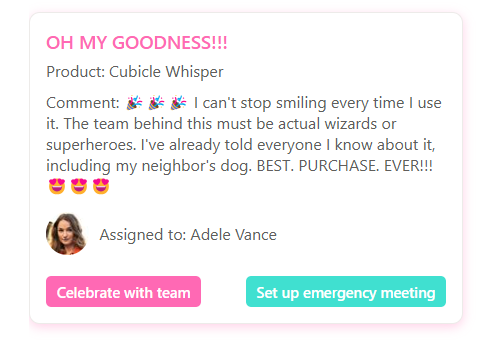
This is a sample that enables you to show content of various columns (single line of text, person) in a modern card design. It also shows two buttons that can call Power Automate flows for actions like sending emails or scheduling meetings.

Format a row as a card with buttons formatting preview
Sample preview · View original image

Copy. Apply. Make it yours.

Get this format

1 definition

Review the requirements below, then paste this JSON into the matching formatting panel. Show me where.

Use your list's internal column names and replace any tenant-specific URLs or flow IDs. Formatting is presentation, not a way to secure data.

Column formatting
Download JSON
{
  "$schema": "https://developer.microsoft.com/json-schemas/sp/v2/column-formatting.schema.json",
  "elmType": "div",
  "style": {
    "box-sizing": "border-box",
    "padding": "8px 0",
    "height": "100%",
    "display": "flex",
    "align-items": "center"
  },
  "children": [
    {
      "elmType": "div",
      "style": {
        "display": "flex",
        "flex-direction": "column",
        "padding": "12px",
        "background-color": "#ffffff",
        "border": "1px solid #edebe9",
        "border-radius": "8px",
        "box-shadow": "0 2px 8px rgba(255, 105, 180, 0.3)",
        "max-width": "300px",
        "max-height": "280px",
        "overflow": "hidden"
      },
      "children": [
        {
          "elmType": "div",
          "style": {
            "font-weight": "600",
            "font-size": "14px",
            "margin-bottom": "4px",
            "color": "#ff69b4"
          },
          "txtContent": "[$Title]"
        },
        {
          "elmType": "div",
          "style": {
            "font-size": "12px",
            "margin-bottom": "8px",
            "color": "#605e5c"
          },
          "txtContent": "='Product: ' + [$Product]"
        },
        {
          "elmType": "div",
          "style": {
            "margin-bottom": "12px",
            "color": "#605e5c",
            "font-size": "12px",
            "max-height": "80px",
            "overflow": "auto"
          },
          "txtContent": "='Comment: ' + if([$Comment], [$Comment], 'No comment')"
        },
        {
          "elmType": "div",
          "style": {
            "display": "flex",
            "align-items": "center",
            "margin-bottom": "8px",
            "width": "100%"
          },
          "children": [
            {
              "elmType": "img",
              "style": {
                "width": "32px",
                "height": "32px",
                "border-radius": "50%",
                "margin-right": "8px"
              },
              "attributes": {
                "src": "=if([$Assignedto.email], getUserImage([$Assignedto.email],'s'), '<URL of your fallback image>')",
                "title": "=[$Assignedto.title]"
              }
            },
            {
              "elmType": "div",
              "style": {
                "font-size": "12px",
                "color": "#605e5c"
              },
              "txtContent": "='Assigned to: ' + [$Assignedto.title]"
            }
          ]
        },
        {
          "elmType": "div",
          "style": {
            "display": "flex",
            "justify-content": "space-between",
            "margin-top": "8px"
          },
          "children": [
            {
              "elmType": "button",
              "style": {
                "padding": "4px 8px",
                "background-color": "#ff69b4",
                "color": "#ffffff",
                "border": "none",
                "border-radius": "4px",
                "cursor": "pointer",
                "margin-right": "8px",
                "font-weight": "600",
                "font-size": "11px",
                "transition": "background-color 0.2s ease",
                "white-space": "nowrap"
              },
              "attributes": {
                "class": "ms-fontWeight-semibold"
              },
              "txtContent": "Celebrate with team",
              "customRowAction": {
                "action": "executeFlow",
                "actionParams": "{\"id\": \"<flow 1 id goes in here>\"}"
              }
            },
            {
              "elmType": "button",
              "style": {
                "padding": "4px 8px",
                "background-color": "#40e0d0",
                "color": "#ffffff",
                "border": "none",
                "border-radius": "4px",
                "cursor": "pointer",
                "font-weight": "600",
                "font-size": "11px",
                "transition": "background-color 0.2s ease",
                "white-space": "nowrap"
              },
              "attributes": {
                "class": "ms-fontWeight-semibold"
              },
              "txtContent": "Set up emergency meeting",
              "customRowAction": {
                "action": "executeFlow",
                "actionParams": "{\"id\": \"<flow 2 id goes here>\"}"
              }
            }
          ]
        }
      ]
    }
  ]
}

From the contributor

How to use this sample

Summary

This is a sample that enables you to show content of various columns (single line of text, person) in a modern card design. It also shows two buttons that can call Power Automate flows for actions like sending emails or scheduling meetings in the context of the list or the list item.

This blog post explains the Power Automate flows in detail: How to apply modern card design in a SharePoint list with listformatting
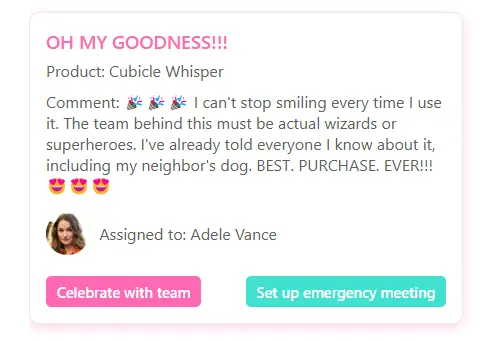
screenshot of the sample

View requirements

  • This format can be applied to any column type
  • It assumes columns Title, Product, Assignedto, Comment - please adjust to your needs
  • It also gives you the option to define a fallback image in case the person in the Assignedto column has no profile picture.

Sample

Solution Author(s)
generic-card-with-buttons.json Luise Freese

Version history

Version Date Comments
1.0 October 16, 2024 Initial release

Disclaimer

THIS CODE IS PROVIDED AS IS WITHOUT WARRANTY OF ANY KIND, EITHER EXPRESS OR IMPLIED, INCLUDING ANY IMPLIED WARRANTIES OF FITNESS FOR A PARTICULAR PURPOSE, MERCHANTABILITY, OR NON-INFRINGEMENT.


Additional notes

None