Back to column formats
Column formattingSharePoint Online

Linear Gauge

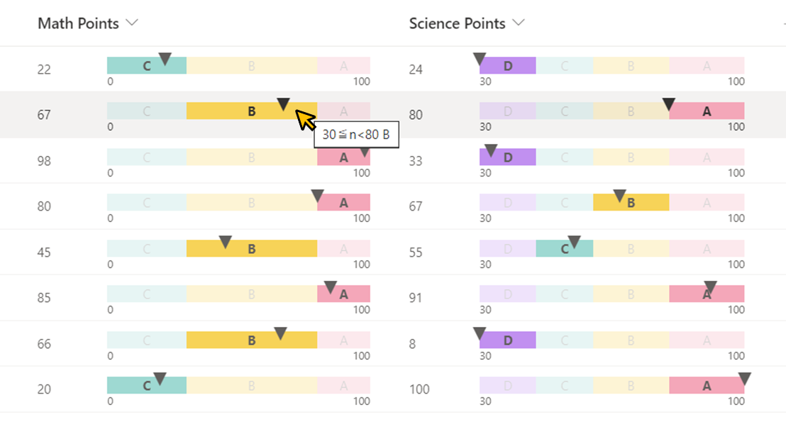
This sample demonstrates displaying a linear gauge from a regular string set to the split operator.
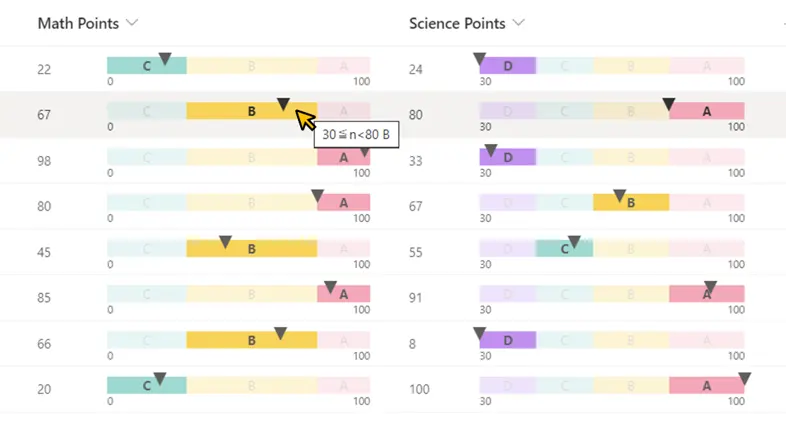
Linear Gauge formatting preview
Sample preview · View original image

Copy. Apply. Make it yours.

Get this format

1 definition

Review the requirements below, then paste this JSON into the matching formatting panel. Show me where.

Use your list's internal column names and replace any tenant-specific URLs or flow IDs. Formatting is presentation, not a way to secure data.

Column formatting
Download JSON
{
  "$schema": "https://developer.microsoft.com/json-schemas/sp/v2/column-formatting.schema.json",
  "elmType": "div",
  "children": [
    {
      "elmType": "div",
      "style": {
        "display": "flex",
        "flex-direction": "row",
        "align-items": "center",
        "width": "100%"
      },
      "children": [
        {
          "elmType": "div",
          "style": {
            "width": "20%"
          },
          "children": [
            {
              "elmType": "div",
              "txtContent": "@currentField.displayValue",
              "style": {
                "margin-right": "10px"
              }
            }
          ]
        },
        {
          "elmType": "div",
          "forEach": "_overallRange in split('min:0,max:100','^')",
          "style": {
            "width": "75%",
            "position": "relative",
            "display": "flex",
            "flex-direction": "column",
            "margin-top": "6px"
          },
          "children": [
            {
              "elmType": "div",
              "style": {
                "width": "100%",
                "height": "16px",
                "position": "relative"
              },
              "children": [
                {
                  "elmType": "div",
                  "forEach": "_range in split('0<=n<30:#9ED9D2:C,30<=n<80:#F7D358:B,80<=n<=100:#F4A7B9:A',',')",
                  "txtContent": "=substring([$_range],lastIndexOf([$_range],':')+1,lastIndexOf([$_range]+'^','^'))",
                  "style": {
                    "width": "=(Number(replaceAll(substring([$_range],lastIndexOf([$_range],'<')+1,indexOf([$_range],':')),'=',''))-if(Number(substring([$_range],0,indexOf([$_range],'<')))<Number(substring([$_overallRange],indexOf([$_overallRange],'min:')+4,indexOf([$_overallRange],','))),Number(substring([$_overallRange],indexOf([$_overallRange],'min:')+4,indexOf([$_overallRange],','))),Number(substring([$_range],0,indexOf([$_range],'<')))))/(Number(substring([$_overallRange],indexOf([$_overallRange],'max:')+4,indexOf([$_overallRange]+'^','^')))-Number(substring([$_overallRange],indexOf([$_overallRange],'min:')+4,indexOf([$_overallRange],','))))*100+'%'",
                    "max-width": "=(Number(substring([$_overallRange],indexOf([$_overallRange],'max:')+4,indexOf([$_overallRange]+'^','^')))-if(Number(substring([$_range],0,indexOf([$_range],'<')))<Number(substring([$_overallRange],indexOf([$_overallRange],'min:')+4,indexOf([$_overallRange],','))),Number(substring([$_overallRange],indexOf([$_overallRange],'min:')+4,indexOf([$_overallRange],','))),Number(substring([$_range],0,indexOf([$_range],'<')))))/(Number(substring([$_overallRange],indexOf([$_overallRange],'max:')+4,indexOf([$_overallRange]+'^','^')))-Number(substring([$_overallRange],indexOf([$_overallRange],'min:')+4,indexOf([$_overallRange],','))))*100+'%'",
                    "height": "100%",
                    "background-color": "=substring([$_range],indexOf([$_range],':')+1,lastIndexOf([$_range],':'))",
                    "position": "absolute",
                    "left": "=(if(Number(substring([$_range],0,indexOf([$_range],'<')))<Number(substring([$_overallRange],indexOf([$_overallRange],'min:')+4,indexOf([$_overallRange],','))),0,Number(substring([$_range],0,indexOf([$_range],'<')))-Number(substring([$_overallRange],indexOf([$_overallRange],'min:')+4,indexOf([$_overallRange],',')))))/(Number(substring([$_overallRange],indexOf([$_overallRange],'max:')+4,indexOf([$_overallRange]+'^','^')))-Number(substring([$_overallRange],indexOf([$_overallRange],'min:')+4,indexOf([$_overallRange],','))))*100+'%'",
                    "display": "=if(Number(replaceAll(substring([$_range],lastIndexOf([$_range],'<')+1,indexOf([$_range],':')),'=',''))<=Number(substring([$_overallRange],indexOf([$_overallRange],'min:')+4,indexOf([$_overallRange],',')))||Number(substring([$_overallRange],indexOf([$_overallRange],'max:')+4,indexOf([$_overallRange]+'^','^')))<=Number(substring([$_range],0,indexOf([$_range],'<')))||Number(substring([$_range],0,indexOf([$_range],'<')))>Number(replaceAll(substring([$_range],lastIndexOf([$_range],'<')+1,indexOf([$_range],':')),'=','')),'none','flex')",
                    "align-items": "center",
                    "justify-content": "center",
                    "overflow": "hidden",
                    "white-space": "nowrap",
                    "opacity": "=if(if(indexOf(substring([$_range],0,indexOf([$_range],'n')),'=')>=0,Number(@currentField)>=Number(substring([$_range],0,indexOf([$_range],'<'))),Number(@currentField)>Number(substring([$_range],0,indexOf([$_range],'<'))))&&if(indexOf(substring([$_range],indexOf([$_range],'n'),indexOf([$_range],':')),'=')>=0,Number(@currentField)<=Number(replaceAll(substring([$_range],lastIndexOf([$_range],'<')+1,indexOf([$_range],':')),'=','')),Number(@currentField)<Number(replaceAll(substring([$_range],lastIndexOf([$_range],'<')+1,indexOf([$_range],':')),'=',''))),'100%','25%')",
                    "font-weight": "=if(if(indexOf(substring([$_range],0,indexOf([$_range],'n')),'=')>=0,Number(@currentField)>=Number(substring([$_range],0,indexOf([$_range],'<'))),Number(@currentField)>Number(substring([$_range],0,indexOf([$_range],'<'))))&&if(indexOf(substring([$_range],indexOf([$_range],'n'),indexOf([$_range],':')),'=')>=0,Number(@currentField)<=Number(replaceAll(substring([$_range],lastIndexOf([$_range],'<')+1,indexOf([$_range],':')),'=','')),Number(@currentField)<Number(replaceAll(substring([$_range],lastIndexOf([$_range],'<')+1,indexOf([$_range],':')),'=',''))),'bold','')"
                  },
                  "attributes": {
                    "class": "ms-fontColor-Primary ms-fontSize-s",
                    "title": "=replaceAll(substring([$_range],0,indexOf([$_range],':')),'<=','≦')+' '+substring([$_range],lastIndexOf([$_range],':')+1,indexOf([$_range]+'^','^'))"
                  }
                },
                {
                  "elmType": "div",
                  "style": {
                    "position": "absolute",
                    "height": "100%",
                    "left": "=if(Number(@currentField)<Number(substring([$_overallRange],indexOf([$_overallRange],'min:')+4,indexOf([$_overallRange],','))),'0%',if(Number(@currentField)>Number(substring([$_overallRange],indexOf([$_overallRange],'max:')+4,indexOf([$_overallRange]+'^','^'))),'100%',(Number(@currentField)-Number(substring([$_overallRange],indexOf([$_overallRange],'min:')+4,indexOf([$_overallRange],','))))/(Number(substring([$_overallRange],indexOf([$_overallRange],'max:')+4,indexOf([$_overallRange]+'^','^')))-Number(substring([$_overallRange],indexOf([$_overallRange],'min:')+4,indexOf([$_overallRange],','))))*100+'%'))"
                  },
                  "children": [
                    {
                      "elmType": "div",
                      "style": {
                        "position": "relative",
                        "left": "-50%",
                        "display": "=if(toString(@currentField)=='','none','flex')",
                        "flex-direction": "column",
                        "justify-content": "center",
                        "bottom": "25%"
                      },
                      "attributes": {
                        "class": "ms-fontSize-sPlus",
                        "title": "@currentField.displayValue",
                        "iconName": "TriangleSolidDown12"
                      }
                    }
                  ]
                }
              ]
            },
            {
              "elmType": "div",
              "style": {
                "width": "100%",
                "display": "flex",
                "justify-content": "space-between"
              },
              "attributes": {
                "class": "ms-fontSize-mi"
              },
              "children": [
                {
                  "elmType": "div",
                  "txtContent": "=substring([$_overallRange],indexOf([$_overallRange],'min:')+4,indexOf([$_overallRange],','))"
                },
                {
                  "elmType": "div",
                  "txtContent": "=substring([$_overallRange],indexOf([$_overallRange],'max:')+4,indexOf([$_overallRange]+'^','^'))"
                }
              ]
            }
          ]
        }
      ]
    }
  ]
}
Schema compatibility review notes

This historical definition differs from the pinned Microsoft schema. This may indicate an unsupported pattern or a schema limitation. Check the original requirements and test in your tenant before use.

  • /children/0/children/1/children/0/children/0/forEach must match pattern "^[^\]\$@\. ]+ in (\@currentField|\[\$.+\])$"

From the contributor

How to use this sample

Summary

This sample demonstrates displaying a linear gauge from a regular string set to the split operator.

screenshot of the sample

View requirements

  • This format can be applied to a Number column.

How to apply this sample

This sample needs modification for your specific use. Two changes are required.

Step 1: Set the min and max values

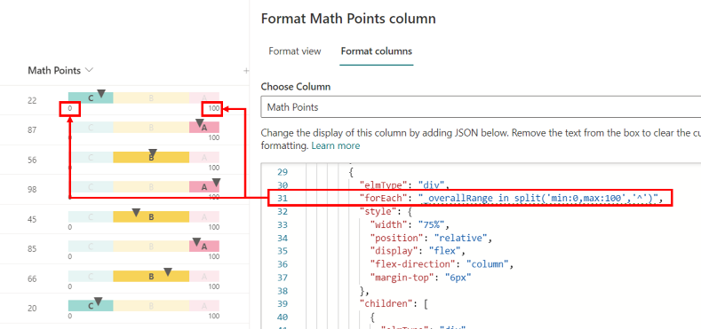
  1. Find the split operator on line 31 of the JSON.

  2. Adjust the min and max values to match your desired range.

    "forEach": "_overallRange in split('min:MIN_VALUE,max:MAX_VALUE','^')",
    
    # Example 1
    "forEach": "_overallRange in split('min:0,max:100','^')",
    
    # Example 2
    "forEach": "_overallRange in split('min:-150,max:250','^')",
    
    # Example 3
    "forEach": "_overallRange in split('min:0,max:1','^')",
    

    screenshot of the gauge setting

Step 2: Set numerical range, background color, and range name

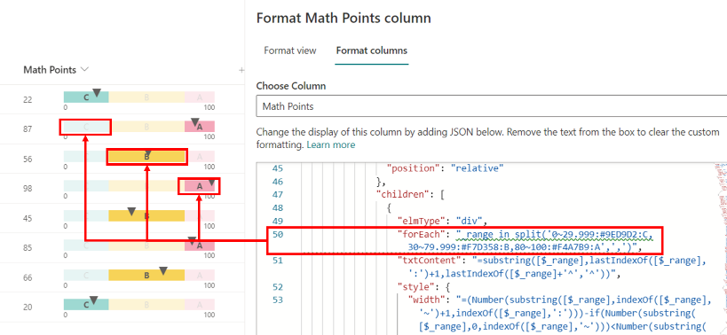
  1. Find the split operator on line 50 of the JSON.

  2. Adjust the numerical range, background color, and range name for each range according to your use case. Use a comma-separated format.

    "forEach": "_range in split('RANGE_MIN[<= or <]n[<= or <]RANGE_MAX:BACKGROUND_COLOR:RANGE_NAME',',')",
    
    # Example 1
    "forEach": "_range in split('0<=n<30:#9ED9D2:C,30<=n<80:#F7D358:B,80<=n<=100:#F4A7B9:A',',')",
    
    # Example 2
    "forEach": "_range in split('-99999<=n<0:#c190f0:D,0<=n<100:#9ED9D2:C,100<=n<200:#F7D358:B,200<=n<=99999:#F4A7B9:A',',')",
    
    # Example 3
    "forEach": "_range in split('0<=n<0.4:#9ED9D2:C,0.4<=n<0.8:#F7D358:B,0.8<=n<=1:#F4A7B9:A',',')",
    
    • RANGE_MIN[<= or <]n[<= or <]RANGE_MAX: Specifies the range of values for each segment of the linear gauge.

      • Example: 0<=n<30, 0<n<=30, 0<=n<=30, 0<n<30
    • BACKGROUND_COLOR: Defines the background color for the respective range.

      • Example: #9ED9D2, Blue
    • RANGE_NAME: Set the text to be displayed in the range.

      • Example: A, Range_B, Great

    screenshot of the range setting

[!NOTE]

  • Expressions such as n>=20 or 20<n are not acceptable for numeric ranges. Please strictly adhere to the specified format RANGE_MIN[<= or <]n[<= or <]RANGE_MAX.
  • The value range can exceed the linear gauge's min and max.
  • Make sure that the values do not overlap between ranges.
  • Avoid single-byte spaces in the string to prevent errors. For single-byte spaces in range names, use an underscore (_) instead. The underscore (_) will be converted to half-width spaces when displayed. (Related link: #642)
  • Do not use <, :, =, and , in range names.
  • When configuring percentage values, ensure that they are set as decimals. For example, if you want to represent 50%, set the value as 0.5 instead of 50.

Range setting examples:

  • Using HTML color code:

    80<=n<=100:#F4A7B9:A
    
  • Using HTML color name:

    30<=n<80:Yellow:B
    
  • Range name not set:

    50<=n<60:#00FF00:
    
  • Using an underscore (_) instead of single-byte spaces in the range name:

    90<=n<=100:#FFD700:Range_D
    

Sample

Solution Author(s)
number-linear-gauge.json Tetsuya Kawahara

Version history

Version Date Comments
1.0 December 1, 2023 Initial release

Disclaimer

THIS CODE IS PROVIDED AS IS WITHOUT WARRANTY OF ANY KIND, EITHER EXPRESS OR IMPLIED, INCLUDING ANY IMPLIED WARRANTIES OF FITNESS FOR A PARTICULAR PURPOSE, MERCHANTABILITY, OR NON-INFRINGEMENT.


Additional notes

About the size of the linear gauge

The linear gauge adjusts based on the column width.

About formulas in JSON
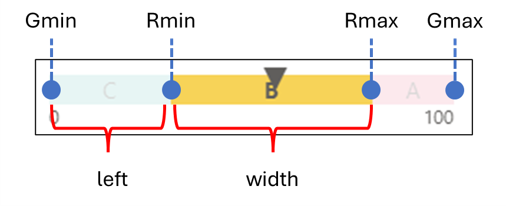
screenshot of the explanatory diagram

The style properties of each range are set to the following values:

Style Value
display
  • if (Rmax<=Gmin||Gmax<=Rmin||Rmin>Rmax): none
  • Otherwise: flex
width
  • if (Rmin<Gmin): $$\frac{R_{max}-G_{min}}{G_{max}-G_{min}}*100\%$$
  • Otherwise: $$\frac{R_{max}-R_{min}}{G_{max}-G_{min}}*100\%$$
max-width
  • if (Rmin<Gmin): $$\frac{G_{max}-G_{min}}{G_{max}-G_{min}}*100\%$$
  • Otherwise: $$\frac{G_{max}-R_{min}}{G_{max}-G_{min}}*100\%$$
left
  • if (Rmin<Gmin): $$\frac{0}{G_{max}-G_{min}}*100\%$$
  • Otherwise: $$\frac{R_{min}-G_{min}}{G_{max}-G_{min}}*100\%$$

The characters used in the above formula and their meanings are as follows:

Character Meaning Formula in JSON
$$G_{max}$$ Max value of linear gauge Number(substring([$_overallRange],indexOf([$_overallRange],'max:')+4,indexOf([$_overallRange]+'^','^')))
$$G_{min}$$ Min value of linear gauge Number(substring([$_overallRange],indexOf([$_overallRange],'min:')+4,indexOf([$_overallRange],',')))
$$R_{max}$$ Max value of each range Number(replaceAll(substring([$_range],lastIndexOf([$_range],'<')+1,indexOf([$_range],':')),'=',''))
$$R_{min}$$ Min value of each range Number(substring([$_range],0,indexOf([$_range],'<')))