
Back to column formats
Column formattingSharePoint Online

People Name Avatar Card

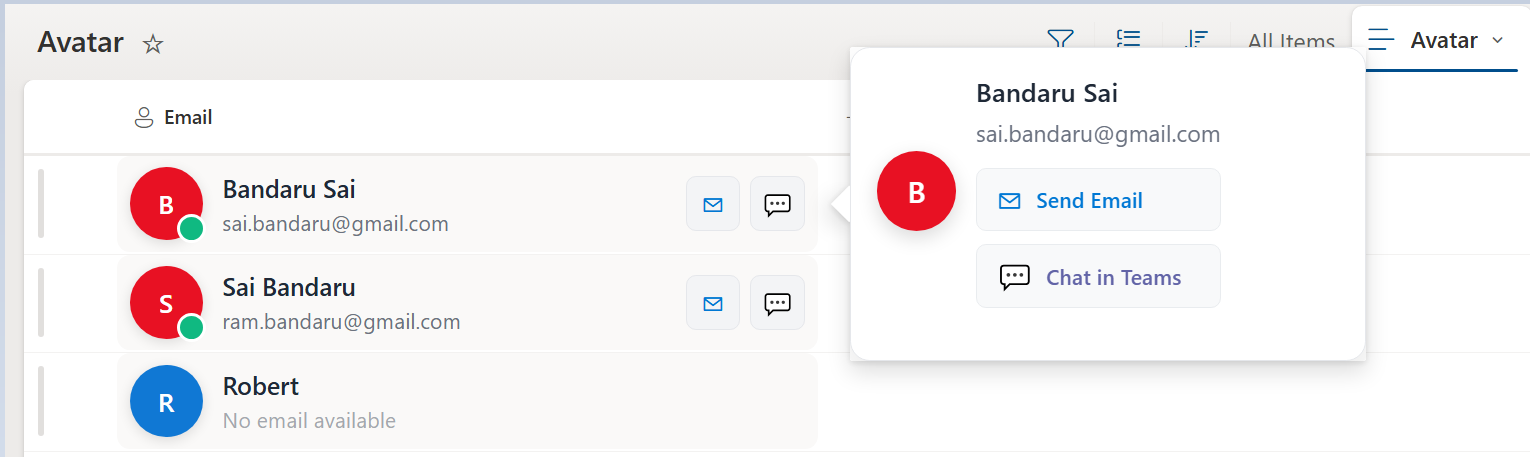
This SharePoint column formatting sample provides a modern, interactive People card for list items using JSON formatting.

People Name Avatar Card formatting preview
Sample preview Β· View original image

Copy. Apply. Make it yours.

Get this format

1 definition

Review the requirements below, then paste this JSON into the matching formatting panel. Show me where.

Use your list's internal column names and replace any tenant-specific URLs or flow IDs. Formatting is presentation, not a way to secure data.

Column formatting
Download JSON
{
  "$schema": "https://developer.microsoft.com/json-schemas/sp/v2/column-formatting.schema.json",
  "elmType": "div",
  "style": {
    "display": "flex",
    "align-items": "center",
    "gap": "12px",
    "padding": "6px 8px",
    "border-radius": "8px"
  },
  "attributes": {
    "class": "=if(@me == @currentField.email, 'sp-css-backgroundColor-themeLighterAlt', 'sp-css-backgroundColor-neutralLighterAlt')"
  },
  "children": [
    {
      "elmType": "div",
      "style": {
        "position": "relative",
        "display": "flex"
      },
      "children": [
        {
          "elmType": "div",
          "style": {
            "display": "inline-flex",
            "align-items": "center",
            "justify-content": "center",
            "border-radius": "50%",
            "width": "44px",
            "height": "44px",
            "color": "white",
            "font-weight": "600",
            "font-size": "16px",
            "text-transform": "uppercase",
            "box-shadow": "0 2px 8px rgba(0,0,0,0.12)",
            "cursor": "pointer",
            "background-color": "=if(@currentField.email , '#e81123', '#1078D4')"

          },
          "txtContent": "=if(@currentField.title, substring(@currentField.title, 0, 1), '?')",
          "customRowAction": {
            "action": "defaultClick"
          }
        },
        {
          "elmType": "div",
          "style": {
            "position": "absolute",
            "bottom": "-2px",
            "right": "-2px",
            "width": "14px",
            "height": "14px",
            "border-radius": "50%",
            "border": "2px solid white",
            "background-color": "#10b981",
            "display": "=if(@currentField.email && length(@currentField.email) > 0, 'block', 'none')"
          }
        }
      ]
    },
    {
      "elmType": "div",
      "style": {
        "display": "flex",
        "flex-direction": "column",
        "flex": "1",
        "min-width": "0"
      },
      "children": [
        {
          "elmType": "div",
          "txtContent": "=@currentField.title",
          "style": {
            "font-size": "15px",
            "font-weight": "500",
            "color": "#1f2937",
            "line-height": "1.4",
            "margin-bottom": "2px",
            "white-space": "nowrap",
            "overflow": "hidden",
            "text-overflow": "ellipsis",
            "cursor": "pointer"
          },
          "customRowAction": {
            "action": "defaultClick"
          }
        },
        {
          "elmType": "div",
          "txtContent": "=if(@currentField.email, @currentField.email, 'No email available')",
          "style": {
            "font-size": "13px",
            "color": "#6b7280",
            "line-height": "1.3",
            "white-space": "nowrap",
            "overflow": "hidden",
            "text-overflow": "ellipsis",
            "opacity": "=if(@currentField.email, '1', '0.6')"
          }
        }
      ]
    },
    {
      "elmType": "div",
      "style": {
        "display": "=if(@currentField.email && length(@currentField.email) > 0, 'flex', 'none')",
        "align-items": "center",
        "gap": "6px",
        "margin-left": "auto"
      },
      "children": [
        {
          "elmType": "a",
          "attributes": {
            "href": "='mailto:' + @currentField.email",
            "title": "Send Email",
            "target": "_self"
          },
          "style": {
            "display": "flex",
            "align-items": "center",
            "justify-content": "center",
            "width": "32px",
            "height": "32px",
            "border-radius": "6px",
            "background-color": "#f3f4f6",
            "border": "1px solid #e5e7eb",
            "transition": "all 0.2s ease",
            "cursor": "pointer",
            "text-decoration": "none",
            "color": "#0078d4"
          },
          "children": [
            {
              "elmType": "span",
              "txtContent": "βœ‰",
              "style": {
                "font-size": "14px"
              }
            }
          ]
        },
        {
          "elmType": "a",
          "attributes": {
            "href": "='https://teams.microsoft.com/l/chat/0/0?users=' + @currentField.email",
            "title": "Chat in Teams",
            "target": "_blank"
          },
          "style": {
            "display": "flex",
            "align-items": "center",
            "justify-content": "center",
            "width": "32px",
            "height": "32px",
            "border-radius": "6px",
            "background-color": "#f3f4f6",
            "border": "1px solid #e5e7eb",
            "transition": "all 0.2s ease",
            "cursor": "pointer",
            "text-decoration": "none",
            "color": "#6264a7"
          },
          "children": [
            {
              "elmType": "span",
              "txtContent": "πŸ’¬",
              "style": {
                "font-size": "14px"
              }
            }
          ]
        }
      ]
    }
  ],
  "customCardProps": {
    "openOnEvent": "hover",
    "directionalHint": "rightCenter",
    "isBeakVisible": true,
    "formatter": {
      "elmType": "div",
      "style": {
        "padding": "16px",
        "border": "1px solid #e5e7eb",
        "border-radius": "12px",
        "background-color": "#ffffff",
        "box-shadow": "0 10px 25px rgba(0,0,0,0.1)",
        "min-width": "280px",
        "max-width": "320px"
      },
      "children": [
        {
          "elmType": "div",
          "style": {
            "display": "flex",
            "align-items": "center",
            "gap": "12px",
            "margin-bottom": "16px"
          },
          "children": [
            {
              "elmType": "div",
              "style": {
                "display": "inline-flex",
                "align-items": "center",
                "justify-content": "center",
                "border-radius": "50%",
                "width": "48px",
                "height": "48px",
                "color": "white",
                "font-weight": "600",
                "font-size": "18px",
                "text-transform": "uppercase",
                "box-shadow": "0 4px 12px rgba(0,0,0,0.15)",
                "background-color": "=if(@currentField.email , '#e81123', '#1078D4')"
              },
              "txtContent": "=if(@currentField.title, substring(@currentField.title, 0, 1), '?')"
            },
            {
              "elmType": "div",
              "style": {
                "flex": "1"
              },
              "children": [
                {
                  "elmType": "div",
                  "txtContent": "=@currentField.title",
                  "style": {
                    "font-size": "16px",
                    "font-weight": "600",
                    "color": "#1f2937",
                    "line-height": "1.4",
                    "margin-bottom": "4px"
                  }
                },
                {
                  "elmType": "div",
                  "txtContent": "=if(@currentField.email, @currentField.email, 'No email available')",
                  "style": {
                    "font-size": "14px",
                    "color": "#6b7280",
                    "line-height": "1.3",
                    "margin-bottom": "12px"
                  }
                },
                {
                  "elmType": "div",
                  "style": {
                    "display": "=if(@currentField.email && length(@currentField.email) > 0, 'flex', 'none')",
                    "flex-direction": "column",
                    "gap": "8px",
                    "margin-top": "4px"
                  },
                  "children": [
                    {
                      "elmType": "a",
                      "attributes": {
                        "href": "='mailto:' + @currentField.email",
                        "title": "=@currentField.title",
                        "target": "_self"
                      },
                      "style": {
                        "display": "flex",
                        "align-items": "center",
                        "gap": "8px",
                        "padding": "8px 12px",
                        "border-radius": "6px",
                        "background-color": "#f8f9fa",
                        "border": "1px solid #e9ecef",
                        "text-decoration": "none",
                        "color": "#0078d4",
                        "cursor": "pointer"
                      },
                      "children": [
                        {
                          "elmType": "span",
                          "txtContent": "βœ‰",
                          "style": {
                            "font-size": "16px"
                          }
                        },
                        {
                          "elmType": "span",
                          "txtContent": "Send Email",
                          "style": {
                            "font-size": "13px",
                            "color": "#0078d4",
                            "font-weight": "500"
                          }
                        }
                      ]
                    },
                    {
                      "elmType": "a",
                      "attributes": {
                        "href": "='https://teams.microsoft.com/l/chat/0/0?users=' + @currentField.email",
                        "title": "=@currentField.title",
                        "target": "_blank"
                      },
                      "style": {
                        "display": "flex",
                        "align-items": "center",
                        "gap": "8px",
                        "padding": "8px 12px",
                        "border-radius": "6px",
                        "background-color": "#f8f9fa",
                        "border": "1px solid #e9ecef",
                        "text-decoration": "none",
                        "color": "#6264a7",
                        "cursor": "pointer"
                      },
                      "children": [
                        {
                          "elmType": "span",
                          "txtContent": "πŸ’¬",
                          "style": {
                            "font-size": "16px"
                          }
                        },
                        {
                          "elmType": "span",
                          "txtContent": "Chat in Teams",
                          "style": {
                            "font-size": "13px",
                            "color": "#6264a7",
                            "font-weight": "500"
                          }
                        }
                      ]
                    }
                  ]
                }
              ]
            }
          ]
        }
      ]
    }
  }
}

From the contributor

How to use this sample

Summary

This SharePoint column formatting sample provides a modern, interactive People card for list items using JSON formatting. It enhances the display of user information and enables quick actions directly from the list. The column supports Person or Group type fields for Email, making it fully compatible with SharePoint user data.
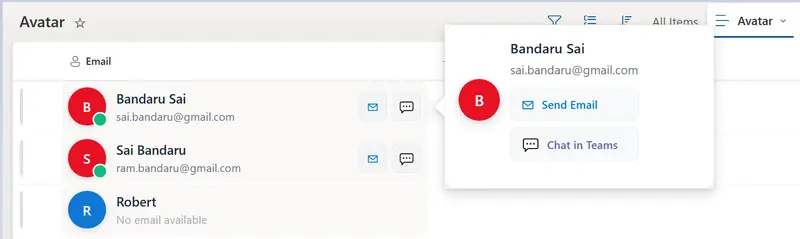
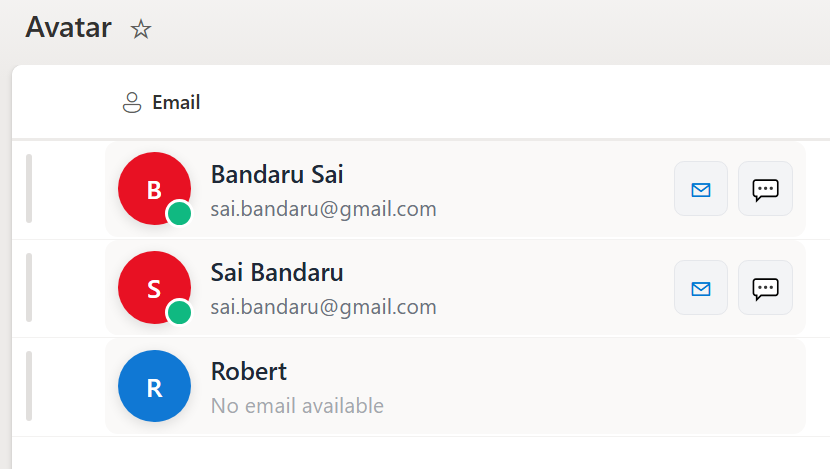
screenshot of the sample Screenshot2 of People Card

View Requirements

  • This format expects to be applied to a Person column

Key Features

Custom Avatar

  • Displays the first letter of the user’s name inside a circular avatar.
  • Dynamic background color:
    • Red (#e81123) if the user has an email.
    • Blue (#1078D4) if no email is provided.
  • Rounded circle with shadow and uppercase initials for visibility.
  • Hover effects enhance user experience.

Person/Email Integration

  • Works with Person or Group column type to extract the user's email and display name.
  • Automatically shows "No email available" if the person field is empty.

Quick Actions

  • Email button opens the default mail client with the user's email.
  • Teams chat button opens Microsoft Teams for direct conversation.

Hover Card

  • Displays detailed user information when hovering over the avatar.
  • Includes secondary actions like sending email or starting Teams chat.

Responsive Layout

  • Adapts to column widths and is mobile-friendly.
  • Flexible spacing ensures clean alignment of avatar, name, and actions.

Usage Instructions

  1. Navigate to your SharePoint list.
  2. Click the column header β†’ Column settings β†’ Format this column.
  3. Paste the JSON sample into the formatting editor.
  4. Save the column formatting.

The column will now display custom avatars with hover cards and action buttons.

Requirements

  • SharePoint Online (Modern Experience)
  • Person or Group column type for Email
  • Modern browser for full functionality

Sample

Solution Author(s)
person-name-avatar.json Sai Bandaru

Version history

Version Date Comments
1.0 August 25, 2025 Initial release

Disclaimer

THIS CODE IS PROVIDED AS IS WITHOUT WARRANTY OF ANY KIND, EITHER EXPRESS OR IMPLIED, INCLUDING ANY IMPLIED WARRANTIES OF FITNESS FOR A PARTICULAR PURPOSE, MERCHANTABILITY, OR NON-INFRINGEMENT.