
Back to view formats
View formattingSharePoint Online

Horse Crests

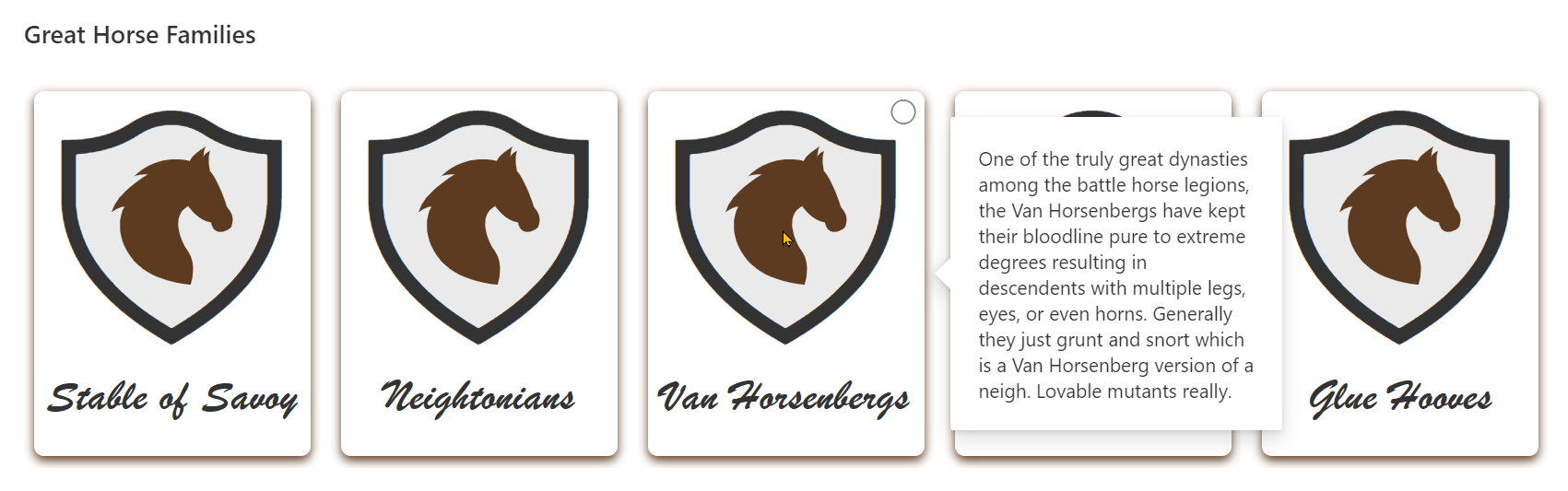
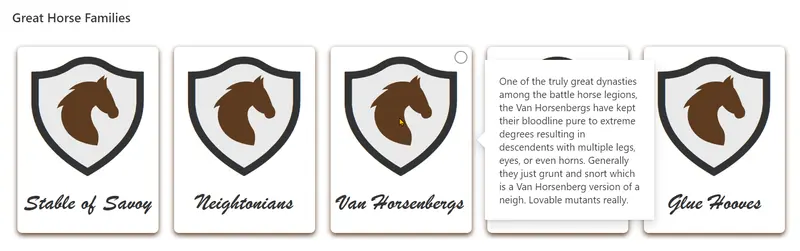
This sample illustrates some advanced techniques for applying theme colors to SVG elements, box-shadows, and borders. It also demonstrates using custom hover cards on complex elements (elements with children).
horses
Sample preview · View original image

Copy. Apply. Make it yours.

Get this format

1 definition

Review the requirements below, then paste this JSON into the matching formatting panel. Show me where.

Use your list's internal column names and replace any tenant-specific URLs or flow IDs. Formatting is presentation, not a way to secure data.

View formatting
Download JSON
{
  "$schema": "https://developer.microsoft.com/json-schemas/sp/v2/view-formatting.schema.json",
  "tileProps": {
    "width": "214",
    "height": "280",
    "formatter": {
      "elmType": "div",
      "style": {
        "border-radius": "7px",
        "width": "200px",
        "height": "264px",
        "margin-top": "7px",
        "margin-left": "7px",
        "box-shadow": "0 3px 7px 0",
        "position": "relative"
      },
      "attributes": {
        "class": "ms-fontColor-themePrimary"
      },
      "children": [
        {
          "elmType": "div",
          "style": {
            "width": "100%",
            "height": "100%",
            "display": "flex",
            "flex-direction": "column",
            "align-items": "center"
          },
          "attributes": {
            "class": "ms-fontColor-neutralPrimary"
          },
          "children": [
            {
              "elmType": "div",
              "style": {
                "padding": "14px",
                "position": "relative"
              },
              "children": [
                {
                  "elmType": "div",
                  "style": {
                    "font-size": "170px",
                    "padding-left": "10px"
                  },
                  "attributes": {
                    "class": "ms-fontColor-neutralLight",
                    "iconName": "ShieldSolid"
                  }
                },
                {
                  "elmType": "div",
                  "style": {
                    "position": "absolute",
                    "font-size": "170px",
                    "top": "10",
                    "left": "24px"
                  },
                  "attributes": {
                    "class": "ms-fontColor-neutralPrimary",
                    "iconName": "Shield"
                  }
                },
                {
                  "elmType": "svg",
                  "style": {
                    "position": "absolute",
                    "width": "88px",
                    "height": "100px",
                    "top": "40px",
                    "left": "60px",
                    "fill": "currentColor"
                  },
                  "attributes": {
                    "class": "ms-fontColor-themePrimary"
                  },
                  "children": [
                    {
                      "elmType": "path",
                      "attributes": {
                        "d": "M 13.293424,79.005018 C -0.23486286,59.040168 9.3124783,43.447536 9.3124783,43.447536 7.0942758,42.790838 0,47.4402 0,47.4402 3.9901158,32.817586 25.936774,20.394322 25.936774,20.394322 23.500522,19.502762 16.627352,21.273658 16.627352,21.273658 34.582366,3.9931728 56.531572,10.419033 56.531572,10.419033 57.193873,6.6474772 68.061743,0 68.061743,0 66.950094,1.10095 66.501767,7.0947858 66.501767,7.0947858 67.610358,5.09667 71.163356,3.1021214 71.163356,3.1021214 c -1.99353,4.6493614 0,14.6231246 0,14.6231246 5.763048,5.768142 12.189927,25.7228 12.189927,25.7228 l 2.445425,3.545864 c 3.104667,4.439972 1.963467,11.420638 -1.11165,13.076392 -11.52406,6.22157 -12.638765,-5.09514 -12.638765,-5.09514 C 62.514708,53.866568 55.419922,43.221844 55.419922,43.221844 42.566164,49.870848 49.725142,68.628272 55.275234,75.831063 62.406192,85.064067 57.184703,100 57.184703,100 c 0,0 -30.533151,-1.264483 -43.891279,-20.994982 z"
                      }
                    }
                  ]
                }
              ]
            },
            {
              "elmType": "div",
              "style": {
                "font-family": "Brush Script MT",
                "font-size": "32px",
                "font-weight": "bold",
                "border-bottom-style": "solid",
                "border-bottom-width": "2px"
              },
              "attributes": {
                "class": "ms-borderColor-themePrimary--hover ms-borderColor-white"
              },
              "txtContent": "[$Title]"
            }
          ]
        },
        {
          "elmType": "div",
          "style": {
            "position": "absolute",
            "top": "0",
            "left": "0",
            "right": "0",
            "bottom": "0"
          },
          "customCardProps": {
            "openOnEvent": "hover",
            "isBeakVisible": true,
            "formatter": {
              "elmType": "div",
              "style": {
                "width": "200px",
                "padding": "20px"
              },
              "txtContent": "[$History]"
            }
          }
        }
      ]
    }
  }
}

From the contributor

How to use this sample

Summary

This sample illustrates some advanced techniques for applying theme colors to SVG elements, box-shadows, and borders. It also demonstrates using custom hover cards on complex elements (elements with children).

screenshot of the sample

View requirements

Type Internal Name Required
Single line of text Title Yes
Multiple line of text History Yes

Sample

Solution Author(s)
horse-crests.json Chris Kent

Version history

Version Date Comments
1.0 November 12, 2020 Initial release

Disclaimer

THIS CODE IS PROVIDED AS IS WITHOUT WARRANTY OF ANY KIND, EITHER EXPRESS OR IMPLIED, INCLUDING ANY IMPLIED WARRANTIES OF FITNESS FOR A PARTICULAR PURPOSE, MERCHANTABILITY, OR NON-INFRINGEMENT.


Additional notes

None