
From the contributor
How to use this sample
Summary
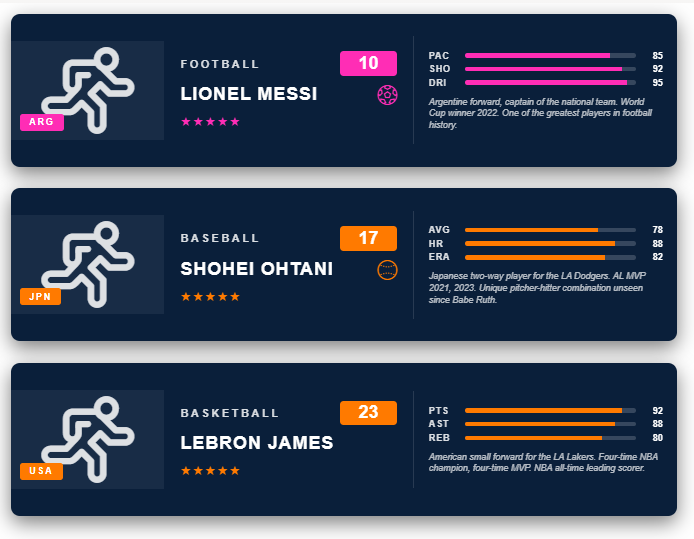
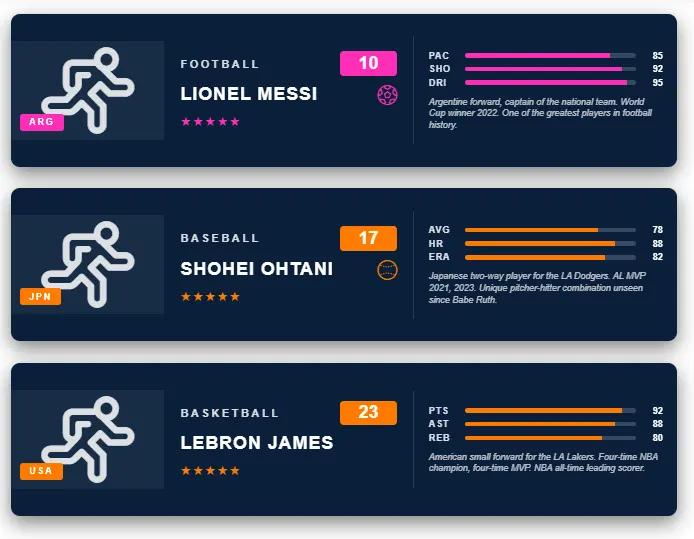
This SharePoint JSON view formatting sample transforms list items into landscape sports trading cards inspired by FIFA / NBA-style collectibles, sized to fit cleanly in a standard List view row (~170 px tall). Each card has a player silhouette panel with country badge on the left, a sport name / jersey number / player name / star rating column in the middle, and three labelled stat bars plus a short description on the right.
It's designed for player rosters, team directories, character lists, or any "collectible" style list.
View requirements
Recommended SharePoint List Columns
| Column Name | Internal Name | Type | Description |
|---|---|---|---|
| Title | Title | Single line of text | Player full name (shown in the name band, uppercase) |
| Sport | Sport | Single line of text | Sport / league label shown in the header (e.g. FOOTBALL, BASEBALL) |
| Jersey Number | JerseyNumber | Number | Jersey number shown in the accent-coloured header badge |
| Country | Country | Single line of text | Country code shown in the top-right badge (e.g. ARG, JPN, USA) |
| Rating | Rating | Single line of text | Star glyphs (e.g. ★★★★★) |
| Description | Description | Multiple lines of text | Short paragraph shown at the bottom of the card |
| Stat 1 Label | Stat1Label | Single line of text | Short label for stat 1 (e.g. PAC for pace, AVG for batting average) |
| Stat 1 Value | Stat1Value | Number | Value for stat 1 — 0 - 100 (drives the bar fill width) |
| Stat 2 Label | Stat2Label | Single line of text | Short label for stat 2 |
| Stat 2 Value | Stat2Value | Number | Value for stat 2 — 0 - 100 |
| Stat 3 Label | Stat3Label | Single line of text | Short label for stat 3 |
| Stat 3 Value | Stat3Value | Number | Value for stat 3 — 0 - 100 |
| Accent Color | AccentColor | Single line of text | Hex for the header badge, country badge, name band, stat bars (e.g. #ff2db5) |
| Background Color | BackgroundColor | Single line of text | Hex for the card background (e.g. #0a1f3a dark navy) |
| Player Icon | PlayerIcon | Single line of text | Fluent UI icon name for the large silhouette (e.g. Running, Contact) |
| Sport Icon | SportIcon | Single line of text | Fluent UI icon name shown next to the player name (e.g. Trophy, Soccer) |
A PowerShell script has been provided in the assets folder to provision the list for you. The script also seeds 3 sample cards (soccer, baseball, basketball) covering the visual variety in the design.
Note: This script uses PnP PowerShell and requires an environment ready for PnP PowerShell.
Sample
| Solution | Author |
|---|---|
| sports-card.json | Sudeep Ghatak (LinkedIn) |
Version history
| Version | Date | Comments |
|---|---|---|
| 1.0 | July 23, 2026 | Initial release |
Disclaimer
THIS CODE IS PROVIDED AS IS WITHOUT WARRANTY OF ANY KIND, EITHER EXPRESS OR IMPLIED, INCLUDING ANY IMPLIED WARRANTIES OF FITNESS FOR A PARTICULAR PURPOSE, MERCHANTABILITY, OR NON-INFRINGEMENT.
Additional notes
- Colours are column-driven. Both
BackgroundColorandAccentColorare read directly via[$BackgroundColor]/[$AccentColor]. This avoids unreliable nestedif()expressions in style values and lets you re-skin per card without editing the JSON. - Icons are column-driven too. Both
PlayerIcon(the large central silhouette) andSportIcon(the small glyph next to the player name) useiconName: "[$ColumnName]". Pick any name from the Fluent UI v1 set that ships with SharePoint - common options includeRunning,Contact,Trophy,Soccer,Basketball,Baseball. If a chosen icon doesn't render in your tenant, swap it for a safe default likeTrophyorRunning. - Stat bars are computed with
=toString([$StatNValue]) + '%'. Store integers0 - 100and each bar fills proportionally. - Rating is stored as plain text so you can paste any star sequence (
★★★★★,★★★★☆, etc.). - Card orientation is landscape (740 px max-width, 170 px min-height) so the whole card fits in a single standard List view row. If you'd rather have the portrait FIFA-style look from the original inspiration image, switch the list to a Gallery / Tiles view and use the portrait variant of the JSON.