
From the contributor
How to use this sample
Summary
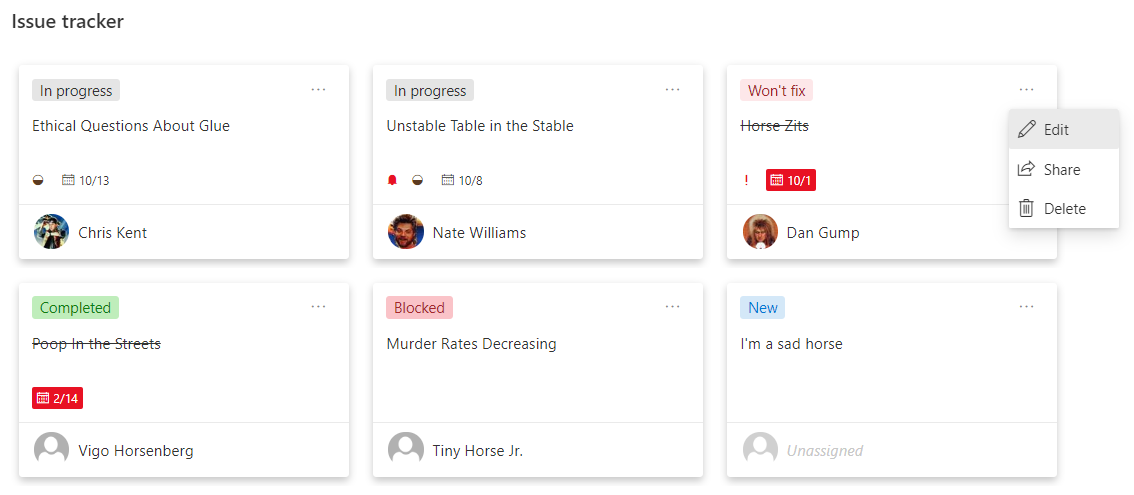
This sample is intended to be used in combination with the Issue Tracker list template. The format keeps the row highlighting for blocked issues but also adds a Tiles view that provides a Microsoft Planner look and feel.
View requirements
Adding a new list using the Issue Tracker template will provide all the fields required. But the fields used are listed below for reference.
| Type | Internal Name | Required |
|---|---|---|
| Choice | Status | Yes |
| Multi-line text | Description | Yes |
| Single line of text | Title | Yes |
| Choice | Priority | Yes |
| Date/Time | DateReported | Yes |
| Number | DaysOld | Yes |
| Person | Assignedto | Yes |
Sample
| Solution | Author(s) |
|---|---|
| issue-tracker-planner-cards.json | Chris Kent |
Version history
| Version | Date | Comments |
|---|---|---|
| 1.0 | October 15, 2020 | Initial release |
Disclaimer
THIS CODE IS PROVIDED AS IS WITHOUT WARRANTY OF ANY KIND, EITHER EXPRESS OR IMPLIED, INCLUDING ANY IMPLIED WARRANTIES OF FITNESS FOR A PARTICULAR PURPOSE, MERCHANTABILITY, OR NON-INFRINGEMENT.