
From the contributor
How to use this sample
Summary
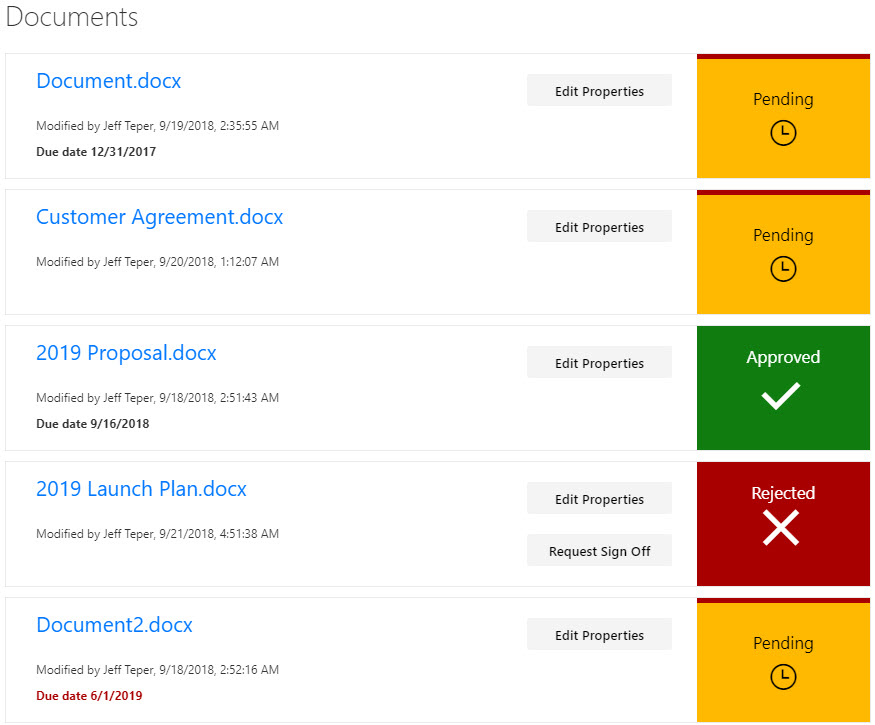
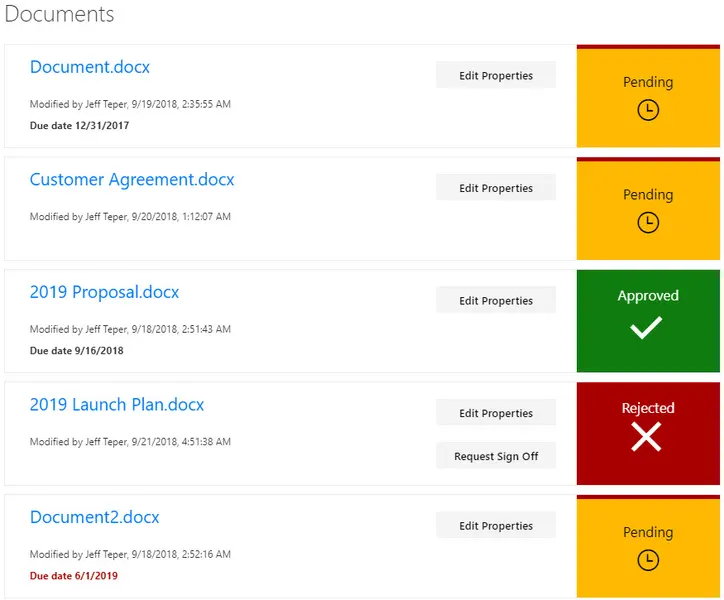
This sample provides a custom view to focus on files within a document library that need to be approved. A Power Automate flow is included to request sign-off (and to launch that flow directly from the view). This format provides a better visual indication of where documents are in the approval process.
View requirements
The view must include these columns:
Standard columns
- LinkFilename
- Editor
- Modified
Custom columns
| Column Name | Type |
|---|---|
| RequiresSignOff | Boolean |
| SignOffDueDate | DateTime |
| SignOffStatus | Text |
Provisioning
This sample includes a site script (update-documents.json) that creates the required site columns, the Document Library, and a new view named All Documents - customized in the Document Library that contains all the required columns.
See the SharePoint site design and site script overview article to learn how to use the site script.
Flow Integration
Install the Flow
- Import the Flow (requestsignoff.zip), which is basically the same Flow as the out of the box Request Sign Off Flow, but its ID is knowable and it can be modified.
- Rename the Flow.
- Find all the places where the Flow refers to the original site and Document Library, and change it to the site / Document Library in your environment.
Note: Be sure to use the Document Library GUID, not the name.
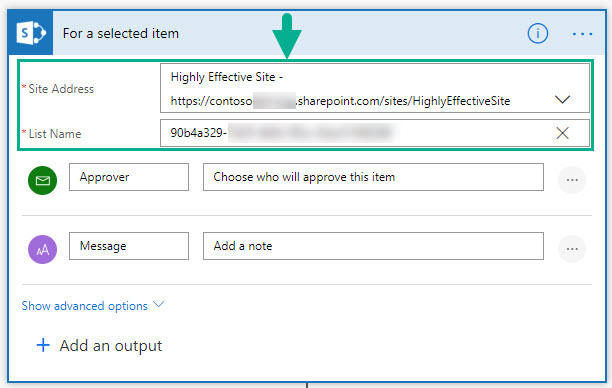
You will make these updates in 5 places:
For a selected item node
Get item node
Update item node Update Sign Off Status: Pending
Update item node Update Sign Off Status: Approved
Update item node Update Sign Off Status: Rejected
- Save the Flow.
- Copy the Flow ID.
Update the Flow ID in the View Formatter JSON
The View Formatter JSON (request-sign-off.json) defines a button labeled Request Sign Off that executes a Flow. To make it execute the Flow you just imported, follow these steps.
- Replace the actionParams id value (shown below) with the ID of the Flow you imported and configured in the steps above.
                "elmType": "button",
                "customRowAction": {
                  "action": "executeFlow",
                  "actionParams": "{\"id\": \"3fee4531-d1c5-4e3d-9e4a-8bdecd81257b\"}"
                },
                "txtContent": "Request Sign Off",
                "attributes": {
                  "class": "sp-row-button"
                },
Sample
| Solution | Author(s) |
|---|---|
| request-sign-off.json | Lincoln DeMaris, Todd Baginski, Justin So, Tyler Lui |
Version history
| Version | Date | Comments |
|---|---|---|
| 1.0 | October 9, 2018 | Initial release |
Disclaimer
THIS CODE IS PROVIDED AS IS WITHOUT WARRANTY OF ANY KIND, EITHER EXPRESS OR IMPLIED, INCLUDING ANY IMPLIED WARRANTIES OF FITNESS FOR A PARTICULAR PURPOSE, MERCHANTABILITY, OR NON-INFRINGEMENT.
Additional notes
None