
Back to view formats
View formattingSharePoint Online

Travel Requests

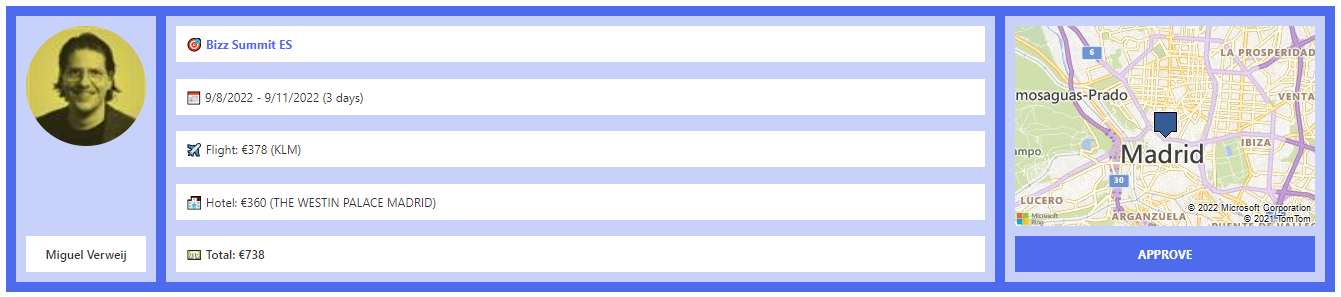
This sample formats the SharePoint list template Travel requests.

Travel Requests formatting preview
Sample preview ยท View original image

Copy. Apply. Make it yours.

Get this format

1 definition

Review the requirements below, then paste this JSON into the matching formatting panel. Show me where.

Use your list's internal column names and replace any tenant-specific URLs or flow IDs. Formatting is presentation, not a way to secure data.

View formatting
Download JSON
{
  "$schema": "https://developer.microsoft.com/json-schemas/sp/v2/row-formatting.schema.json",
  "hideColumnHeader": true,
  "hideSelection": true,
  "rowFormatter": {
    "elmType": "div",
    "attributes": {
      "class": "ms-bgColor-themePrimary"
    },
    "style": {
      "padding": "10px",
      "column-gap": "10px",
      "align-items": "stretch"
    },
    "children": [
      {
        "elmType": "div",
        "defaultHoverField": "[$Requester]",
        "attributes": {
          "class": "ms-bgColor-themeLight"
        },
        "style": {
          "padding": "inherit",
          "text-align": "center",
          "display": "flex",
          "flex-direction": "column",
          "justify-content": "space-between",
          "width": "120px"
        },
        "children": [
          {
            "elmType": "img",
            "attributes": {
              "src": "=getUserImage('[$Requester.email]','medium')"
            },
            "style": {
              "border-radius": "50%",
              "margin-bottom": "10px"
            }
          },
          {
            "elmType": "div",
            "txtContent": "[$Requester.title]",
            "attributes": {
              "class": "ms-bgColor-white"
            },
            "style": {
              "text-align": "center",
              "font-weight": "500",
              "padding": "inherit"
            }
          }
        ]
      },
      {
        "elmType": "div",
        "attributes": {
          "class": "ms-bgColor-themeLight"
        },
        "style": {
          "padding": "inherit",
          "align-items": "stretch",
          "flex-grow": "1",
          "display": "flex",
          "flex-direction": "column",
          "justify-content": "space-between"
        },
        "children": [
          {
            "elmType": "div",
            "txtContent": "= '๐ŸŽฏ ' + [$Title]",
            "attributes": {
              "class": "ms-bgColor-white ms-fontColor-themePrimary"
            },
            "style": {
              "text-align": "left",
              "font-weight": "700",
              "padding": "inherit"
            }
          },
          {
            "elmType": "div",
            "txtContent": "='๐Ÿ“… ' + toLocaleDateString([$TravelStartDate]) + ' - ' + toLocaleDateString([$TravelEndDate]) + ' (' + [$TravelDuration] + ' days)'",
            "attributes": {
              "class": "ms-bgColor-white"
            },
            "style": {
              "text-align": "left",
              "padding": "inherit"
            }
          },
          {
            "elmType": "div",
            "txtContent": "='โœˆ๏ธ Flight: โ‚ฌ' + '[$EstimatedAirfare]' + ' (' + '[$Airline]' + ')'",
            "attributes": {
              "class": "ms-bgColor-white"
            },
            "style": {
              "text-align": "left",
              "padding": "inherit"
            }
          },
          {
            "elmType": "div",
            "txtContent": "='๐Ÿจ Hotel: โ‚ฌ' + '[$EstimatedHotelCost]' + ' (' + '[$Hotel.DisplayName]' + ')'",
            "attributes": {
              "class": "ms-bgColor-white"
            },
            "style": {
              "text-align": "left",
              "padding": "inherit"
            }
          },
          {
            "elmType": "div",
            "txtContent": "='๐Ÿ’ต Total: โ‚ฌ' + Number([$EstimatedAirfare] + [$EstimatedHotelCost])",
            "attributes": {
              "class": "ms-bgColor-white"
            },
            "style": {
              "text-align": "left",
              "font-weight": "500",
              "padding": "inherit"
            }
          }
        ]
      },
      {
        "elmType": "div",
        "attributes": {
          "class": "ms-bgColor-themeLight"
        },
        "style": {
          "padding": "inherit",
          "column-gap": "10px",
          "display": "flex",
          "flex-direction": "column",
          "justify-content": "space-between"
        },
        "children": [
          {
            "elmType": "img",
            "attributes": {
              "src": "='https://dev.virtualearth.net/REST/v1/Imagery/Map/Road?mapSize=300,200&pp=' + if([$Destination.Coordinates.Latitude], [$Destination.Coordinates.Latitude], '0') + ',' + if([$Destination.Coordinates.Longitude], [$Destination.Coordinates.Longitude], '0') + '&zoomlevel=12&key=REPLACE_THIS_WITH_YOUR_BING_MAPS_KEY'"
            },
            "style": {
              "margin-bottom": "10px"
            }
          },
          {
            "elmType": "div",
            "txtContent": "APPROVE",
            "customRowAction": {
              "action": "setValue",
              "actionInput": {
                "Approved": true
              }
            },
            "attributes": {
              "class": "ms-bgColor-themePrimary ms-fontColor-white"
            },
            "style": {
              "text-align": "center",
              "font-weight": "700",
              "padding": "inherit",
              "cursor": "pointer",
              "display": "=if([$Approved],'none','')"
            }
          },
          {
            "elmType": "div",
            "txtContent": "APPROVED",
            "customRowAction": {
              "action": "defaultClick"
            },
            "attributes": {
              "class": "ms-bgColor-white ms-fontColor-themePrimary"
            },
            "style": {
              "text-align": "center",
              "font-weight": "700",
              "padding": "inherit",
              "cursor": "default",
              "display": "=if([$Approved],'','none')"
            }
          }
        ]
      }
    ]
  }
}
Schema compatibility review notes

This historical definition differs from the pinned Microsoft schema. This may indicate an unsupported pattern or a schema limitation. Check the original requirements and test in your tenant before use.

  • /rowFormatter/children/2/children/1/customRowAction/actionInput/Approved must be object
  • /rowFormatter/children/2/children/1/customRowAction/actionInput/Approved must be string
  • /rowFormatter/children/2/children/1/customRowAction/actionInput/Approved must match a schema in anyOf
  • /rowFormatter/children/2/children/1/customRowAction must match a schema in anyOf

From the contributor

How to use this sample

Summary

This sample formats the SharePoint list template Travel requests.
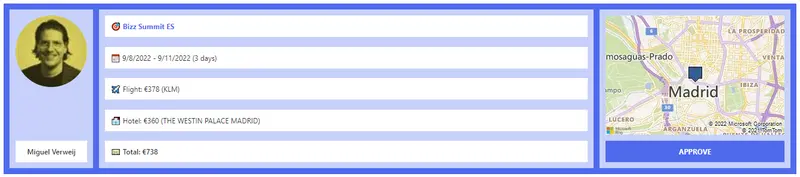
screenshot of the sample

The approve button will set the value of the Approved column to Yes (true).

View requirements

SharePoint List

The following fields are all included in the "Travel requests" template. You can find this template in the new List dialog:
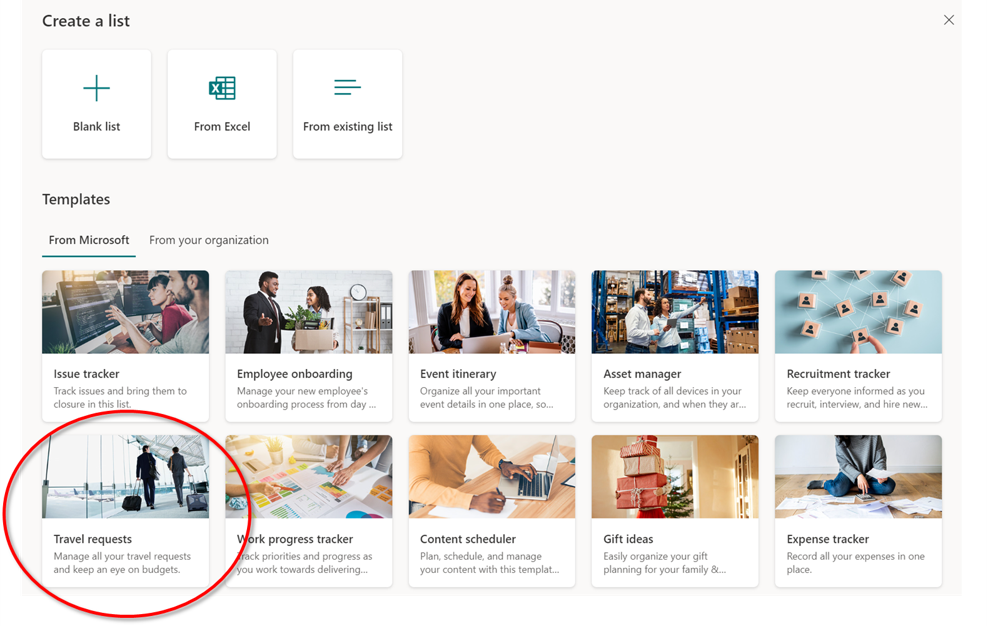
image on the list template

Type Internal Name Required
Single line of text Title Yes
Person or Group Requester No
Location Destination No
Date and Time TravelStartDate No
Date and Time TravelEndDate No
Calculated TravelDuration No
Choice Airline No
Number EstimatedAirfare No
Location Hotel No
Number EstimatedHotelCost No
Yes/No Approved No

The items above are not required, but highly recommended. Furthermore, You could filter the view on the Approved column (Approved? is equal to No) to create an action list. You can then copy that view and adjust the filtering to yes and name the view approved, to only indicate approved items.

Bing maps key

The view shows a static map image of the Destination column. You need to enter a Bing Map key to make it work. You can create an account at the Bing maps Dev Center. Once registered, you can create a key. Copy that key and put it in the json file where indicated.

Sample

Solution Author(s)
travel-requests.json Miguel Verweij

Version history

Version Date Comments
1.0 August 20, 2022 Initial release

Disclaimer

THIS CODE IS PROVIDED AS IS WITHOUT WARRANTY OF ANY KIND, EITHER EXPRESS OR IMPLIED, INCLUDING ANY IMPLIED WARRANTIES OF FITNESS FOR A PARTICULAR PURPOSE, MERCHANTABILITY, OR NON-INFRINGEMENT.