The RFP Response - Compliance Review skill is a configurable, rule-based compliance check that runs after the salesperson has reviewed the draft. It ships with illustrative example rules for an advisory firm — these must be replaced with the firm's actual rules before use.
High severity findings are publication blockers. A salesperson who believes a High finding is incorrect must escalate to an authorized approver — the skill will not downgrade a finding without human sign-off.
Checks a proposal draft against the firm's configurable compliance rules — prohibited language, required disclosures, role and positioning boundaries, and procurement submission requirements — logging all findings and blocking publication until High severity issues are resolved.
What you get
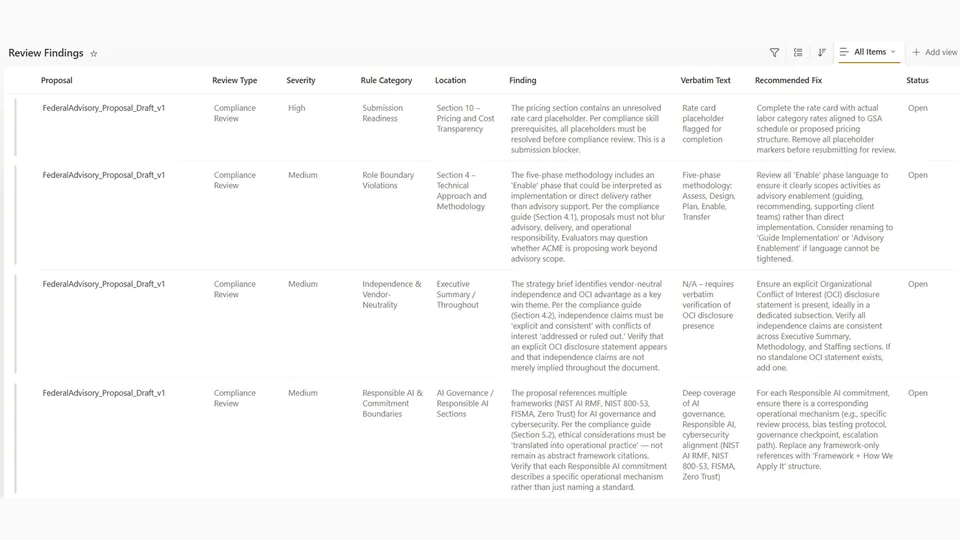
- Findings logged to the Review Findings SharePoint List — severity, location, verbatim text, recommended fix
- Draft annotated inline at each finding's location
- Summary: findings by severity, all High findings listed, page count vs. RFP limit
- High severity findings block publication until resolved by an authorized approver
- Links to the annotated draft and filtered Review Findings list
SharePoint Skill
| Solution | Author(s) |
|---|---|
| rfp-response-compliance-review | Matt Wolodarsky | GitHub |
Version history
| Version | Date | Comments |
|---|---|---|
| 1.0 | June 2026 | Initial Release |
Disclaimer
THIS CODE IS PROVIDED AS IS WITHOUT WARRANTY OF ANY KIND, EITHER EXPRESS OR IMPLIED, INCLUDING ANY IMPLIED WARRANTIES OF FITNESS FOR A PARTICULAR PURPOSE, MERCHANTABILITY, OR NON-INFRINGEMENT.
Package
Ready to install
The ZIP contains only the upload-ready inner skill folder.
022ac9e97d16a499f270ca491e3671c8a6f6b90a0b901bd3571f082858591496View SKILL.md
---
name: rfp-response-compliance-review
description: >
  Reviews a draft proposal against the firm's configurable compliance rules —
  prohibited language, required disclosures, role and positioning boundaries,
  and procurement-submission requirements. Logs all findings to the Review
  Findings SharePoint list and annotates the draft document for salesperson and
  reviewer resolution.
---

# Compliance Review Skill

## Firm Profile (REQUIRED — fill in before use)

These values define who your firm is and how it writes. See `SETUP.md`.

- FIRM NAME:          [FIRM NAME]
- WHAT THE FIRM DOES: [one sentence]
- ROLE BOUNDARY:      [what the firm will NOT claim to do — leave blank if none]
- VENDOR STANCE:      [vendor-neutral OR resells/implements specific products]
- SPECIALIZATION:     [domains the firm credibly claims]
- VOICE:              [3–5 adjectives]

> **The rule set in this skill is an EXAMPLE** written for an independent
> advisory firm, included to show the *shape* of a good rule set. Before use,
> replace the rule content with your firm's actual compliance rules derived from
> your `Firm Profile` and style/compliance guide. **Keep the structure**
> (categories, severity, detect/why/fix); change only the content.

---

## Purpose

Before any proposal leaves the firm, it must pass a compliance review covering:
language that misrepresents the firm's role or positioning, commitments the firm
cannot or should not make, omitted required disclosures, and violations of the
procurement's submission standards. This skill runs against the
salesperson-reviewed draft (post-Phase 3) and produces a structured findings log.
**No proposal proceeds to publication until all High severity findings are resolved.**

This skill is strictly rule-based. Subjective tone and quality judgments are
handled by the Quality & Tone Review skill.

---

## Prerequisites

- The salesperson-reviewed draft must be in the WIP Collaboration Folder. Do not
  run against the raw Phase 3 draft — wait for the human review checkpoint.
- All Phase 3 placeholders must be filled. If placeholders remain, **halt and
  notify the user** — placeholders cannot be compliance-checked.
- The **Review Findings** SharePoint list must be accessible for logging.
- The firm's **style and compliance guide** (source of truth for prohibited terms
  and required language) should be accessible — confirm its location if uncertain.

---

## Compliance Rule Set (EXAMPLE — customize for your firm)

Severities and the detect/why/fix structure are the template to keep; edit each
category's content to reflect your firm's rules.

### Rule Category 1 — Role Boundary Violations (Severity: High)

*Use only if your Firm Profile defines a ROLE BOUNDARY.* Flag any language
implying the firm will act outside its stated role.

*Example (advisory firm that does not implement):*

| Pattern to Detect | Why It Violates | Recommended Fix |
|---|---|---|
| "[FIRM NAME] will implement…", "…will deploy…", "…will build…" | Implies an implementation role the firm does not hold | "[FIRM NAME] will advise on…", "…will design the approach for…" |
| "[FIRM NAME] will manage [system/platform/tool]…" | Implies a managed-services/operations role | "[FIRM NAME] will provide oversight during…" |
| "Our solution includes…", "Our platform…", "Our technology…" | Implies the firm is a technology vendor | "Our advisory approach…", "Our methodology…" |
| "We will ensure the system performs…" | Implies operational accountability | "We will help the client design the performance governance framework…" |

### Rule Category 2 — Positioning and Disclosure (Severity: High)

*Enforces your VENDOR STANCE and positioning that carries contractual or
reputational commitment.*

*Example (vendor-neutral firm):*
- Include at least one explicit statement of vendor-neutral independence (exec
  summary or approach section).
- Do not name a specific product as preferred/recommended unless the RFP requires
  vendor identification — and even then, frame as illustrative, not endorsement.
- References to open standards or public frameworks are permitted and encouraged.

> If your firm *does* resell or implement specific products, invert this rule:
> flag language that incorrectly disclaims a product relationship.

### Rule Category 3 — Outcome and Commitment Boundaries (Severity: High)

*Example:*
- Do not promise specific performance outcomes (accuracy rates, savings %) unless
  sourced from a client-approved business case or third-party study — and even
  then, attribute rather than guarantee.
- Do not claim the firm's work eliminates risk — only that it structures risk
  identification, mitigation, and oversight.
- Prefer "designed to make X more transparent, accountable, and controllable"
  over "ensures X".

### Rule Category 4 — Procurement Submission Compliance (Severity: Medium–High)

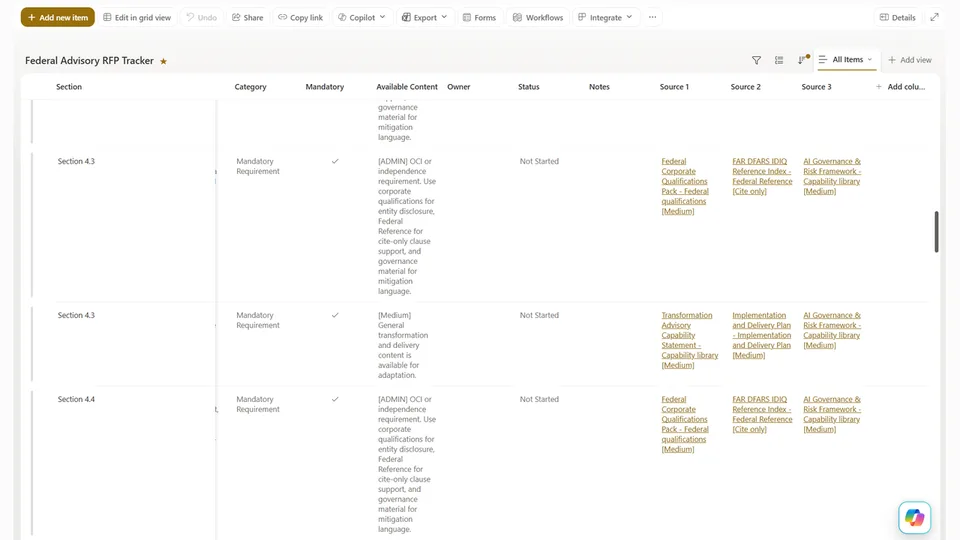
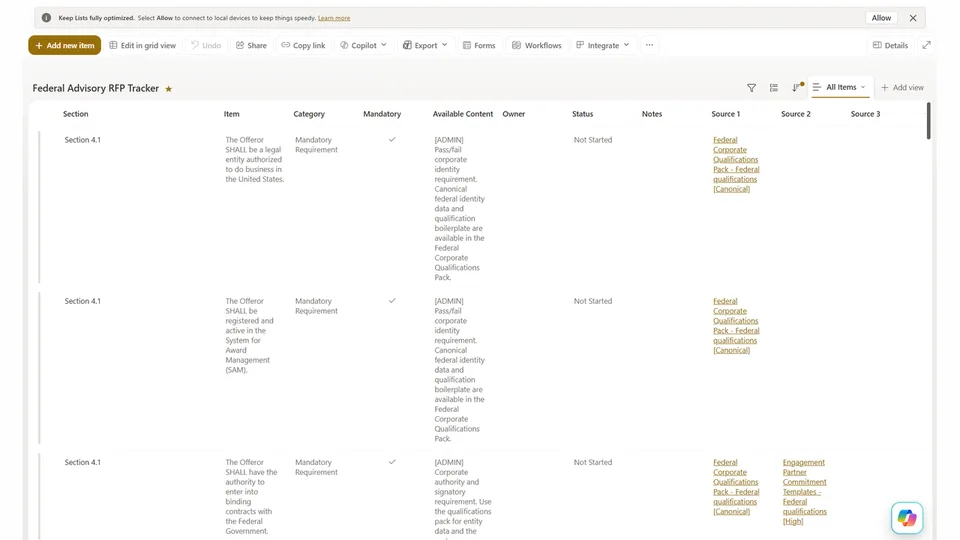
Check the draft against the Submission Rules captured in the RFP Tracker:

| Requirement | Check |
|---|---|
| **Conflict of interest disclosure** | If required, confirm a section/appendix exists and is populated |
| **Mandatory certifications / representations** | If listed (insurance, accessibility, data handling), confirm each is addressed |
| **Page and format limits** | Cross-reference the draft's page count and format against Submission Rules |
| **Confidentiality markings** | Confirm "Confidential"/"Proprietary" is marked per RFP instructions, if required |
| **No-contact provisions** | Flag language that appears intended to initiate contact outside the procurement process |

### Rule Category 5 — Prohibited General Language (Severity: Low–Medium)

| Term / Pattern | Reason | Alternative |
|---|---|---|
| "World-class", "best-in-class", "leading" (unsubstantiated) | Unverifiable superlatives | Specific proof points: "completed X engagements of this type" |
| "Guaranteed", "ensure", "assure" (as outcome promises) | Legal exposure | "designed to", "structured to support", "intended to" |
| "Cutting-edge", "state-of-the-art", "innovative" (without specificity) | Vague filler | Remove or describe what is specifically novel |
| "Turnkey solution" | Implies product/implementation delivery | Remove if outside the firm's role |
| "Partner" (referring to the client) | Ambiguous where "partner" has legal meaning | "client", "the organization", or the client's formal name |
| Passive-voice commitments: "…will be delivered" (no actor) | Obscures responsibility | Rephrase with a clear subject |

---

## Step 1 — Load the Draft and Prepare for Review

1. Retrieve the salesperson-reviewed draft from the WIP Collaboration Folder.
2. Confirm no placeholders remain (search `[PLACEHOLDER`). If found, halt and
   notify user.
3. Extract the full text, preserving section and paragraph structure.
4. Retrieve the RFP Tracker and extract all Submission Rules rows — needed for
   Rule Category 4.

---

## Step 2 — Run Compliance Checks

Process each rule category in order. For every violation, record a finding per
Step 3. Apply checks systematically:
- **Full-text search** for prohibited terms/patterns (Categories 1, 5)
- **Structural check** for required disclosures and sections (Categories 2, 3, 4)
- **Cross-reference check** against RFP Submission Rules for format, page count,
  and required certifications (Category 4)

---

## Step 3 — Log Findings

For each violation/gap, create an item in the **Review Findings** list:

| Field | Value |
|---|---|
| **Proposal** | Proposal name (link to a Proposals tracking item) |
| **Review Type** | `Compliance` |
| **Severity** | `High` / `Medium` / `Low` |
| **Rule Category** | Category 1–5 |
| **Location** | Section name and approximate paragraph or slide number |
| **Finding** | Brief description of the violation or gap |
| **Verbatim text** | The exact text that triggered the finding (quote from the draft) |
| **Recommended fix** | Specific suggested correction |
| **Status** | `Open` (default) |
| **Resolved by** | *(blank — filled by reviewer)* |

Also add an inline annotation to the draft at each finding's location:
```
[COMPLIANCE FLAG — Severity: High | Category 1: Role Boundary]
Issue: This sentence implies the firm will implement the system.
Fix: Replace "[FIRM NAME] will deploy" with "[FIRM NAME] will design the governance structure for the deployment of"
```

---

## Step 4 — Report Back to the User

Provide a summary with:

- Total findings by severity (High / Medium / Low).
- All High severity findings — must be resolved before the proposal can proceed.
- Confirmation that required disclosures (per configured rules) are present or flagged missing.
- Page count vs. any RFP-specified limit.
- URL of the annotated draft in SharePoint.
- URL of the Review Findings list filtered to this proposal.

### Example Summary Output

```
Compliance Review complete.

Findings summary:
  High severity:    3
  Medium severity:  4
  Low severity:     6

HIGH — Must resolve before proceeding:
  1. [Section 3.2] Role boundary violation — "[FIRM NAME] will implement the governance platform"
     → Replace with role-appropriate framing (see Review Findings row 1)
  2. [Section 5.1] Vendor endorsement — a specific product referenced as "recommended platform"
     → Firm cannot recommend a specific vendor; reframe as illustrative or remove
  3. [Executive Summary] Missing positioning disclosure
     → Insert required independence statement (see Rule Category 2)

MEDIUM — Resolve before publication:
  4. [Appendix A] COI declaration section is blank — RFP requires completion
  5. [Section 7] "[FIRM NAME] guarantees readiness within 6 months" — prohibited outcome promise
  6. [Cover page] "Confidential" marking absent — required per RFP Section 2.4
  7. [Section 4] "Turnkey solution" — prohibited product framing

LOW — Recommended improvements:
  [6 findings — see Review Findings list]

Page count: 34 pages | RFP limit: Not specified

Review Findings logged:
   https://contoso.sharepoint.com/sites/Proposals/Lists/ReviewFindings (filtered to this proposal)

Annotated draft:
   https://contoso.sharepoint.com/sites/Proposals/WIP/NorthwindRFP/Northwind_Proposal_DRAFT_ComplianceAnnotated.docx

Next steps: Salesperson resolves all High findings, then resubmits for Quality & Tone review.
```

---

## Notes & Edge Cases

- **Waivers for High findings:** If a salesperson believes a High finding is
  incorrect or context-dependent, escalate to an authorized approver for sign-off.
  The skill must not downgrade a High finding without human authorization.
- **Re-running after corrections:** On re-run, carry forward unresolved findings
  and check only the corrected sections for new issues.
- **Buyer-specific rules:** The skill applies the firm's general rule set by
  default. If the RFP comes from a buyer with known additional requirements,
  confirm with the user whether a buyer-specific addendum to the rule set applies.
- **Confidential source material:** If the draft references client-specific data
  from past proposals (e.g., a named prior client that has not authorized public
  reference), flag it as a High finding regardless of other context.
References
- agentskills.io specification
The specification that SharePoint AI skills follow for installation and discovery.
Discuss this skill
Ask a question, share how you used it, or suggest an improvement with the community.
Open GitHub Discussions